HTML longdesc attribute
longdesc
The purpose of the HTML longdesc attribute is to specify a link to a long textual description for images, iframes and frames.
When used with img element, it complements alt attribute of img. When used with iframe and frame elements, it complements title attribute.
Supported elements
HTML longdesc attribute supports img, iframe and frame elements.
Syntax
<ElementName longdesc="value" >.....</ElementName>
Where ElementName is any supported elements.
Type of value
URI.
Value
A URI.
Default value
There is no default value of HTML longdesc attribute.
Supported doctypes
When used with img element, HTML 4.01 strict, HTML 4.01 transitional, HTML 4.01 frameset. When used with iframe and frame elements, HTML 4.01 frameset.
Example of HTML longdesc attribute with img
<!DOCTYPE HTML PUBLIC "-//W3C//DTD HTML 4.01//EN" "http://www.w3.org/TR/html4/strict.dtd">
<html>
<head>
<meta http-equiv="Content-Type" content="text/html; charset=iso-8859-1">
<title>Example of HTML longdesc attribute with img </title>
</head>
<body>
<img src="../../images/w3logo5.gif" alt="The w3resource logo "     longdesc="logo.txt"/>
</body>
</html>
Result

View this example in a separate browser window
Example of HTML longdesc attribute with img
Note
In the real world, usage of longdesc is rare with respect to img element. But writing a long description for iframe and frame is near appropriate.
Example of HTML longdesc attribute with frame
<!DOCTYPE HTML PUBLIC "-//W3C//DTD HTML 4.01//EN" "http://www.w3.org/TR/html4/strict.dtd">
<html>
<head>
<meta http-equiv="Content-Type" content="text/html; charset=iso-8859-1">
<title>Example of HTML longdesc attribute with frame</title>
</head>
<frameset rows="20%,*,20%" >
<frame src="header.html" frameborder="1"  name="header" title="Header window"/>
<frame src="content.html" frameborder="0"  name="content" title="Content window" longdesc="content-description.txt"/>
<frame src="footer.html" frameborder="0"  name="footer" title="footer window" longdesc="footer-description.txt"/>
</frameset>
</body>
</html>
Result
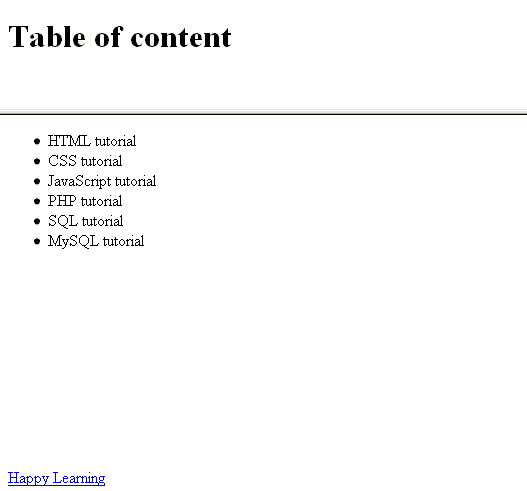
View this example a separate browser window
Example of HTML longdesc attribute with frame
Example of HTML longdesc attribute with iframe
<!DOCTYPE HTML PUBLIC "-//W3C//DTD HTML 4.01//EN" "http://www.w3.org/TR/html4/strict.dtd">
<html>
<head>
<meta http-equiv="Content-Type" content="text/html; charset=iso-8859-1">
<title>Example of HTML longdesc attribute with iframe</title>
</head>
<body>
<iframe src="../../sql/customer.php" height="100%" width="540" frameborder="1" title="The customer inforamtion " longdesc="customer.txt"> </iframe>
</body>
</body>
</html>
Result
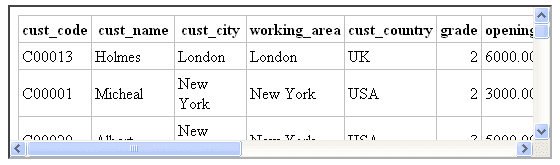
View this example in a separate browser window
Example of HTML longdesc attribute with iframe
Previous: lang and dir attribute of HTML
Next: HTML marginheight attribute
Test your Programming skills with w3resource's quiz.
- Weekly Trends and Language Statistics
- Weekly Trends and Language Statistics