HTML marginwidth attribute
marginwidth
The purpose of the HTML marginwidth attribute is to specify the width of the margins in a frame or iframe.
Supported elements
HTML marginwidth attribute supports iframe and frame elements.
Syntax
<ElementName marginwidth="value" >.....</ElementName>
Where ElementName is any supported elements.
Type of value
Pixel.
Value
A value in pixels.
Default value
There is no default value of HTML marginwidth attribute.
Supported doctypes
HTML 4.01 frameset.
Example of HTML marginwidth attribute with frame
<!DOCTYPE HTML PUBLIC "-//W3C//DTD HTML 4.01//EN"
"http://www.w3.org/TR/html4/strict.dtd">
<html>
<head>
<meta http-equiv="Content-Type" content="text/html;
charset=iso-8859-1">
<title>Example of HTML marginwidth attribute with
frame</title>
</head>
<frameset rows="20%,*,20%" >
<frame src="header.html" frameborder="1" name="header" title="Header
window"/>
<frame src="content.html" frameborder="0" name="content"
title="Content window" marginheight="10" marginwidth="5"/>
<frame src="footer.html" frameborder="0" name="footer" title="footer
window" marginheight="10" marginwidth="5"/>
</frameset>
</body>
</html>
Result
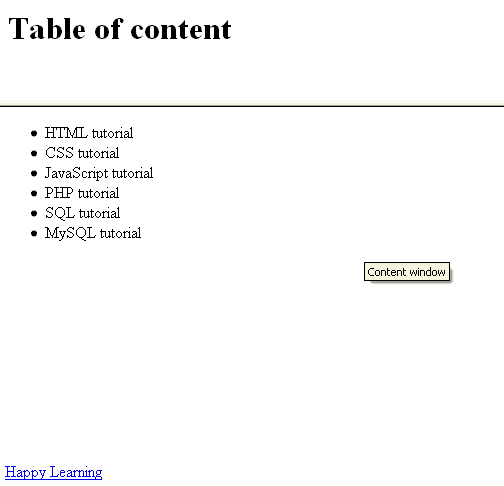
View this example in a separate browser window
Example of HTML marginwidth attribute with frame
Example of HTML marginwidth attribute with iframe
<!DOCTYPE HTML PUBLIC "-//W3C//DTD HTML 4.01//EN"
"http://www.w3.org/TR/html4/strict.dtd">
<html>
<head>
<meta http-equiv="Content-Type" content="text/html;
charset=iso-8859-1">
<title>Example of HTML marginwidth attribute with
iframe</title>
</head>
<body>
<iframe src="../../sql/customer.php" height="100%" width="540"
frameborder="1" title="The customer inforamtion " marginheight="10"
marginwidth="5"> </iframe>
</body>
</body>
</html>
Result
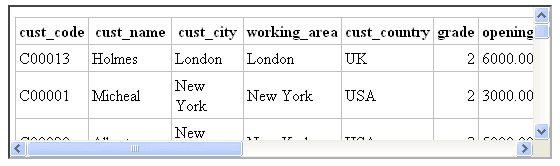
View this example in a separate browser window
Example of HTML marginwidth attribute with iframe
Previous: HTML marginheight attribute
Next: HTML maxlength attribute
Test your Programming skills with w3resource's quiz.
- Weekly Trends and Language Statistics
- Weekly Trends and Language Statistics