PHP: ltrim() function
Description
The ltrim() function is used to remove white spaces or other predefined characters form the left side of the string.
Version:
(PHP 4 and above)
Syntax:
ltrim(string_name, char_list)
Parameter:
| Name | Description | Required / Optional |
Type |
|---|---|---|---|
| string_name | The string that will be trimmed. | Required | String |
| char_list | Specifies which
character to remove from
the string. Without this
parameter, the function
removes the following
characters. ' ' an ordinary space. "\0" - the NUL-byte. "\t" - tab. "\n" - line feed. "\x0B" - a vertical tab. "\r" - a carriage return. |
Optional | String |
Return value:
This function returns a string with whitespace stripped from the beginning of string_name. Without the second parameter, ltrim() will strip these characters:
Value Type: String.
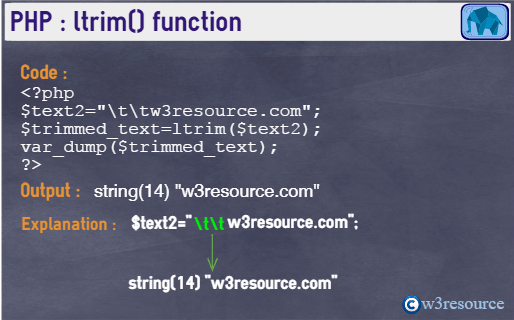
Pictorial Presentation
Example:
<?php
$text1="w3resource.com  ";
$text2="\t\tw3resource.com";
$text3="\t\tw3resource.com\x0A";
$text4="Good Morning";
$trimmed_text=ltrim($text1);
var_dump($trimmed_text);
echo '<br>';
$trimmed_text=ltrim($text2);
var_dump($trimmed_text);
echo '<br>';
$trimmed_text=ltrim($text3);
var_dump($trimmed_text);
echo '<br>';
$trimmed_text=ltrim($text1,'w3');
var_dump($trimmed_text);
echo '<br>';
$trimmed_text=ltrim($text4,"Go");
var_dump($trimmed_text);
?>
Output :
string(16) "w3resource.com  "
string(14) "w3resource.com"
string(15) "w3resource.com  "
string(14) "resource.com  "
string(9) "d Morning"
View the example in the browser
See also
- Weekly Trends and Language Statistics
- Weekly Trends and Language Statistics