SQL Arithmetic Operators
Arithmetic Operators
Arithmetic operators can perform arithmetical operations on numeric operands involved. Arithmetic operators are addition(+), subtraction(-), multiplication(*) and division(/). The + and - operators can also be used in date arithmetic.
| Operator | Meaning | Operates on |
|---|---|---|
| + (Add) | Addition | Numeric value |
| - (Subtract) | Subtraction | Numeric value |
| * (Multiply) | Multiplication | Numeric value |
| / (Divide) | Division | Numeric value |
| % (Modulo) | Returns the integer remainder of a division. For example, 17 % 5 = 2 because the remainder of 17 divided by 5 is 2. | Numeric value |
Syntax:
SELECT <Expression>[arithmetic operator]<expression>...
 FROM [table_name]
 WHERE [expression];
| Parameter | Description |
|---|---|
| Expression | Expression made up of a single constant, variable, scalar function, or column name and can also be the pieces of a SQL query that compare values against other values or perform arithmetic calculations. |
| arithmetic operator | Plus(+), minus(-), multiply(*), and divide(/). |
| table_name | Name of the table. |
Contents:
Example: SQL Arithmetic Operators
This is a simple example of using SQL arithmetic operators:
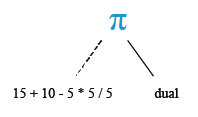
SELECT 15+10-5*5/5 FROM dual;
Explanation:
- SELECT: This keyword is used to retrieve data from the database.
- 15 + 10 - 5 * 5 / 5: This part of the code represents a mathematical expression. It performs the following operations, adhering to the order of operations (PEMDAS/BODMAS):
- Addition: 15 + 10 = 25
- Subtraction: 25 - 5 = 20
- Multiplication: 5 * 5 = 25
- Division: 25 / 5 = 5
- The final result of this expression is 5.
- FROM dual: The dual is a special one-row, one-column table in many database systems, including Oracle. It is often used in situations where a table reference is required but the actual table content is irrelevant. In this case, it doesn't affect the result of the mathematical expression, as it's just a dummy table to satisfy the syntax requirements of the SELECT statement.
Relational Algebra Expression:

Relational Algebra Tree:
SQL plus (+) operator
The SQL plus (+) operator is used to add two or more expressions or numbers.
Example:
Sample table: customer+-----------+-------------+-------------+--------------+--------------+-------+-------------+-------------+-------------+---------------+--------------+------------+ |CUST_CODE | CUST_NAME | CUST_CITY | WORKING_AREA | CUST_COUNTRY | GRADE | OPENING_AMT | RECEIVE_AMT | PAYMENT_AMT |OUTSTANDING_AMT| PHONE_NO | AGENT_CODE | +-----------+-------------+-------------+--------------+--------------+-------+-------------+-------------+-------------+---------------+--------------+------------+ | C00013 | Holmes | London | London | UK | 2 | 6000.00 | 5000.00 | 7000.00 | 4000.00 | BBBBBBB | A003 | | C00001 | Micheal | New York | New York | USA | 2 | 3000.00 | 5000.00 | 2000.00 | 6000.00 | CCCCCCC | A008 | | C00020 | Albert | New York | New York | USA | 3 | 5000.00 | 7000.00 | 6000.00 | 6000.00 | BBBBSBB | A008 | | C00025 | Ravindran | Bangalore | Bangalore | India | 2 | 5000.00 | 7000.00 | 4000.00 | 8000.00 | AVAVAVA | A011 | | C00024 | Cook | London | London | UK | 2 | 4000.00 | 9000.00 | 7000.00 | 6000.00 | FSDDSDF | A006 | | C00015 | Stuart | London | London | UK | 1 | 6000.00 | 8000.00 | 3000.00 | 11000.00 | GFSGERS | A003 | | C00002 | Bolt | New York | New York | USA | 3 | 5000.00 | 7000.00 | 9000.00 | 3000.00 | DDNRDRH | A008 | | C00018 | Fleming | Brisban | Brisban | Australia | 2 | 7000.00 | 7000.00 | 9000.00 | 5000.00 | NHBGVFC | A005 | | C00021 | Jacks | Brisban | Brisban | Australia | 1 | 7000.00 | 7000.00 | 7000.00 | 7000.00 | WERTGDF | A005 | | C00019 | Yearannaidu | Chennai | Chennai | India | 1 | 8000.00 | 7000.00 | 7000.00 | 8000.00 | ZZZZBFV | A010 | | C00005 | Sasikant | Mumbai | Mumbai | India | 1 | 7000.00 | 11000.00 | 7000.00 | 11000.00 | 147-25896312 | A002 | | C00007 | Ramanathan | Chennai | Chennai | India | 1 | 7000.00 | 11000.00 | 9000.00 | 9000.00 | GHRDWSD | A010 | | C00022 | Avinash | Mumbai | Mumbai | India | 2 | 7000.00 | 11000.00 | 9000.00 | 9000.00 | 113-12345678 | A002 | | C00004 | Winston | Brisban | Brisban | Australia | 1 | 5000.00 | 8000.00 | 7000.00 | 6000.00 | AAAAAAA | A005 | | C00023 | Karl | London | London | UK | 0 | 4000.00 | 6000.00 | 7000.00 | 3000.00 | AAAABAA | A006 | | C00006 | Shilton | Torento | Torento | Canada | 1 | 10000.00 | 7000.00 | 6000.00 | 11000.00 | DDDDDDD | A004 | | C00010 | Charles | Hampshair | Hampshair | UK | 3 | 6000.00 | 4000.00 | 5000.00 | 5000.00 | MMMMMMM | A009 | | C00017 | Srinivas | Bangalore | Bangalore | India | 2 | 8000.00 | 4000.00 | 3000.00 | 9000.00 | AAAAAAB | A007 | | C00012 | Steven | San Jose | San Jose | USA | 1 | 5000.00 | 7000.00 | 9000.00 | 3000.00 | KRFYGJK | A012 | | C00008 | Karolina | Torento | Torento | Canada | 1 | 7000.00 | 7000.00 | 9000.00 | 5000.00 | HJKORED | A004 | | C00003 | Martin | Torento | Torento | Canada | 2 | 8000.00 | 7000.00 | 7000.00 | 8000.00 | MJYURFD | A004 | | C00009 | Ramesh | Mumbai | Mumbai | India | 3 | 8000.00 | 7000.00 | 3000.00 | 12000.00 | Phone No | A002 | | C00014 | Rangarappa | Bangalore | Bangalore | India | 2 | 8000.00 | 11000.00 | 7000.00 | 12000.00 | AAAATGF | A001 | | C00016 | Venkatpati | Bangalore | Bangalore | India | 2 | 8000.00 | 11000.00 | 7000.00 | 12000.00 | JRTVFDD | A007 | | C00011 | Sundariya | Chennai | Chennai | India | 3 | 7000.00 | 11000.00 | 7000.00 | 11000.00 | PPHGRTS | A010 | +-----------+-------------+-------------+--------------+--------------+-------+-------------+-------------+-------------+---------------+--------------+------------+
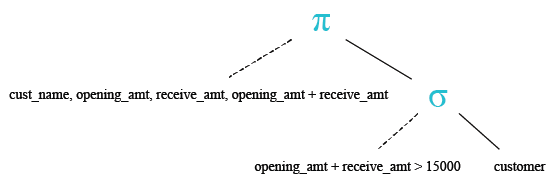
To get data of 'cust_name', 'opening_amt', 'receive_amt', ('opening_amt' + 'receive_amt') from the 'customer' table with following condition -
1. sum of 'opening_amt' and 'receive_amt' is greater than 15000,
the following SQL statement can be used :
-- Selecting the columns cust_name, opening_amt, receive_amt, and their sum
SELECT cust_name, opening_amt, receive_amt, (opening_amt + receive_amt)
-- Selecting from the table 'customer'
FROM customer
-- Filtering the rows where the sum of opening_amt and receive_amt is greater than 15000
WHERE (opening_amt + receive_amt) > 15000;
Explanation:
- SELECT cust_name, opening_amt, receive_amt, (opening_amt + receive_amt): This line selects the columns cust_name, opening_amt, receive_amt, and the sum of opening_amt and receive_amt as a calculated column.
- FROM customer: This specifies that we're selecting data from the customer table.
- WHERE (opening_amt + receive_amt) > 15000: This filters the rows to include only those where the sum of opening_amt and receive_amt is greater than 15000.
Output:
CUST_NAME                                OPENING_AMT RECEIVE_AMT (OPENING_AMT+RECEIVE_AMT)
---------------------------------------- ----------- ----------- -------------------------
Sasikant                                        7000       11000                     18000
Ramanathan                                      7000       11000                     18000
Avinash                                         7000       11000                     18000
Shilton                                        10000        7000                     17000
Rangarappa                                      8000       11000                     19000
Venkatpati                                      8000       11000                     19000
Sundariya                                       7000       11000                     18000
Relational Algebra Expression:

Relational Algebra Tree:
SQL minus (-) operator
The SQL minus (-) operator is used to subtract one expression or number from another expression or number.
Example:
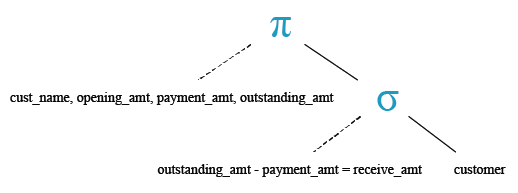
To get data of 'cust_name', 'opening_amount', 'payment_amount' and 'oustanding_amount' from the 'customer' table with following condition -
1. 'outstanding_amt' - 'payment_amt' is equal to the 'receive_amt',
the following SQL statement can be used:/p>
-- Selecting the columns cust_name, opening_amt, payment_amt, and outstanding_amt
SELECT cust_name, opening_amt, payment_amt, outstanding_amt
-- Selecting from the table 'customer'
FROM customer
-- Filtering the rows where the difference between outstanding_amt and payment_amt is equal to receive_amt
WHERE (outstanding_amt - payment_amt) = receive_amt;
Explanation:
- SELECT cust_name, opening_amt, payment_amt, outstanding_amt: This line selects the columns cust_name, opening_amt, payment_amt, and outstanding_amt from the customer table.
- FROM customer: This specifies that we're selecting data from the customer table.
- WHERE (outstanding_amt - payment_amt) = receive_amt: This line filters the rows to include only those where the difference between outstanding_amt and payment_amt is equal to receive_amt.
Output:
CUST_NAME                                OPENING_AMT PAYMENT_AMT OUTSTANDING_AMT
---------------------------------------- ----------- ----------- ---------------
Stuart                                          6000        3000           11000
Relational Algebra Expression:

Relational Algebra Tree:
SQL multiply ( * ) operator
The SQL multiply ( * ) operator is used to multiply two or more expressions or numbers.
Example:
Sample table: agents+------------+----------------------+--------------------+------------+-----------------+---------+ | AGENT_CODE | AGENT_NAME | WORKING_AREA | COMMISSION | PHONE_NO | COUNTRY | +------------+----------------------+--------------------+------------+-----------------+---------+ | A007 | Ramasundar | Bangalore | 0.15 | 077-25814763 | | | A003 | Alex | London | 0.13 | 075-12458969 | | | A008 | Alford | New York | 0.12 | 044-25874365 | | | A011 | Ravi Kumar | Bangalore | 0.15 | 077-45625874 | | | A010 | Santakumar | Chennai | 0.14 | 007-22388644 | | | A012 | Lucida | San Jose | 0.12 | 044-52981425 | | | A005 | Anderson | Brisban | 0.13 | 045-21447739 | | | A001 | Subbarao | Bangalore | 0.14 | 077-12346674 | | | A002 | Mukesh | Mumbai | 0.11 | 029-12358964 | | | A006 | McDen | London | 0.15 | 078-22255588 | | | A004 | Ivan | Torento | 0.15 | 008-22544166 | | | A009 | Benjamin | Hampshair | 0.11 | 008-22536178 | | +------------+----------------------+--------------------+------------+-----------------+---------+
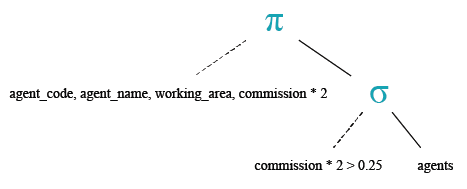
To get data of 'agent_code', 'agent_name', 'working_area' and ('commission'*2) from the 'agents' table with following condition -
1. two times of the default 'commission' is greater than 0.25,
the following SQL statement can be used :
-- Selecting the columns agent_code, agent_name, working_area, and twice the commission
SELECT agent_code, agent_name, working_area, (commission*2)
-- Selecting from the table 'agents'
FROM agents
-- Filtering the rows where twice the commission is greater than 0.25
WHERE (commission*2) > 0.25;
Explanation:
- SELECT agent_code, agent_name, working_area, (commission*2): This line selects the columns agent_code, agent_name, working_area, and calculates twice the value of the commission.
- FROM agents: This specifies that we're selecting data from the agents table.
- WHERE (commission*2) > 0.25: This line filters the rows to include only those where twice the value of the commission is greater than 0.25.
Output:
AGENT_ AGENT_NAME                               WORKING_AREA                        (COMMISSION*2)
------ ---------------------------------------- ----------------------------------- --------------
A003   Alex                                     London                                         .26
A001   Subbarao                                 Bangalore                                      .28
A007   Ramasundar                               Bangalore                                       .3
A011   Ravi Kumar                               Bangalore                                       .3
A010   Santakumar                               Chennai                                        .28
A005   Anderson                                 Brisban                                        .26
A006   McDen                                    London                                          .3
A004   Ivan                                     Torento                                         .3
Relational Algebra Expression:

Relational Algebra Tree:
SQL divide ( / ) operator
The SQL divide ( / ) operator is used to divide one expressions or numbers by another.
Example:
To get data of 'cust_name', 'opening_amt', 'receive_amt', 'outstanding_amt' and ('receive_amt'*5/ 100) as a column heading 'commission' from the customer table with following condition -
1. 'outstanding_amt' is less than or equal to 4000,
the following SQL statement can be used :
-- Selecting the columns cust_name, opening_amt, receive_amt, outstanding_amt, and calculating the commission
SELECT cust_name, opening_amt, receive_amt, outstanding_amt, (receive_amt*5/100) commission
-- Selecting from the table 'customer'
FROM customer
-- Filtering the rows where outstanding_amt is less than or equal to 4000
WHERE outstanding_amt <= 4000;
Explanation:
- SELECT cust_name, opening_amt, receive_amt, outstanding_amt, (receive_amt*5/100) commission: This line selects the columns cust_name, opening_amt, receive_amt, and outstanding_amt from the customer table, and it calculates the commission as 5% of the receive_amt.
- FROM customer: This specifies that we're selecting data from the customer table.
- WHERE outstanding_amt <= 4000: This line filters the rows to include only those where the outstanding_amt is less than or equal to 4000.
Output:
CUST_NAME                                OPENING_AMT RECEIVE_AMT OUTSTANDING_AMT COMMISSION
---------------------------------------- ----------- ----------- --------------- ----------
Holmes                                          6000        5000            4000        250
Bolt                                            5000        7000            3000        350
Karl                                            4000        6000            3000        300
Steven                                          5000        7000            3000        350
SQL modulo ( % ) operator
The SQL MODULO operator returns the remainder (an integer) of the division.
Example:To get the modulus of a division of 150 by 7 from the DUAL table, the following SQL statement can be used :
-- The SELECT statement is used to retrieve data from the database.
SELECT 150%7;
-- The expression 150%7 calculates the remainder of dividing 150 by 7.
-- In this case, 150 divided by 7 equals 21 with a remainder of 3.
-- So, the result of the expression is 3.
Explanation:
- When you execute this SQL query, it will return the result 3, which is the remainder of dividing 150 by 7.
Output:

Check out our 1000+ SQL Exercises with solution and explanation to improve your skills.
- Weekly Trends and Language Statistics
- Weekly Trends and Language Statistics