
SQL LIKE Operator
LIKE Operator
LIKE is the ANSI/ISO standard operator for comparing a column value to another column value, or to a quoted string. Returns either 1 (TRUE) or 0 (FALSE)
The SQL LIKE operator is only applied on a field of types CHAR or VARCHAR to match a pattern.
To match a pattern from a word, special characters, and wildcards characters may have used with LIKE operator.
The LIKE operator can be used within any valid SQL statement, such as SELECT, INSERT INTO, UPDATE or DELETE.
Syntax:
SELECT [* |  column_list]
FROM <table_name> WHERE expression [NOT] LIKE pattern
[ESCAPE escape_sequence]
Parameters:
| Name | Description |
|---|---|
| column_list | List of columns of a table. |
| table_name | Name of the table. |
| column_name | Name of the column which will participate in the action with LIKE operator. |
| WHERE | Tests whether an expression matches the pattern. Both expression and pattern may be any valid expression and are evaluated to strings. Use NOT LIKE to test if a string does not match a pattern. Patterns may use the following SQL wildcard characters : |
SQL Wildcards:
The SQL wildcards can be used to search data within a table.
SQL wildcards are used with SQL LIKE operator.
The boolean NOT operator in the select statement can be used as wildcard NOT LIKE operator.
In SQL, the wildcards are:
| Wildcards | Description |
|---|---|
| % | The percent sign character (%) represent a sequence of 0 (zero) or more characters. |
| Underscore ( _ ) | The underscore character ( _ ) represents a single character. |
| [charlist] | It represents any single character within a charlist |
| [^charlist] or [!charlist] | It represents any single character other than the charlist |
Here are some important tips regarding wildcard operators:
- Percent Symbol (%): The percent symbol (%) represents zero, one, or multiple characters in a string. For example:
- LIKE 'a%': Matches any string that starts with 'a'.
- LIKE '%a': Matches any string that ends with 'a'.
- LIKE '%a%': Matches any string that contains 'a' anywhere in the string.
- Underscore Symbol (_): The underscore symbol (_) represents a single character in a string. For example:
- LIKE 'a_': Matches any string that starts with 'a' followed by one character.
- LIKE '_a': Matches any string that ends with 'a' preceded by one character.
- LIKE '_a_': Matches any string that has 'a' as the second character.
- Combining Wildcards: You can combine wildcard characters in a single pattern. For example:
- LIKE 'a%b': Matches any string that starts with 'a' and ends with 'b'.
- LIKE '_a%': Matches any string that has 'a' as the second character.
- LIKE '%a_': Matches any string that ends with 'a' and has one character before 'a'.
- Escape Character: Sometimes you may need to match wildcard characters themselves in a string. You can use the escape character (usually \) to treat a wildcard character as a literal character. For example:
- LIKE '100\%': Matches the string '100%'.
Visual Presentation:SQL LIKE Operator
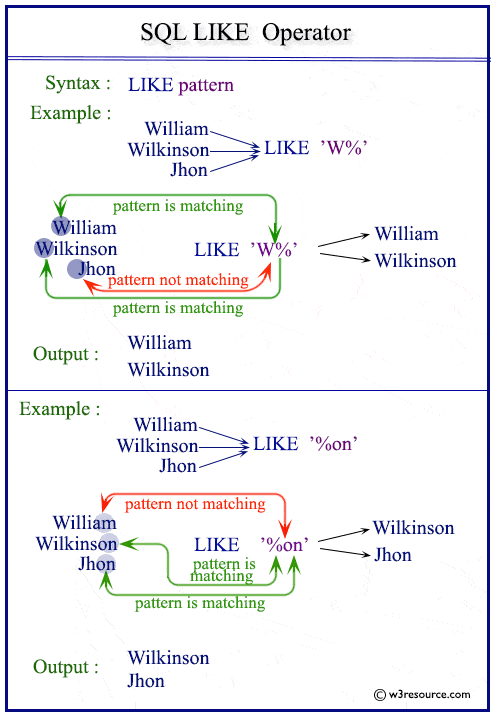
Examples: SQL LIKE Operator
Contents:
SQL wildcards percentage (%)
Sample table: customer
+-----------+-------------+-------------+--------------+--------------+-------+-------------+-------------+-------------+---------------+--------------+------------+
|CUST_CODE  | CUST_NAME   | CUST_CITY   | WORKING_AREA | CUST_COUNTRY | GRADE | OPENING_AMT | RECEIVE_AMT | PAYMENT_AMT |OUTSTANDING_AMT| PHONE_NO     | AGENT_CODE |
+-----------+-------------+-------------+--------------+--------------+-------+-------------+-------------+-------------+---------------+--------------+------------+
| C00013    | Holmes      | London      | London       | UK           |     2 |     6000.00 |     5000.00 |     7000.00 |       4000.00 | BBBBBBB      | A003       |
| C00001    | Micheal     | New York    | New York     | USA          |     2 |     3000.00 |     5000.00 |     2000.00 |       6000.00 | CCCCCCC      | A008       |
| C00020    | Albert      | New York    | New York     | USA          |     3 |     5000.00 |     7000.00 |     6000.00 |       6000.00 | BBBBSBB      | A008       |
| C00025    | Ravindran   | Bangalore   | Bangalore    | India        |     2 |     5000.00 |     7000.00 |     4000.00 |       8000.00 | AVAVAVA      | A011       |
| C00024    | Cook        | London      | London       | UK           |     2 |     4000.00 |     9000.00 |     7000.00 |       6000.00 | FSDDSDF      | A006       |
| C00015    | Stuart      | London      | London       | UK           |     1 |     6000.00 |     8000.00 |     3000.00 |      11000.00 | GFSGERS      | A003       |
| C00002    | Bolt        | New York    | New York     | USA          |     3 |     5000.00 |     7000.00 |     9000.00 |       3000.00 | DDNRDRH      | A008       |
| C00018    | Fleming     | Brisban     | Brisban      | Australia    |     2 |     7000.00 |     7000.00 |     9000.00 |       5000.00 | NHBGVFC      | A005       |
| C00021    | Jacks       | Brisban     | Brisban      | Australia    |     1 |     7000.00 |     7000.00 |     7000.00 |       7000.00 | WERTGDF      | A005       |
...........
| C00011    | Sundariya   | Chennai     | Chennai      | India        |     3 |     7000.00 |    11000.00 |     7000.00 |      11000.00 | PPHGRTS      | A010       |
+-----------+-------------+-------------+--------------+--------------+-------+-------------+-------------+-------------+---------------+--------------+------------+
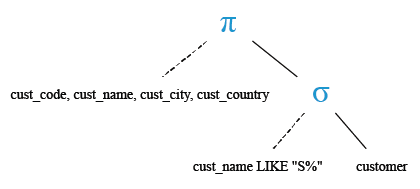
To get the 'cust_code', 'cust_name', 'cust_city' and 'cust_country' from the table 'customer' with following condition -
1. the 'cust_name' must begin with the letter 'S',
the following SQL statement can be used :
SELECT cust_code, cust_name, cust_city, cust_country
-- Selecting specific columns: cust_code, cust_name, cust_city, cust_country
FROM customer
-- From the table named "customer"
WHERE cust_name LIKE 'S%'
-- Where the value in the column cust_name starts with 'S' and may be followed by zero or more characters
Explanation:
- SELECT cust_code, cust_name, cust_city, cust_country: This specifies that we want to retrieve specific columns (cust_code, cust_name, cust_city, cust_country) from the table.
- FROM customer: This indicates the table from which we want to retrieve the data. In this case, the table is named "customer".
- WHERE cust_name LIKE 'S%': This is a conditional clause that filters the rows returned by the query. It specifies that only rows where the value in the column cust_name starts with 'S' should be included in the result set. The '%' symbol is a wildcard that matches any sequence of characters, so 'S%' matches any string that starts with 'S' followed by zero or more characters.
Output:
CUST_CODE  CUST_NAME            CUST_CITY       CUST_COUNTRY
---------- -------------------- --------------- -------------------
C00015     Stuart               London          UK
C00005     Sasikant             Mumbai          India
C00006     Shilton              Torento         Canada
C00017     Srinivas             Bangalore       India
C00012     Steven               San Jose        USA
C00011     Sundariya            Chennai         India
Relational Algebra Expression:

Relational Algebra Tree:
SQL wildcards percentage (%) with boolean NOT
Sample table: agents
+------------+----------------------+--------------------+------------+-----------------+---------+
| AGENT_CODE | AGENT_NAME           | WORKING_AREA       | COMMISSION | PHONE_NO        | COUNTRY |
+------------+----------------------+--------------------+------------+-----------------+---------+
| A007       | Ramasundar           | Bangalore          |       0.15 | 077-25814763    |         |
| A003       | Alex                 | London             |       0.13 | 075-12458969    |         |
| A008       | Alford               | New York           |       0.12 | 044-25874365    |         |
| A011       | Ravi Kumar           | Bangalore          |       0.15 | 077-45625874    |         |
| A010       | Santakumar           | Chennai            |       0.14 | 007-22388644    |         |
| A012       | Lucida               | San Jose           |       0.12 | 044-52981425    |         |
| A005       | Anderson             | Brisban            |       0.13 | 045-21447739    |         |
| A001       | Subbarao             | Bangalore          |       0.14 | 077-12346674    |         |
| A002       | Mukesh               | Mumbai             |       0.11 | 029-12358964    |         |
.........
| A009       | Benjamin             | Hampshair          |       0.11 | 008-22536178    |         |
+------------+----------------------+--------------------+------------+-----------------+---------+
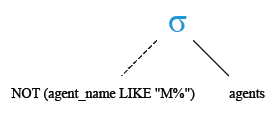
To get all the columns from the table 'agents' with the following condition -
1. the 'agent_name' not initiated with the letter 'M',
the following SQL statement can be used :
SELECT *
-- Selecting all columns
FROM agents
-- From the table named "agents"
WHERE agent_name NOT LIKE 'M%';
-- Where the value in the column agent_name does not start with 'M'
Explanation:
- SELECT *: This specifies that we want to retrieve all columns from the table.
- FROM agents: This indicates the table from which we want to retrieve the data. In this case, the table is named "agents".
- WHERE agent_name NOT LIKE 'M%': This is a conditional clause that filters the rows returned by the query. It specifies that only rows where the value in the column agent_name does not start with 'M' should be included in the result set. The NOT LIKE 'M%' condition uses the NOT keyword to negate the pattern match. The 'M%' pattern matches any string that starts with 'M'.
Output:
AGENT_CODE AGENT_NAME           WORKING_AREA    COMMISSION PHONE_NO        COUNTRY
---------- -------------------- --------------- ---------- --------------- --------
A003       Alex                 London                 .13 075-12458969
A001       Subbarao             Bangalore              .14 077-12346674
A009       Benjamin             Hampshair              .11 008-22536178
A007       Ramasundar           Bangalore              .15 077-25814763
A008       Alford               New York               .12 044-25874365
A011       Ravi Kumar           Bangalore              .15 077-45625874
A010       Santakumar           Chennai                .14 007-22388644
A012       Lucida               San Jose               .12 044-52981425
A005       Anderson             Brisban                .13 045-21447739
A004       Ivan                 Torento                .15 008-22544166
Relational Algebra Expression:

Relational Algebra Tree:
Equals(=) vs. LIKE
The equals to(=) operator is a comparison operator and used for equality test within two numbers or expressions. For example :
SELECT *
-- Selecting all columns
FROM agents
-- From the table named "agents"
WHERE commission = 0.11;
-- Where the value in the column commission is equal to 0.11
Explanation:
- SELECT *: This specifies that we want to retrieve all columns from the table.
- FROM agents: This indicates the table from which we want to retrieve the data. In this case, the table is named "agents".
- WHERE commission = 0.11: This is a conditional clause that filters the rows returned by the query. It specifies that only rows where the value in the column commission is equal to 0.11 should be included in the result set.
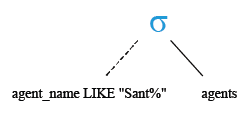
LIKE operator checks whether a specific character string matches a specified pattern. For example:
SELECT *
-- Selecting all columns
FROM agents
-- From the table named "agents"
WHERE agent_name LIKE 'Sant%';
-- Where the value in the column agent_name starts with 'Sant'
LIKE is generally used only with strings and equals (=) is used for exact matching and it seems faster.
Explanation:
- SELECT *: This specifies that we want to retrieve all columns from the table.
- FROM agents: This indicates the table from which we want to retrieve the data. In this case, the table is named "agents".
- WHERE agent_name LIKE 'Sant%': This is a conditional clause that filters the rows returned by the query. It specifies that only rows where the value in the column agent_name starts with 'Sant' should be included in the result set. The % symbol is a wildcard that matches any sequence of characters, so 'Sant%' matches any string that starts with 'Sant'.
Relational Algebra Expression:

Relational Algebra Tree:
Example : SQL wildcards underscore ( _ )
The underscore character ( _ ) represents a single character to match a pattern from a word or string. More than one ( _ ) underscore characters can be used to match a pattern of multiple characters.
Sample table: customer
+-----------+-------------+-------------+--------------+--------------+-------+-------------+-------------+-------------+---------------+--------------+------------+
|CUST_CODE  | CUST_NAME   | CUST_CITY   | WORKING_AREA | CUST_COUNTRY | GRADE | OPENING_AMT | RECEIVE_AMT | PAYMENT_AMT |OUTSTANDING_AMT| PHONE_NO     | AGENT_CODE |
+-----------+-------------+-------------+--------------+--------------+-------+-------------+-------------+-------------+---------------+--------------+------------+
| C00013    | Holmes      | London      | London       | UK           |     2 |     6000.00 |     5000.00 |     7000.00 |       4000.00 | BBBBBBB      | A003       |
| C00001    | Micheal     | New York    | New York     | USA          |     2 |     3000.00 |     5000.00 |     2000.00 |       6000.00 | CCCCCCC      | A008       |
| C00020    | Albert      | New York    | New York     | USA          |     3 |     5000.00 |     7000.00 |     6000.00 |       6000.00 | BBBBSBB      | A008       |
| C00025    | Ravindran   | Bangalore   | Bangalore    | India        |     2 |     5000.00 |     7000.00 |     4000.00 |       8000.00 | AVAVAVA      | A011       |
| C00024    | Cook        | London      | London       | UK           |     2 |     4000.00 |     9000.00 |     7000.00 |       6000.00 | FSDDSDF      | A006       |
| C00015    | Stuart      | London      | London       | UK           |     1 |     6000.00 |     8000.00 |     3000.00 |      11000.00 | GFSGERS      | A003       |
| C00002    | Bolt        | New York    | New York     | USA          |     3 |     5000.00 |     7000.00 |     9000.00 |       3000.00 | DDNRDRH      | A008       |
| C00018    | Fleming     | Brisban     | Brisban      | Australia    |     2 |     7000.00 |     7000.00 |     9000.00 |       5000.00 | NHBGVFC      | A005       |
| C00021    | Jacks       | Brisban     | Brisban      | Australia    |     1 |     7000.00 |     7000.00 |     7000.00 |       7000.00 | WERTGDF      | A005       |
............
| C00011    | Sundariya   | Chennai     | Chennai      | India        |     3 |     7000.00 |    11000.00 |     7000.00 |      11000.00 | PPHGRTS      | A010       |
+-----------+-------------+-------------+--------------+--------------+-------+-------------+-------------+-------------+---------------+--------------+------------+
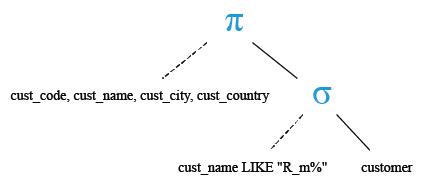
To get 'cust_code', 'cust_name', 'cust_city' and 'cust_country' from the table 'customer' with following conditions -
1. the 'cust_name' must initiate with the letter 'R',
2. the third letter of 'cust_name' must be 'm',
3. and the second letter of 'cust_name' may be any,
the following SQL statement can be used :
SELECT cust_code, cust_name, cust_city, cust_country
-- Selecting specific columns: cust_code, cust_name, cust_city, cust_country
FROM customer
-- From the table named "customer"
WHERE cust_name LIKE 'R_m%';
-- Where the value in the column cust_name starts with 'R', followed by any single character ('_'), and then followed by 'm' and any number of characters after that
Explanation:
- SELECT cust_code, cust_name, cust_city, cust_country: This specifies that we want to retrieve specific columns (cust_code, cust_name, cust_city, cust_country) from the table.
- FROM customer: This indicates the table from which we want to retrieve the data. In this case, the table is named "customer".
- WHERE cust_name LIKE 'R_m%': This is a conditional clause that filters the rows returned by the query. It specifies that only rows where the value in the column cust_name starts with 'R', followed by any single character ('_'), and then followed by 'm' and any number of characters after that should be included in the result set. The '_' symbol is a wildcard that matches any single character, and the % symbol is a wildcard that matches any sequence of characters.
Output:
CUST_CODE  CUST_NAME            CUST_CITY       CUST_COUNTRY
---------- -------------------- --------------- -------------------
C00007     Ramanathan           Chennai         India
C00009     Ramesh               Mumbai          India
Relational Algebra Expression:

Relational Algebra Tree:
SQL wildcards underscore ( _ ) multiple characters
Sample table: customer
+-----------+-------------+-------------+--------------+--------------+-------+-------------+-------------+-------------+---------------+--------------+------------+
|CUST_CODE  | CUST_NAME   | CUST_CITY   | WORKING_AREA | CUST_COUNTRY | GRADE | OPENING_AMT | RECEIVE_AMT | PAYMENT_AMT |OUTSTANDING_AMT| PHONE_NO     | AGENT_CODE |
+-----------+-------------+-------------+--------------+--------------+-------+-------------+-------------+-------------+---------------+--------------+------------+
| C00013    | Holmes      | London      | London       | UK           |     2 |     6000.00 |     5000.00 |     7000.00 |       4000.00 | BBBBBBB      | A003       |
| C00001    | Micheal     | New York    | New York     | USA          |     2 |     3000.00 |     5000.00 |     2000.00 |       6000.00 | CCCCCCC      | A008       |
| C00020    | Albert      | New York    | New York     | USA          |     3 |     5000.00 |     7000.00 |     6000.00 |       6000.00 | BBBBSBB      | A008       |
| C00025    | Ravindran   | Bangalore   | Bangalore    | India        |     2 |     5000.00 |     7000.00 |     4000.00 |       8000.00 | AVAVAVA      | A011       |
| C00024    | Cook        | London      | London       | UK           |     2 |     4000.00 |     9000.00 |     7000.00 |       6000.00 | FSDDSDF      | A006       |
| C00015    | Stuart      | London      | London       | UK           |     1 |     6000.00 |     8000.00 |     3000.00 |      11000.00 | GFSGERS      | A003       |
| C00002    | Bolt        | New York    | New York     | USA          |     3 |     5000.00 |     7000.00 |     9000.00 |       3000.00 | DDNRDRH      | A008       |
| C00018    | Fleming     | Brisban     | Brisban      | Australia    |     2 |     7000.00 |     7000.00 |     9000.00 |       5000.00 | NHBGVFC      | A005       |
| C00021    | Jacks       | Brisban     | Brisban      | Australia    |     1 |     7000.00 |     7000.00 |     7000.00 |       7000.00 | WERTGDF      | A005       |
.............
| C00011    | Sundariya   | Chennai     | Chennai      | India        |     3 |     7000.00 |    11000.00 |     7000.00 |      11000.00 | PPHGRTS      | A010       |
+-----------+-------------+-------------+--------------+--------------+-------+-------------+-------------+-------------+---------------+--------------+------------+
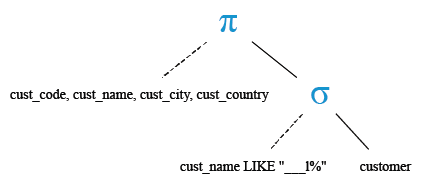
To get 'cust_code', 'cust_name', 'cust_city' and 'cust_country' from the table 'customer' with following conditions -
1. the first three letters of 'cust_name' may be any letter
2. the forth letter of 'cust_name' must be 'l'
3. and the rest may be any
the following SQL statement can be used:
SELECT cust_code, cust_name, cust_city, cust_country
-- Selecting specific columns: cust_code, cust_name, cust_city, cust_country
FROM customer
-- From the table named "customer"
WHERE cust_name LIKE '___l%';
-- Where the value in the column cust_name starts with any three characters ('___'), followed by 'l' and any number of characters after that
Explanation:
- SELECT cust_code, cust_name, cust_city, cust_country: This specifies that we want to retrieve specific columns (cust_code, cust_name, cust_city, cust_country) from the table.
- FROM customer: This indicates the table from which we want to retrieve the data. In this case, the table is named "customer".
- WHERE cust_name LIKE '___l%': This is a conditional clause that filters the rows returned by the query. It specifies that only rows where the value in the column cust_name starts with any three characters ('___'), followed by 'l' and any number of characters after that should be included in the result set. The '___' symbol represents any three characters, and the % symbol is a wildcard that matches any sequence of characters.
Output:
CUST_CODE  CUST_NAME            CUST_CITY       CUST_COUNTRY
---------- -------------------- --------------- ------------------
C00023     Karl                 London          UK
C00006     Shilton              Torento         Canada
Relational Algebra Expression:

Relational Algebra Tree:
SQL wildcards underscore ( _ ) for specific length
Sample table: customer
+-----------+-------------+-------------+--------------+--------------+-------+-------------+-------------+-------------+---------------+--------------+------------+
|CUST_CODE  | CUST_NAME   | CUST_CITY   | WORKING_AREA | CUST_COUNTRY | GRADE | OPENING_AMT | RECEIVE_AMT | PAYMENT_AMT |OUTSTANDING_AMT| PHONE_NO     | AGENT_CODE |
+-----------+-------------+-------------+--------------+--------------+-------+-------------+-------------+-------------+---------------+--------------+------------+
| C00013    | Holmes      | London      | London       | UK           |     2 |     6000.00 |     5000.00 |     7000.00 |       4000.00 | BBBBBBB      | A003       |
| C00001    | Micheal     | New York    | New York     | USA          |     2 |     3000.00 |     5000.00 |     2000.00 |       6000.00 | CCCCCCC      | A008       |
| C00020    | Albert      | New York    | New York     | USA          |     3 |     5000.00 |     7000.00 |     6000.00 |       6000.00 | BBBBSBB      | A008       |
| C00025    | Ravindran   | Bangalore   | Bangalore    | India        |     2 |     5000.00 |     7000.00 |     4000.00 |       8000.00 | AVAVAVA      | A011       |
| C00024    | Cook        | London      | London       | UK           |     2 |     4000.00 |     9000.00 |     7000.00 |       6000.00 | FSDDSDF      | A006       |
| C00015    | Stuart      | London      | London       | UK           |     1 |     6000.00 |     8000.00 |     3000.00 |      11000.00 | GFSGERS      | A003       |
| C00002    | Bolt        | New York    | New York     | USA          |     3 |     5000.00 |     7000.00 |     9000.00 |       3000.00 | DDNRDRH      | A008       |
| C00018    | Fleming     | Brisban     | Brisban      | Australia    |     2 |     7000.00 |     7000.00 |     9000.00 |       5000.00 | NHBGVFC      | A005       |
| C00021    | Jacks       | Brisban     | Brisban      | Australia    |     1 |     7000.00 |     7000.00 |     7000.00 |       7000.00 | WERTGDF      | A005       |
..........
| C00011    | Sundariya   | Chennai     | Chennai      | India        |     3 |     7000.00 |    11000.00 |     7000.00 |      11000.00 | PPHGRTS      | A010       |
+-----------+-------------+-------------+--------------+--------------+-------+-------------+-------------+-------------+---------------+--------------+------------+
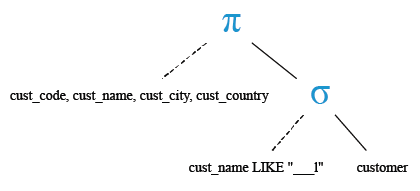
To get 'cust_code', 'cust_name', 'cust_city' and 'cust_country' from the table 'customer' with following conditions -
1. the first three letters of 'cust_name' may be any letter
2. the forth letter of 'cust_name' must be 'l'
3. and the string must be a length of 4 letters
the following SQL statement can be used :
SELECT cust_code, cust_name, cust_city, cust_country
-- Selecting specific columns: cust_code, cust_name, cust_city, cust_country
FROM customer
-- From the table named "customer"
WHERE cust_name LIKE '___l';
-- Where the value in the column cust_name starts with any three characters ('___'), followed by 'l' and nothing else
Explanation:
- SELECT cust_code, cust_name, cust_city, cust_country: This specifies that we want to retrieve specific columns (cust_code, cust_name, cust_city, cust_country) from the table.
- FROM customer: This indicates the table from which we want to retrieve the data. In this case, the table is named "customer".
- WHERE cust_name LIKE '___l': This is a conditional clause that filters the rows returned by the query. It specifies that only rows where the value in the column cust_name starts with any three characters ('___'), followed by 'l' and nothing else should be included in the result set. The '___' symbol represents any three characters, and the 'l' specifies that the next character must be 'l'.
Output:
CUST_CODE  CUST_NAME            CUST_CITY       CUST_COUNTRY
---------- -------------------- --------------- --------------------
C00023     Karl                 London          UK
Relational Algebra Expression:

Relational Algebra Tree:
Example: SQL [charlist] wildcards
The [charlist] WILDCARDS are used to represent any single character within a charlist.
The [^charlist] and [!charlist] WILDCARDS is used to represents any single character, not in the charlist.
Sample table: agents
+------------+----------------------+--------------------+------------+-----------------+---------+
| AGENT_CODE | AGENT_NAME           | WORKING_AREA       | COMMISSION | PHONE_NO        | COUNTRY |
+------------+----------------------+--------------------+------------+-----------------+---------+
| A007       | Ramasundar           | Bangalore          |       0.15 | 077-25814763    |         |
| A003       | Alex                 | London             |       0.13 | 075-12458969    |         |
| A008       | Alford               | New York           |       0.12 | 044-25874365    |         |
| A011       | Ravi Kumar           | Bangalore          |       0.15 | 077-45625874    |         |
| A010       | Santakumar           | Chennai            |       0.14 | 007-22388644    |         |
| A012       | Lucida               | San Jose           |       0.12 | 044-52981425    |         |
| A005       | Anderson             | Brisban            |       0.13 | 045-21447739    |         |
| A001       | Subbarao             | Bangalore          |       0.14 | 077-12346674    |         |
| A002       | Mukesh               | Mumbai             |       0.11 | 029-12358964    |         |
..........
| A009       | Benjamin             | Hampshair          |       0.11 | 008-22536178    |         |
+------------+----------------------+--------------------+------------+-----------------+---------+
To get all rows from the table 'agents' with the following condition -
1. the 'agent_name' must begin with the letter 'a' or 'b' or 'i'
the following SQL statement can be used :
SELECT *
-- Selecting all columns
FROM agents
-- From the table named "agents"
WHERE agent_name LIKE '[abi]%';
-- Where the value in the column agent_name starts with either 'a', 'b', or 'i' followed by any number of characters
Explanation:
- SELECT *: This specifies that you want to retrieve all columns from the table.
- FROM agents: This indicates the table from which you want to retrieve the data. In this case, the table is named "agents".
- WHERE agent_name LIKE '[abi]%': This is a conditional clause that filters the rows returned by the query. It specifies that only rows where the value in the column agent_name starts with either 'a', 'b', or 'i' followed by any number of characters should be included in the result set.
Example: SQL [^charlist] wildcards
Sample table: agents
+------------+----------------------+--------------------+------------+-----------------+---------+
| AGENT_CODE | AGENT_NAME           | WORKING_AREA       | COMMISSION | PHONE_NO        | COUNTRY |
+------------+----------------------+--------------------+------------+-----------------+---------+
| A007       | Ramasundar           | Bangalore          |       0.15 | 077-25814763    |         |
| A003       | Alex                 | London             |       0.13 | 075-12458969    |         |
| A008       | Alford               | New York           |       0.12 | 044-25874365    |         |
| A011       | Ravi Kumar           | Bangalore          |       0.15 | 077-45625874    |         |
| A010       | Santakumar           | Chennai            |       0.14 | 007-22388644    |         |
| A012       | Lucida               | San Jose           |       0.12 | 044-52981425    |         |
| A005       | Anderson             | Brisban            |       0.13 | 045-21447739    |         |
| A001       | Subbarao             | Bangalore          |       0.14 | 077-12346674    |         |
| A002       | Mukesh               | Mumbai             |       0.11 | 029-12358964    |         |
............
| A009       | Benjamin             | Hampshair          |       0.11 | 008-22536178    |         |
+------------+----------------------+--------------------+------------+-----------------+---------+
To get all rows from the table 'agents' with the following condition -
1. the 'agent_name' must not begin with the letter 'a' or 'b' or 'i',
the following SQL statement can be used :
SELECT *
-- Selecting all columns
FROM agents
-- From the table named "agents"
WHERE agent_name LIKE '[^abi]%';
-- Where the value in the column agent_name does not start with 'a', 'b', or 'i'
Explanation:
- SELECT *: This specifies that you want to retrieve all columns from the table.
- FROM agents: This indicates the table from which you want to retrieve the data. In this case, the table is named "agents".
- WHERE agent_name LIKE '[^abi]%': This is a conditional clause that filters the rows returned by the query. It specifies that only rows where the value in the column agent_name does not start with 'a', 'b', or 'i' should be included in the result set. The [^abi] part is a character class that matches any single character not in the set 'a', 'b', or 'i'. The % symbol is a wildcard that matches any sequence of characters.
Example: SQL [!charlist] wildcards
Sample table: agents
+------------+----------------------+--------------------+------------+-----------------+---------+
| AGENT_CODE | AGENT_NAME           | WORKING_AREA       | COMMISSION | PHONE_NO        | COUNTRY |
+------------+----------------------+--------------------+------------+-----------------+---------+
| A007       | Ramasundar           | Bangalore          |       0.15 | 077-25814763    |         |
| A003       | Alex                 | London             |       0.13 | 075-12458969    |         |
| A008       | Alford               | New York           |       0.12 | 044-25874365    |         |
| A011       | Ravi Kumar           | Bangalore          |       0.15 | 077-45625874    |         |
| A010       | Santakumar           | Chennai            |       0.14 | 007-22388644    |         |
| A012       | Lucida               | San Jose           |       0.12 | 044-52981425    |         |
| A005       | Anderson             | Brisban            |       0.13 | 045-21447739    |         |
| A001       | Subbarao             | Bangalore          |       0.14 | 077-12346674    |         |
| A002       | Mukesh               | Mumbai             |       0.11 | 029-12358964    |         |
...........
| A009       | Benjamin             | Hampshair          |       0.11 | 008-22536178    |         |
+------------+----------------------+--------------------+------------+-----------------+---------+
To get all rows from the table 'agents' with the following condition -
1. the 'agent_name' must not begin with the letter 'a' or 'b' or 'i',
the following SQL statement can be used :
SELECT *
-- Selecting all columns
FROM agents
-- From the table named "agents"
WHERE agent_name LIKE '[!abi]%';
-- Where the value in the column agent_name does not start with 'a', 'b', or 'i'
Explanation:
- SELECT *: This specifies that you want to retrieve all columns from the table.
- FROM agents: This indicates the table from which you want to retrieve the data. In this case, the table is named "agents".
- WHERE agent_name LIKE '[!abi]%': This is a conditional clause that filters the rows returned by the query. It specifies that only rows where the value in the column agent_name does not start with 'a', 'b', or 'i' should be included in the result set. The [!abi] part is a character class that matches any single character except 'a', 'b', or 'i'. The % symbol is a wildcard that matches any sequence of characters.
Check out our 1000+ SQL Exercises with solution and explanation to improve your skills.
PREV : SQL Logical Operators
NEXT : SQL wildcards underscore ( _ )