SQL Logical Operators
Logical Operators
The Logical operators are those that are true or false. They return a true or false values to combine one or more true or false values.
The Logical operators are:
| Operator | Description |
|---|---|
| AND | Logical AND compares between two Booleans as expression and returns true when both expressions are true... |
| OR | Logical OR compares between two Booleans as expression and returns true when one of the expression is true... |
| NOT | Not takes a single Boolean as an argument and changes its value from false to true or from true to false.... |
| Special operators | ||
| Operator | Description | Operates on |
|---|---|---|
| IN | The IN operator checks a value within a set of values separated by commas and retrieve the rows from the table which are matching.... | Any set of values of the same datatype |
| BETWEEN | The SQL BETWEEN operator tests an expression against a range. The range consists of a beginning, followed by an AND keyword and an end expression.... | Numeric, characters, or datetime values |
| ANY | ANY compares a value to each value in a list or results from a query and evaluates to true if the result of an inner query contains at least one row.... | A value to a list or a single - columns set of values |
| ALL | ALL is used to select all records of a SELECT STATEMENT. It compares a value to every value in a list or results from a query. The ALL must be preceded by the comparison operators and evaluates to TRUE if the query returns no rows.... | A value to a list or a single - columns set of values |
| SOME | SOME compare a value to each value in a list or results from a query and evaluate to true if the result of an inner query contains at least one row... | A value to a list or a single - columns set of values |
| EXISTS | The EXISTS checks the existence of a result of a subquery. The EXISTS subquery tests whether a subquery fetches at least one row. When no data is returned then this operator returns 'FALSE'... | Table |
Syntax:
SELECT [column_name | * | expression] [logical operator]
[column_name | * | expression .....]
FROM <table_name>
WHERE <expressions> [ logical operator |
arithmetic operator | ...] <expressions>;
Parameters:
| Name | Description |
|---|---|
| column_name | Name of the column of a table. |
| * | All the columns of a table. |
| expression | Expression made up of a single constant, variable, scalar function, or column name and can also be the pieces of a SQL query that compare values against other values or perform arithmetic calculations. |
| table_name | Name of the sable. |
| logical operator | AND, OR , NOT etc. |
| arithmetic operator | Plus(+), minus(-), multiply(*) and divide(/). |
Contents:
- AND operator
- OR operator
- NOT operator
- Using multiple AND operator
- Using AND OR comparison operator
- Using NOT AND operator
- Using NOT AND comparison operator
- Using multiple NOT operator
- Using multiple NOT with Equal to operator
- Using multiple NOT with Not equal to operator
- Using NOT AND OR operator
- Using AND NOT OR with Equal to operator
- Using AND NOT OR with greater than, less than operator
- Using AND OR NOT with date value
SQL Logical AND operator
Logical AND compares two Booleans as expression and returns TRUE when both of the conditions are TRUE and returns FALSE when either is FALSE; otherwise, returns UNKNOWN (an operator that has one or two NULL expressions returns UNKNOWN).
Example:
Sample table: customer+-----------+-------------+-------------+--------------+--------------+-------+-------------+-------------+-------------+---------------+--------------+------------+ |CUST_CODE | CUST_NAME | CUST_CITY | WORKING_AREA | CUST_COUNTRY | GRADE | OPENING_AMT | RECEIVE_AMT | PAYMENT_AMT |OUTSTANDING_AMT| PHONE_NO | AGENT_CODE | +-----------+-------------+-------------+--------------+--------------+-------+-------------+-------------+-------------+---------------+--------------+------------+ | C00013 | Holmes | London | London | UK | 2 | 6000.00 | 5000.00 | 7000.00 | 4000.00 | BBBBBBB | A003 | | C00001 | Micheal | New York | New York | USA | 2 | 3000.00 | 5000.00 | 2000.00 | 6000.00 | CCCCCCC | A008 | | C00020 | Albert | New York | New York | USA | 3 | 5000.00 | 7000.00 | 6000.00 | 6000.00 | BBBBSBB | A008 | | C00025 | Ravindran | Bangalore | Bangalore | India | 2 | 5000.00 | 7000.00 | 4000.00 | 8000.00 | AVAVAVA | A011 | | C00024 | Cook | London | London | UK | 2 | 4000.00 | 9000.00 | 7000.00 | 6000.00 | FSDDSDF | A006 | | C00015 | Stuart | London | London | UK | 1 | 6000.00 | 8000.00 | 3000.00 | 11000.00 | GFSGERS | A003 | | C00002 | Bolt | New York | New York | USA | 3 | 5000.00 | 7000.00 | 9000.00 | 3000.00 | DDNRDRH | A008 | | C00018 | Fleming | Brisban | Brisban | Australia | 2 | 7000.00 | 7000.00 | 9000.00 | 5000.00 | NHBGVFC | A005 | | C00021 | Jacks | Brisban | Brisban | Australia | 1 | 7000.00 | 7000.00 | 7000.00 | 7000.00 | WERTGDF | A005 | | C00019 | Yearannaidu | Chennai | Chennai | India | 1 | 8000.00 | 7000.00 | 7000.00 | 8000.00 | ZZZZBFV | A010 | | C00005 | Sasikant | Mumbai | Mumbai | India | 1 | 7000.00 | 11000.00 | 7000.00 | 11000.00 | 147-25896312 | A002 | | C00007 | Ramanathan | Chennai | Chennai | India | 1 | 7000.00 | 11000.00 | 9000.00 | 9000.00 | GHRDWSD | A010 | | C00022 | Avinash | Mumbai | Mumbai | India | 2 | 7000.00 | 11000.00 | 9000.00 | 9000.00 | 113-12345678 | A002 | | C00004 | Winston | Brisban | Brisban | Australia | 1 | 5000.00 | 8000.00 | 7000.00 | 6000.00 | AAAAAAA | A005 | | C00023 | Karl | London | London | UK | 0 | 4000.00 | 6000.00 | 7000.00 | 3000.00 | AAAABAA | A006 | | C00006 | Shilton | Torento | Torento | Canada | 1 | 10000.00 | 7000.00 | 6000.00 | 11000.00 | DDDDDDD | A004 | | C00010 | Charles | Hampshair | Hampshair | UK | 3 | 6000.00 | 4000.00 | 5000.00 | 5000.00 | MMMMMMM | A009 | | C00017 | Srinivas | Bangalore | Bangalore | India | 2 | 8000.00 | 4000.00 | 3000.00 | 9000.00 | AAAAAAB | A007 | | C00012 | Steven | San Jose | San Jose | USA | 1 | 5000.00 | 7000.00 | 9000.00 | 3000.00 | KRFYGJK | A012 | | C00008 | Karolina | Torento | Torento | Canada | 1 | 7000.00 | 7000.00 | 9000.00 | 5000.00 | HJKORED | A004 | | C00003 | Martin | Torento | Torento | Canada | 2 | 8000.00 | 7000.00 | 7000.00 | 8000.00 | MJYURFD | A004 | | C00009 | Ramesh | Mumbai | Mumbai | India | 3 | 8000.00 | 7000.00 | 3000.00 | 12000.00 | Phone No | A002 | | C00014 | Rangarappa | Bangalore | Bangalore | India | 2 | 8000.00 | 11000.00 | 7000.00 | 12000.00 | AAAATGF | A001 | | C00016 | Venkatpati | Bangalore | Bangalore | India | 2 | 8000.00 | 11000.00 | 7000.00 | 12000.00 | JRTVFDD | A007 | | C00011 | Sundariya | Chennai | Chennai | India | 3 | 7000.00 | 11000.00 | 7000.00 | 11000.00 | PPHGRTS | A010 | +-----------+-------------+-------------+--------------+--------------+-------+-------------+-------------+-------------+---------------+--------------+------------+
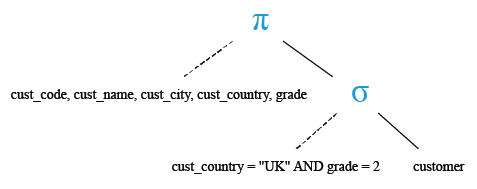
To get data of 'cust_code', 'cust_name', 'cust_city', 'cust_country' and 'grade' from the 'customer' table with following conditions -
1. 'cust_country' must be ’UK’,
2. and 'grade' of the 'customer' must be 2,
the following SQL statement can be used :
SQL Code:
SELECT cust_code, cust_name, cust_city, cust_country, grade
-- Selecting specific columns: cust_code, cust_name, cust_city, cust_country, and grade
FROM customer
-- From the table named "customer"
WHERE cust_country = 'UK' AND grade = 2;
-- Where the value in the column "cust_country" is 'UK' AND the value in the column "grade" is 2
Explanation:
- SELECT cust_code, cust_name, cust_city, cust_country, grade: This specifies that we want to retrieve specific columns (cust_code, cust_name, cust_city, cust_country, and grade) from the table.
- FROM customer: This indicates the table from which we want to retrieve the data. In this case, the table is named "customer".
- WHERE cust_country = 'UK' AND grade = 2: This is a conditional clause that filters the rows returned by the query. It specifies that only rows where the value in the "cust_country" column is 'UK' and the value in the "grade" column is 2 should be included in the result set.
Output:
CUST_CODE CUST_NAME            CUST_CITY                           CUST_COUNTRY           GRADE
--------- -------------------- ----------------------------------- -------------------- ----------
C00013    Holmes               London                              UK                    2
C00024    Cook                 London                              UK                    2
Relational Algebra Expression:

Relational Algebra Tree:
SQL Logical OR operator
Logical OR compares two Booleans as expression and returns TRUE when either of the conditions is TRUE and returns FALSE when both are FALSE. otherwise, returns UNKNOWN (an operator that has one or two NULL expressions returns UNKNOWN).
Example:
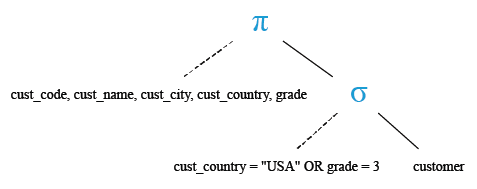
To get data of 'cust_code', 'cust_name', 'cust_city', 'cust_country' and 'grade' from the 'customer' with following conditions -
1. either 'cust_country' is ’USA’,
2. or 'grade' of the 'customer' is 3,
the following SQL statement can be used :
SQL Code:
SELECT cust_code, cust_name, cust_city, cust_country, grade
-- Selecting specific columns: cust_code, cust_name, cust_city, cust_country, and grade
FROM customer
-- From the table named "customer"
WHERE cust_country = 'USA' OR grade = 3;
-- Where the value in the column "cust_country" is 'USA' OR the value in the column "grade" is 3
Explanation:
- SELECT cust_code, cust_name, cust_city, cust_country, grade: This specifies that we want to retrieve specific columns (cust_code, cust_name, cust_city, cust_country, and grade) from the table.
- FROM customer: This indicates the table from which we want to retrieve the data. In this case, the table is named "customer".
- WHERE cust_country = 'USA' OR grade = 3: This is a conditional clause that filters the rows returned by the query. It specifies that rows where the value in the "cust_country" column is 'USA' or the value in the "grade" column is 3 should be included in the result set.
Output:
CUST_CODE       CUST_NAME          CUST_CITY                           CUST_COUNTRY              GRADE
--------------- ----------------- ----------------------------------- -------------------- ----------
C00001          Micheal            New York                            USA                   2
C00020          Albert             New York                            USA                   3
C00002          Bolt               New York                            USA                   3
C00010          Charles            Hampshair                           UK                    3
C00012          Steven             San Jose                            USA                   1
C00009          Ramesh             Mumbai                              India                 3
C00011          Sundariya          Chennai                             India                 3
Relational Algebra Expression:

Relational Algebra Tree:
SQL Logical NOT operator
Logical NOT takes a single Boolean as an argument and changes its value from false to true or from true to false.
Example:
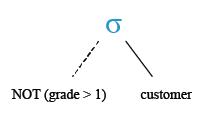
To get all columns from the 'customer' table with following condition -
1. grade for the customer not greater than 1,
the following SQL statement can be used :
SQL Code:
-- Selecting all columns (*)
FROM customer
-- From the table named "customer"
WHERE NOT grade > 1;
-- Where the value in the column "grade" is NOT greater than 1
Explanation:
- SELECT *: This specifies that we want to retrieve all columns from the table.
- FROM customer: This indicates the table from which we want to retrieve the data. In this case, the table is named "customer".
- WHERE NOT grade > 1: This is a conditional clause that filters the rows returned by the query. It specifies that rows where the value in the "grade" column is NOT greater than 1 should be included in the result set.
Output:
CUST_CODE       CUST_NAME       CUST_CITY       WORKING_AREA   CUST_COUNTRY         GRADE
--------------- --------------- --------------- -------------- -------------------- ---------- ---------
C00015          Stuart          London          London         UK                    1        .....
C00021          Jacks           Brisban         Brisban        Australia             1        ....
C00019          Yearannaidu     Chennai         Chennai        India                 1       .....
C00005          Sasikant        Mumbai          Mumbai         India                 1       .....
C00007          Ramanathan      Chennai         Chennai        India                 1        .....
C00004          Winston         Brisban         Brisban        Australia             1        .....
C00023          Karl            London          London         UK                    0        .....
C00006          Shilton         Torento         Torento        Canada                1       .....
C00012          Steven          San Jose        San Jose       USA                   1        .....
C00008          Karolina        Torento         Torento        Canada                1        .....
Relational Algebra Expression:

Relational Algebra Tree:
SQL Logical multiple AND operator
In the following topics, we are discussing the usage of multiple AND operator.
In the following example, more than one 'AND' operators along with the SQL SELECT STATEMENT is used.
Example:
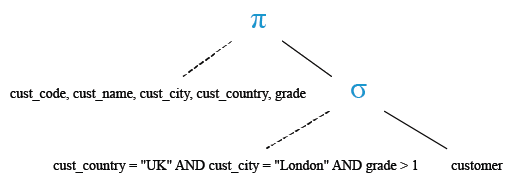
To get data of 'cust_code', 'cust_name', 'cust_city', 'cust_country' and 'grade' from the 'customer' table with following conditions -
1.'cust_country' is ’UK',
2.and 'cust_city' is 'London',
3.and 'grade' of the 'customer' must be greater than 1,
the following SQL statement can be used :
SQL Code:
SELECT cust_code, cust_name, cust_city, cust_country, grade
-- Selecting specific columns: cust_code, cust_name, cust_city, cust_country, and grade
FROM customer
-- From the table named "customer"
WHERE cust_country = 'UK'
-- Where the value in the column "cust_country" is 'UK'
AND cust_city = 'London'
-- And the value in the column "cust_city" is 'London'
AND grade > 1;
-- And the value in the column "grade" is greater than 1
Explanation:
- SELECT cust_code, cust_name, cust_city, cust_country, grade: This specifies that we want to retrieve specific columns (cust_code, cust_name, cust_city, cust_country, and grade) from the table.
- FROM customer: This indicates the table from which we want to retrieve the data. In this case, the table is named "customer".
- WHERE cust_country = 'UK' AND cust_city = 'London' AND grade > 1: This is a conditional clause that filters the rows returned by the query. It specifies that only rows where the value in the "cust_country" column is 'UK', the value in the "cust_city" column is 'London', and the value in the "grade" column is greater than 1 should be included in the result set.
Output:
CUST_CODE       CUST_NAME       CUST_CITY       CUST_COUNTRY              GRADE
--------------- --------------- --------------- -------------------- ----------
C00013          Holmes          London          UK                            2
C00024          Cook            London          UK                            2
Relational Algebra Expression:

Relational Algebra Tree:
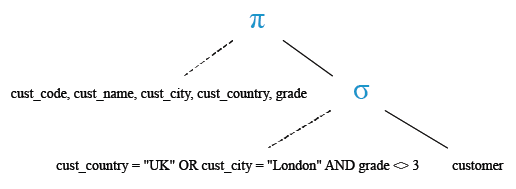
SQL Logical AND OR comparison operator
In the following topic, we are discussing the usage of 'AND' and 'OR' operator.
Using AND OR comparison operator with the select statement an example have shown.
Example:
To get data of 'cust_code', 'cust_name', 'cust_city', 'cust_country' and 'grade' from the 'customer' table with following conditions -
1. 'cust_country' is ’UK’ or cust_city is 'London' ,
2. and 'grade' of the 'customer' must be other than 3 ,
the following SQL statement can be used :
SQL Code:
SELECT cust_code, cust_name, cust_city, cust_country, grade
-- Selecting specific columns: cust_code, cust_name, cust_city, cust_country, and grade
FROM customer
-- From the table named "customer"
WHERE (cust_country = 'UK' OR cust_city = 'London')
-- Where the value in the column "cust_country" is 'UK' OR the value in the column "cust_city" is 'London'
AND grade <> 3;
-- And the value in the column "grade" is not equal to 3
Explanation:
- SELECT cust_code, cust_name, cust_city, cust_country, grade: This specifies that we want to retrieve specific columns (cust_code, cust_name, cust_city, cust_country, and grade) from the table.
- FROM customer: This indicates the table from which we want to retrieve the data. In this case, the table is named "customer".
- WHERE (cust_country = 'UK' OR cust_city = 'London') AND grade <> 3: This is a conditional clause that filters the rows returned by the query. It specifies that only rows where either the value in the "cust_country" column is 'UK' or the value in the "cust_city" column is 'London', and the value in the "grade" column is not equal to 3 should be included in the result set.
Output:
CUST_CODE       CUST_NAME       CUST_CITY       CUST_COUNTRY              GRADE
--------------- --------------- --------------- -------------------- ----------
C00013          Holmes          London          UK                            2
C00024          Cook            London          UK                            2
C00015          Stuart          London          UK                            1
C00023          Karl            London          UK                            0
Relational Algebra Expression:

Relational Algebra Tree:
SQL Logical NOT AND operator
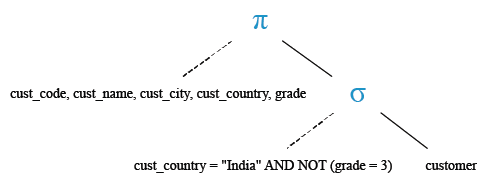
In the following example, NOT, AND operator along with the SQL SELECT STATEMENT have used.
Example:
To get data of 'cust_code', 'cust_name', 'cust_city', 'cust_country' and 'grade' from the 'customer' table with following conditions -
1. 'cust_country' must be 'India',
2. and 'grade' of the 'customer' must be other than 3,
the following SQL statement can be used :
SQL Code:
SELECT cust_code, cust_name, cust_city, cust_country, grade
-- Selecting specific columns: cust_code, cust_name, cust_city, cust_country, and grade
FROM customer
-- From the table named "customer"
WHERE cust_country = 'India'
-- Where the value in the column "cust_country" is 'India'
AND NOT grade = 3;
-- And the value in the column "grade" is not equal to 3
Explanation:
- SELECT cust_code, cust_name, cust_city, cust_country, grade: This specifies that we want to retrieve specific columns (cust_code, cust_name, cust_city, cust_country, and grade) from the table.
- FROM customer: This indicates the table from which we want to retrieve the data. In this case, the table is named "customer".
- WHERE cust_country = 'India' AND NOT grade = 3: This is a conditional clause that filters the rows returned by the query. It specifies that only rows where the value in the "cust_country" column is 'India' and the value in the "grade" column is not equal to 3 should be included in the result set.
Output:
CUST_CODE       CUST_NAME       CUST_CITY       CUST_COUNTRY              GRADE
--------------- --------------- --------------- -------------------- ----------
C00025          Ravindran       Bangalore       India                         2
C00017          Srinivas        Bangalore       India                         2
C00014          Rangarappa      Bangalore       India                         2
C00016          Venkatpati      Bangalore       India                         2
C00019          Yearannaidu     Chennai         India                         1
C00007          Ramanathan      Chennai         India                         1
C00005          Sasikant        Mumbai          India                         1
C00022          Avinash         Mumbai          India                         2
Relational Algebra Expression:

Relational Algebra Tree:
SQL Logical NOT AND comparison operator
In the following example, we are going to discuss the usage of NOT and AND comparison operator along with the SQL SELECT STATEMENT.
Example:
To get data of 'cust_code', 'cust_name', 'cust_city', 'cust_country' and 'grade' from the 'customer' table with following conditions -
1.'cust_country' is other than 'India',
2.and 'grade' of the 'customer' must be 3,
the following SQL statement can be used :
SQL Code:
SELECT cust_code, cust_name, cust_city, cust_country, grade
-- Selecting specific columns: cust_code, cust_name, cust_city, cust_country, and grade
FROM customer
-- From the table named "customer"
WHERE NOT cust_country = 'India' AND grade = 3;
-- Where the value in the column "cust_country" is NOT 'India' AND the value in the column "grade" is 3
Explanation:
- SELECT cust_code, cust_name, cust_city, cust_country, grade: This specifies that we want to retrieve specific columns (cust_code, cust_name, cust_city, cust_country, and grade) from the table.
- FROM customer: This indicates the table from which we want to retrieve the data. In this case, the table is named "customer".
- WHERE NOT cust_country = 'India' AND grade = 3: This is a conditional clause that filters the rows returned by the query. It specifies that only rows where the value in the "cust_country" column is NOT 'India' and the value in the "grade" column is 3 should be included in the result set.
Output:
CUST_CODE       CUST_NAME       CUST_CITY       CUST_COUNTRY              GRADE
--------------- --------------- --------------- -------------------- ----------
C00020          Albert          New York        USA                           3
C00002          Bolt            New York        USA                           3
C00010          Charles         Hampshair       UK                            3
Relational Algebra Expression:

Relational Algebra Tree:
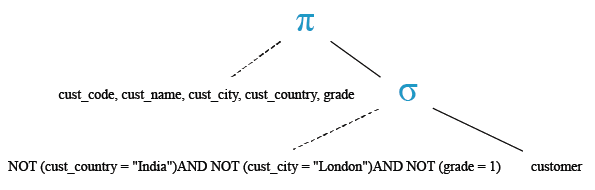
SQL Logical multiple NOT operator
In the following topics, we are discussing the usage of multiple NOT operator.
In the following example, more than one NOT operators with the SQL SELECT STATEMENT have used.
Example:
To get data of 'cust_code', 'cust_name', 'cust_city', 'cust_country' and 'grade' from the 'customer' table with following conditions -
1. 'cust_country' is other than 'India',
2. and 'cust_city' must be other than 'London',
3. and 'grade' of the 'customer' must be other than 1,
the following SQL statement can be used :
SQL Code:
SELECT cust_code, cust_name, cust_city, cust_country, grade
-- Selecting specific columns: cust_code, cust_name, cust_city, cust_country, and grade
FROM customer
-- From the table named "customer"
WHERE NOT cust_country = 'India'
-- Where the value in the column "cust_country" is NOT 'India'
AND NOT cust_city = 'London'
-- And the value in the column "cust_city" is NOT 'London'
AND NOT grade = 1;
-- And the value in the column "grade" is NOT 1
Explanation:
- SELECT cust_code, cust_name, cust_city, cust_country, grade: This specifies that we want to retrieve specific columns (cust_code, cust_name, cust_city, cust_country, and grade) from the table.
- FROM customer: This indicates the table from which we want to retrieve the data. In this case, the table is named "customer".
- WHERE NOT cust_country = 'India': This is a conditional clause that filters the rows returned by the query. It specifies that only rows where the value in the "cust_country" column is NOT 'India' should be included in the result set.
- AND NOT cust_city = 'London': This further narrows down the results by excluding rows where the value in the "cust_city" column is NOT 'London'.
- AND NOT grade = 1: This adds another condition to the query, ensuring that rows where the value in the "grade" column is NOT 1 are also included.
Output:
CUST_CODE       CUST_NAME       CUST_CITY       CUST_COUNTRY              GRADE
--------------- --------------- --------------- -------------------- ----------
C00001          Micheal         New York        USA                           2
C00020          Albert          New York        USA                           3
C00002          Bolt            New York        USA                           3
C00018          Fleming         Brisban         Australia                     2
C00010          Charles         Hampshair       UK                            3
C00003          Martin          Torento         Canada                        2
Relational Algebra Expression:

Relational Algebra Tree:
SQL Logical multiple NOT with equal to (=) operator
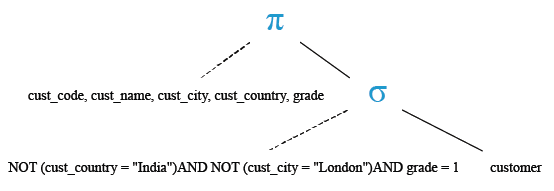
In the following topic, we are discussing the usage of multiple NOT operator with EQUAL TO operator.
In the following example, more than one Not operators and comparison operator equal to ( = ) with the SQL SELECT STATEMENT have used.
Example:
To get data of 'cust_code', 'cust_name', 'cust_city', 'cust_country' and 'grade' from the 'customer' table with following conditions -
1. 'cust_country' is other than 'India',
2. and 'cust_city' must be other than 'London',
3. and 'grade' of the 'customer' must be 1 ,
the following SQL statement can be used :
SQL Code:
SELECT cust_code, cust_name, cust_city, cust_country, grade
-- Selecting specific columns: cust_code, cust_name, cust_city, cust_country, and grade
FROM customer
-- From the table named "customer"
WHERE NOT cust_country = 'India'
-- Where the value in the column "cust_country" is NOT 'India'
AND NOT cust_city = 'London'
-- And the value in the column "cust_city" is NOT 'London'
AND grade = 1;
-- And the value in the column "grade" is 1
Explanation:
- SELECT cust_code, cust_name, cust_city, cust_country, grade: This specifies that we want to retrieve specific columns (cust_code, cust_name, cust_city, cust_country, and grade) from the table.
- FROM customer: This indicates the table from which we want to retrieve the data. In this case, the table is named "customer".
- WHERE NOT cust_country = 'India': This is a conditional clause that filters the rows returned by the query. It specifies that only rows where the value in the "cust_country" column is NOT 'India' should be included in the result set.
- AND NOT cust_city = 'London': This further narrows down the results by excluding rows where the value in the "cust_city" column is NOT 'London'.
- AND grade = 1: This adds another condition to the query, ensuring that rows where the value in the "grade" column is 1 are also included.
Output:
CUST_CODE       CUST_NAME       CUST_CITY       CUST_COUNTRY              GRADE
--------------- --------------- --------------- -------------------- ----------
C00021          Jacks           Brisban         Australia                     1
C00004          Winston         Brisban         Australia                     1
C00006          Shilton         Torento         Canada                        1
C00012          Steven          San Jose        USA                           1
C00008          Karolina        Torento         Canada                        1
Relational Algebra Expression:

Relational Algebra Tree:
SQL Logical multiple NOT with not equal to operator
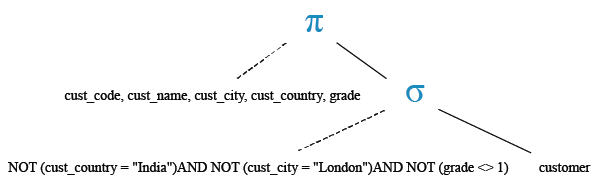
In the following topic, we are discussing the usage of multiple NOT operator with NOT EQUAL TO operator.
In the following example, 'NOT' operator and comparison operator 'not equal to' ( < > ) along with the SQL SELECT STATEMENT have used.
Example:
To get data of 'cust_code', 'cust_name', 'cust_city', 'cust_country' and 'grade' from the 'customer' table with following conditions -
1. 'cust_country' is other than 'India',S
2. and 'cust_city' must be other than 'London' ,
3. and 'grade' of the 'customer' must be not equal to other than 1,
the following SQL statement can be used :
SQL Code:
SELECT cust_code, cust_name, cust_city, cust_country, grade
-- Selecting specific columns: cust_code, cust_name, cust_city, cust_country, and grade
FROM customer
-- From the table named "customer"
WHERE NOT cust_country = 'India'
-- Where the value in the column "cust_country" is NOT 'India'
AND NOT cust_city = 'London'
-- And the value in the column "cust_city" is NOT 'London'
AND NOT grade <> 1;
-- And the value in the column "grade" is NOT NOT equal to 1
Explanation:
- SELECT cust_code, cust_name, cust_city, cust_country, grade: This specifies that we want to retrieve specific columns (cust_code, cust_name, cust_city, cust_country, and grade) from the table.
- FROM customer: This indicates the table from which we want to retrieve the data. In this case, the table is named "customer".
- WHERE NOT cust_country = 'India': This is a conditional clause that filters the rows returned by the query. It specifies that only rows where the value in the "cust_country" column is NOT 'India' should be included in the result set.
- AND NOT cust_city = 'London': This further narrows down the results by excluding rows where the value in the "cust_city" column is NOT 'London'.
- AND NOT grade <> 1: This condition seems to be incorrectly formulated. NOT grade <> 1 essentially means "grade is not not equal to 1," which is equivalent to "grade is equal to 1." So, this part of the query contradicts the intended logic of selecting only rows where the grade is not equal to 1.
Output:
CUST_CODE       CUST_NAME       CUST_CITY       CUST_COUNTRY              GRADE
--------------- --------------- --------------- -------------------- ----------
C00021          Jacks           Brisban         Australia                     1
C00004          Winston         Brisban         Australia                     1
C00006          Shilton         Torento         Canada                        1
C00012          Steven          San Jose        USA                           1
C00008          Karolina        Torento         Canada                        1
Relational Algebra Expression:

Relational Algebra Tree:
SQL Logical NOT AND OR operator
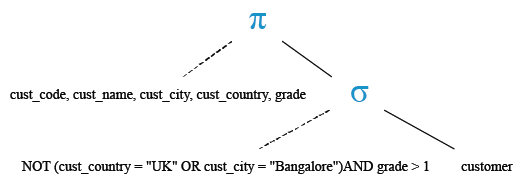
In the example 'NOT' 'AND' 'OR' operator along with the SQL SELECT STATEMENT have used.
Example - 1:
To get data of 'cust_code', 'cust_name', ' cust_city', 'cust_country' and 'grade' from the 'customer' table with following conditions -
1. 'cust_country' is not other than 'UK',
2. or 'cust_city' must be other than 'Bangalore' ,
3. and 'grade' of the 'customer' must be greater than 1,
the following SQL statement can be used :
SQL Code:
SELECT cust_code, cust_name, cust_city, cust_country, grade
-- Selecting specific columns: cust_code, cust_name, cust_city, cust_country, and grade
FROM customer
-- From the table named "customer"
WHERE NOT (cust_country = 'UK' OR cust_city = 'Bangalore')
-- Where the value in the column "cust_country" is NOT 'UK' OR the value in the column "cust_city" is NOT 'Bangalore'
AND grade > 1;
-- And the value in the column "grade" is greater than 1
Explanation:
- SELECT cust_code, cust_name, cust_city, cust_country, grade: This specifies that we want to retrieve specific columns (cust_code, cust_name, cust_city, cust_country, and grade) from the table.
- FROM customer: This indicates the table from which we want to retrieve the data. In this case, the table is named "customer".
- WHERE NOT (cust_country = 'UK' OR cust_city = 'Bangalore'): This is a conditional clause that filters the rows returned by the query. It specifies that only rows where the value in the "cust_country" column is NOT 'UK' or the value in the "cust_city" column is NOT 'Bangalore' should be included in the result set.
- AND grade > 1: This further narrows down the results by including only rows where the value in the "grade" column is greater than 1.
Output:
CUST_CODE       CUST_NAME       CUST_CITY       CUST_COUNTRY              GRADE
--------------- --------------- --------------- -------------------- ----------
C00001          Micheal         New York        USA                           2
C00020          Albert          New York        USA                           3
C00002          Bolt            New York        USA                           3
C00018          Fleming         Brisban         Australia                     2
C00022          Avinash         Mumbai          India                         2
C00003          Martin          Torento         Canada                        2
C00009          Ramesh          Mumbai          India                         3
C00011          Sundariya       Chennai         India                         3
Relational Algebra Expression:

Relational Algebra Tree:
Example - 2:
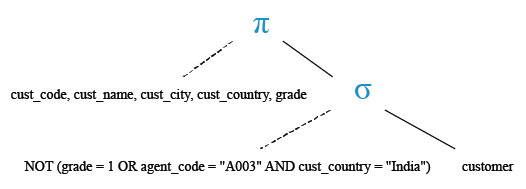
To get data data of all 'cust_code', 'cust_name', 'cust_city', 'cust_country' and 'grade' from the 'customer' table with following conditions -
1. grade is 1 or 'agent_code' is A003 will not come,
2. and 'cust_country' is 'India' will not come,
here is the SQL statement can be used :
SQL Code:
SELECT cust_code, cust_name, cust_city, cust_country, grade
-- Selecting specific columns: cust_code, cust_name, cust_city, cust_country, and grade
FROM customer
-- From the table named "customer"
WHERE NOT((grade = 1 OR agent_code = 'A003')
-- Where the value in the column "grade" is equal to 1 OR the value in the column "agent_code" is equal to 'A003'
AND cust_country = 'India');
-- And the value in the column "cust_country" is 'India'
Explanation:
- SELECT cust_code, cust_name, cust_city, cust_country, grade: This specifies that we want to retrieve specific columns (cust_code, cust_name, cust_city, cust_country, and grade) from the table.
- FROM customer: This indicates the table from which we want to retrieve the data. In this case, the table is named "customer".
- WHERE NOT((grade = 1 OR agent_code = 'A003') AND cust_country = 'India'): This is a conditional clause that filters the rows returned by the query. It specifies that only rows where the value in the "grade" column is not equal to 1 or the value in the "agent_code" column is not equal to 'A003' and the value in the "cust_country" column is not 'India' should be included in the result set.
Output:
CUST_CODE       CUST_NAME       CUST_CITY       CUST_COUNTRY              GRADE
--------------- --------------- --------------- -------------------- ----------
C00013          Holmes          London          UK                            2
C00001          Micheal         New York        USA                           2
C00020          Albert          New York        USA                           3
C00025          Ravindran       Bangalore       India                         2
C00024          Cook            London          UK                            2
C00015          Stuart          London          UK                            1
C00002          Bolt            New York        USA                           3
C00018          Fleming         Brisban         Australia                     2
C00021          Jacks           Brisban         Australia                     1
C00022          Avinash         Mumbai          India                         2
C00004          Winston         Brisban         Australia                     1
C00023          Karl            London          UK                            0
C00006          Shilton         Torento         Canada                        1
C00010          Charles         Hampshair       UK                            3
C00017          Srinivas        Bangalore       India                         2
C00012          Steven          San Jose        USA                           1
C00008          Karolina        Torento         Canada                        1
C00003          Martin          Torento         Canada                        2
C00009          Ramesh          Mumbai          India                         3
C00014          Rangarappa      Bangalore       India                         2
C00016          Venkatpati      Bangalore       India                         2
C00011          Sundariya       Chennai         India                         3
Relational Algebra Expression:

Relational Algebra Tree:
SQL Logical AND NOT OR with EQUAL TO ( = ) operator
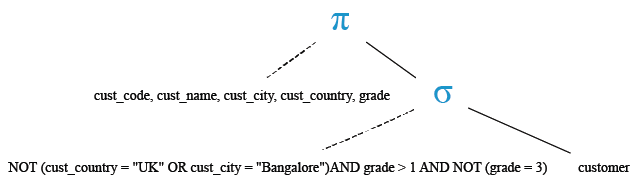
In the following topic, we are discussing the usage of logical AND, NOT, OR and comparison operator EQUAL TO (=) in a select statement.
Example:
To get data of 'cust_code', 'cust_name', 'cust_city', 'cust_country' and 'grade' from the 'customer' table with following conditions -
1. 'cust_country' is not other than 'UK' ,
2. or 'cust_city' must be not other than 'Bangalore' ,
3. and 'grade' of the 'customer' must be greater than 1 and other than 3,
the following SQL statement can be used :
SQL Code:
SELECT cust_code, cust_name, cust_city, cust_country, grade
-- Selecting specific columns: cust_code, cust_name, cust_city, cust_country, and grade
FROM customer
-- From the table named "customer"
WHERE NOT (cust_country = 'UK' OR cust_city = 'Bangalore')
-- Where the value in the column "cust_country" is NOT 'UK' AND the value in the column "cust_city" is NOT 'Bangalore'
AND grade > 1
-- And the value in the column "grade" is greater than 1
AND NOT grade = 3;
-- And the value in the column "grade" is NOT 3
Explanation:
- SELECT cust_code, cust_name, cust_city, cust_country, grade: This specifies that we want to retrieve specific columns (cust_code, cust_name, cust_city, cust_country, and grade) from the table.
- FROM customer: This indicates the table from which we want to retrieve the data. In this case, the table is named "customer".
- WHERE NOT (cust_country = 'UK' OR cust_city = 'Bangalore'): This is a conditional clause that filters the rows returned by the query. It specifies that only rows where the value in the "cust_country" column is NOT 'UK' and the value in the "cust_city" column is NOT 'Bangalore' should be included in the result set.
- AND grade > 1: This further narrows down the results by including only rows where the value in the "grade" column is greater than 1.
- AND NOT grade = 3: This adds another condition to the query, ensuring that rows where the value in the "grade" column is NOT 3 are also included.
Output:
CUST_CODE       CUST_NAME       CUST_CITY       CUST_COUNTRY              GRADE
--------------- --------------- --------------- -------------------- ----------
C00001          Micheal         New York        USA                           2
C00018          Fleming         Brisban         Australia                     2
C00022          Avinash         Mumbai          India                         2
C00003          Martin          Torento         Canada                        2
Relational Algebra Expression:

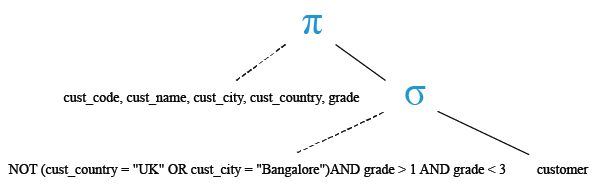
Relational Algebra Tree:
SQL Logical AND NOT OR with LESS THAN, GREATER THAN operator
In the following topic, we are discussing the usage of logical AND NOT OR with LESS THAN (< ) GREATER THAN (>) operator.
Example:
To get data of 'cust_code', 'cust_name', 'cust_city', 'cust_country' and 'grade' from the 'customer' table with following conditions -
1. 'cust_country' is not other than 'UK',
2. or 'cust_city' must be not other than 'Bangalore',
3. and 'grade' of the customer must be within the range 1 to 3,
the following SQL statement can be used :
SQL Code:
SELECT cust_code, cust_name, cust_city, cust_country, grade
-- Selecting specific columns: cust_code, cust_name, cust_city, cust_country, and grade
FROM customer
-- From the table named "customer"
WHERE NOT (cust_country = 'UK' OR cust_city = 'Bangalore')
-- Where the value in the column "cust_country" is NOT 'UK' AND the value in the column "cust_city" is NOT 'Bangalore'
AND grade > 1
-- And the value in the column "grade" is greater than 1
AND grade < 3;
-- And the value in the column "grade" is less than 3
Explanation:
- SELECT cust_code, cust_name, cust_city, cust_country, grade: This specifies that we want to retrieve specific columns (cust_code, cust_name, cust_city, cust_country, and grade) from the table.
- FROM customer: This indicates the table from which we want to retrieve the data. In this case, the table is named "customer".
- WHERE NOT (cust_country = 'UK' OR cust_city = 'Bangalore'): This is a conditional clause that filters the rows returned by the query. It specifies that only rows where the value in the "cust_country" column is NOT 'UK' and the value in the "cust_city" column is NOT 'Bangalore' should be included in the result set.
- AND grade > 1: This further narrows down the results by including only rows where the value in the "grade" column is greater than 1.
- AND grade < 3: This adds another condition to the query, ensuring that rows where the value in the "grade" column is less than 3 are also included.
Output:
CUST_CODE  CUST_NAME         CUST_CITY           CUST_COUNTRY      GRADE
---------- ----------------- ------------------ ---------------- ------------
C00001     Micheal           New York            USA                   2
C00018     Fleming           Brisban             Australia             2
C00022     Avinash           Mumbai              India                 2
C00003     Martin            Torento             Canada                2
Relational Algebra Expression:

Relational Algebra Tree:
SQL Logical AND OR NOT with date value
In the following topic, we are discussing the usage of three operators 'AND', 'OR' and 'NOT' with date value.
Using AND , OR, NOT and comparison operator with the select statement an example have shown
Example - 1:
Sample table: orders
   ORD_NUM ORD_AMOUNT ADVANCE_AMOUNT ORD_DATE  CUST_CODE       AGENT_CODE      ORD_DESCRIPTION
---------- ---------- -------------- --------- --------------- --------------- -----------------
    200114       3500           2000 15-AUG-08 C00002          A008
    200122       2500            400 16-SEP-08 C00003          A004
    200118        500            100 20-JUL-08 C00023          A006
    200119       4000            700 16-SEP-08 C00007          A010
    200121       1500            600 23-SEP-08 C00008          A004
    200130       2500            400 30-JUL-08 C00025          A011
    200134       4200           1800 25-SEP-08 C00004          A005
    200108       4000            600 15-FEB-08 C00008          A004
    200103       1500            700 15-MAY-08 C00021          A005
    200105       2500            500 18-JUL-08 C00025          A011
    200109       3500            800 30-JUL-08 C00011          A010
    200101       3000           1000 15-JUL-08 C00001          A008
    200111       1000            300 10-JUL-08 C00020          A008
    200104       1500            500 13-MAR-08 C00006          A004
    200106       2500            700 20-APR-08 C00005          A002
    200125       2000            600 10-OCT-08 C00018          A005
    200117        800            200 20-OCT-08 C00014          A001
    200123        500            100 16-SEP-08 C00022          A002
    200120        500            100 20-JUL-08 C00009          A002
    200116        500            100 13-JUL-08 C00010          A009
    200124        500            100 20-JUN-08 C00017          A007
    200126        500            100 24-JUN-08 C00022          A002
    200129       2500            500 20-JUL-08 C00024          A006
    200127       2500            400 20-JUL-08 C00015          A003
    200128       3500           1500 20-JUL-08 C00009          A002
    200135       2000            800 16-SEP-08 C00007          A010
    200131        900            150 26-AUG-08 C00012          A012
    200133       1200            400 29-JUN-08 C00009          A002
    200100       1000            600 08-JAN-08 C00015          A003
    200110       3000            500 15-APR-08 C00019          A010
    200107       4500            900 30-AUG-08 C00007          A010
    200112       2000            400 30-MAY-08 C00016          A007
    200113       4000            600 10-JUN-08 C00022          A002
    200102       2000            300 25-MAY-08 C00012          A012
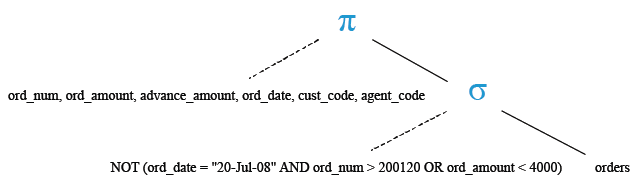
To get data of 'ord_num', 'ord_amount', 'advance_amount', 'ord_date', 'cust_code', 'agent_code' from the 'orders' table with following conditions -
1. combination of 'ord_date' is '20-Jul-08' and 'ord_num' is greater than 200120 will not appear,
2. or 'ord_amount' must be greater than or equal to 4000,
the following SQL statement can be used :
SQL Code:
SELECT ord_num, ord_amount, advance_amount, ord_date, cust_code, agent_code
-- Selecting specific columns: ord_num, ord_amount, advance_amount, ord_date, cust_code, and agent_code
FROM orders
-- From the table named "orders"
WHERE NOT ((ord_date = '20-Jul-08' AND ord_num > 200120)
-- Where the value in the column "ord_date" is '20-Jul-08' AND the value in the column "ord_num" is greater than 200120
OR ord_amount < 4000);
-- OR the value in the column "ord_amount" is less than 4000
Explanation:
- SELECT ord_num, ord_amount, advance_amount, ord_date, cust_code, agent_code: This specifies that we want to retrieve specific columns (ord_num, ord_amount, advance_amount, ord_date, cust_code, and agent_code) from the table.
- FROM orders: This indicates the table from which we want to retrieve the data. In this case, the table is named "orders".
- WHERE NOT ((ord_date = '20-Jul-08' AND ord_num > 200120) OR ord_amount < 4000): This is a conditional clause that filters the rows returned by the query. It specifies that only rows where the value in the "ord_date" column is not '20-Jul-08' and the value in the "ord_num" column is not greater than 200120 or the value in the "ord_amount" column is not less than 4000 should be included in the result set.
Output:
   ORD_NUM ORD_AMOUNT ADVANCE_AMOUNT ORD_DATE  CUST_CODE  AGENT_CODE
---------- ---------- -------------- --------- ---------- ----------
    200119       4000            700 16-SEP-08 C00007     A010
    200134       4200           1800 25-SEP-08 C00004     A005
    200108       4000            600 15-FEB-08 C00008     A004
    200107       4500            900 30-AUG-08 C00007     A010
    200113       4000            600 10-JUN-08 C00022     A002
Relational Algebra Expression:

Relational Algebra Tree:
Example - 2:
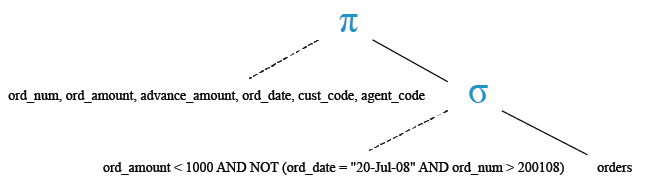
To retrieve data of 'ord_num', 'ord_amount', 'advance_amount', 'ord_date', 'cust_code', and 'agent_code' from the 'orders' table with the following conditions:
1. 'ord_amount' must be below 1000,
2. The combination where 'ord_date' is '20-Jul-08' and 'ord_num' is greater than 200108 will not appear,
the following SQL statement can be used :
SQL Code:
SELECT ord_num, ord_amount, advance_amount, ord_date, cust_code, agent_code
-- Selecting specific columns: ord_num, ord_amount, advance_amount, ord_date, cust_code, and agent_code
FROM orders
-- From the table named "orders"
WHERE (ord_amount < 1000 AND NOT (ord_date = '20-Jul-08' AND ord_num > 200108));
-- Where the value in the column "ord_amount" is less than 1000
-- AND NOT ((the value in the column "ord_date" is '20-Jul-08' AND the value in the column "ord_num" is greater than 200108))
Explanation:
- SELECT ord_num, ord_amount, advance_amount, ord_date, cust_code, agent_code: This specifies that we want to retrieve specific columns (ord_num, ord_amount, advance_amount, ord_date, cust_code, and agent_code) from the table.
- FROM orders: This indicates the table from which we want to retrieve the data. In this case, the table is named "orders".
- WHERE (ord_amount < 1000 AND NOT (ord_date = '20-Jul-08' AND ord_num > 200108)): This is a conditional clause that filters the rows returned by the query. It specifies that only rows where the value in the "ord_amount" column is less than 1000 and where the value in the "ord_date" column is not '20-Jul-08' or the value in the "ord_num" column is not greater than 200108 should be included in the result set.
Output:
ORD_NUM    ORD_AMOUNT ADVANCE_AMOUNT ORD_DATE  CUST_CODE  AGENT_CODE
---------- ---------- -------------- --------- ---------- ----------
    200117        800            200 20-OCT-08 C00014     A001
    200123        500            100 16-SEP-08 C00022     A002
    200116        500            100 13-JUL-08 C00010     A009
    200124        500            100 20-JUN-08 C00017     A007
    200126        500            100 24-JUN-08 C00022     A002
    200131        900            150 26-AUG-08 C00012     A012
Relational Algebra Expression:

Relational Algebra Tree:
Check out our 1000+ SQL Exercises with solution and explanation to improve your skills.
- Weekly Trends and Language Statistics
- Weekly Trends and Language Statistics