MySQL TIMESTAMPDIFF() function
TIMESTAMPDIFF() function
MySQL the TIMESTAMPDIFF() returns a value after subtracting a datetime expression from another.
It is not necessary that both the expression are of the same type. One may be a date and another is datetime. A date value is treated as a datetime with a default time part '00:00:00'. The unit for the result is given by another argument.
The unit should be one of the following : FRAC_SECOND (microseconds), SECOND, MINUTE, HOUR, DAY, WEEK, MONTH, QUARTER, or YEAR.
This function is useful in -
- TIMESTAMPDIFF() is essential for time-based analysis by enabling you to measure the duration between events or actions.
- It's useful for calculating ages or durations, such as the age of a person based on their birthdate.
- TIMESTAMPDIFF() is used in time series analysis to calculate the time intervals between data points.
- The function is valuable for filtering records or data based on time criteria, such as selecting records within a specific time range.
- TIMESTAMPDIFF() supports the analysis of historical data by providing precise measurements of time intervals.
- It provides a precise measurement of the time difference between two points in time, allowing for accurate calculations.
- The function allows you to calculate time differences in units other than seconds, such as years, months, or days.
Syntax:
TIMESTAMPDIFF(unit,datetime_expr1,datetime_expr2);
Arguments:
| Name | Description |
|---|---|
| datetime_expr1 | A datetime expression. |
| datetime_expr1 | A datetime expression. |
| unit | An unit, as described in the description. |
Syntax Diagram:

MySQL Version: 8.0
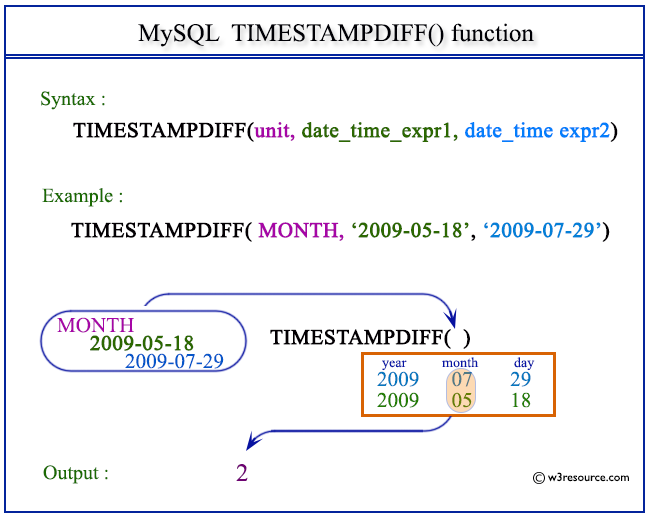
Pictorial Presentation:
Example:
The following statement will return a value in months by subtracting 2009-05-18 from 2009-07-29.
Code:
SELECT TIMESTAMPDIFF(MONTH,'2009-05-18','2009-07-29');
Output:
mysql> SELECT TIMESTAMPDIFF(MONTH,'2009-05-18','2009-07-29');
+------------------------------------------------+
| TIMESTAMPDIFF(MONTH,'2009-05-18','2009-07-29') |
+------------------------------------------------+
|                                              2 |
+------------------------------------------------+
1 row in set (0.00 sec)
Example: TIMESTAMPDIFF() function in MINUTE
The following statement will return a value in minutes after subtracting 2009-05-18 11:45:42 from 2009-05-20 15:16:39.
Code:
SELECT TIMESTAMPDIFF(MINUTE,'2009-05-18 11:45:42','2009-05-20 15:16:39');
Output:
mysql> SELECT TIMESTAMPDIFF(MINUTE,'2009-05-18 11:45:42','2009-05-20 15:16:39');
+-------------------------------------------------------------------+
| TIMESTAMPDIFF(MINUTE,'2009-05-18 11:45:42','2009-05-20 15:16:39') |
+-------------------------------------------------------------------+
|                                                              3090 |
+-------------------------------------------------------------------+
1 row in set (0.00 sec)
Video Presentation:
All Date and Time Functions:
Click here to see the MySQL Date and time functions.
Previous: TIMESTAMPADD()
Next: TO_DAYS()
- Weekly Trends and Language Statistics
- Weekly Trends and Language Statistics