
MySQL STR_TO_DATE() function
STR_TO_DATE() function
MySQL STR_TO_DATE() returns a datetime value by taking a string and a specific format string as arguments. It is particularly useful when dealing with date values stored as strings or when parsing date inputs from users or external sources.
If the date or time or datetime value specified as a string is illegal, the function returns NULL. The format specifiers have been described in DATE_FORMAT() work with this function also.
This function is useful in -
- STR_TO_DATE() allows you to specify the format of the input string, making it versatile for different date formats.
- It is valuable for importing data into MySQL databases when date values are provided in string format.
- STR_TO_DATE() is used in date calculations when you need to work with date values that are provided as strings.
- STR_TO_DATE() can handle date formats from different regions and languages, making it suitable for international applications.
- The function helps transform date strings into a format that can be used for various date-related operations.
- It aids in validating and parsing date strings to ensure they conform to the expected format.
- It is valuable for cleaning and standardizing date data that may be inconsistent or stored in non-standard formats.
Syntax:
STR_TO_DATE(str,format);
Arguments:
| Name | Description |
|---|---|
| str | A string. |
| format | A date format. |
Syntax Diagram:

MySQL Version: 8.0
Pictorial Presentation:
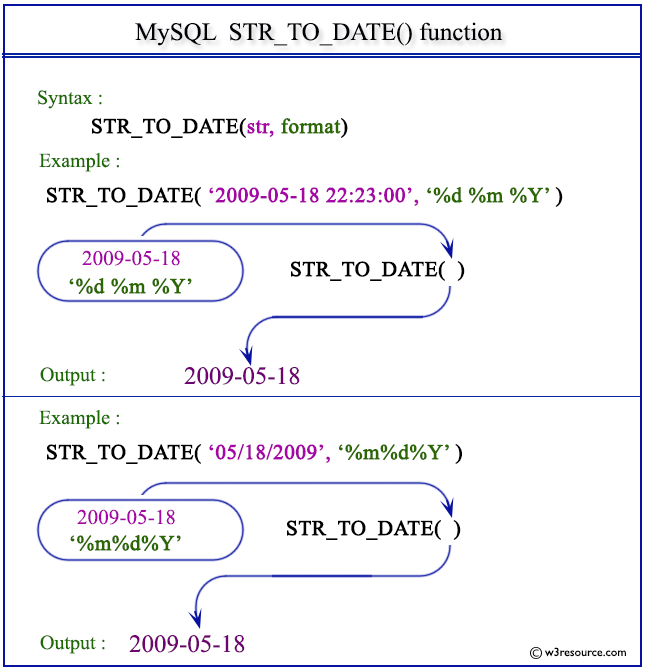
Example: MySQL STR_TO_DATE() function
The following statement will return a valid date from the given string 18,05,2009 according to the format %d,%m,%Y.
Code:
SELECT STR_TO_DATE('18,05,2009','%d,%m,%Y');
Output:
mysql> SELECT STR_TO_DATE('18,05,2009','%d,%m,%Y');
+--------------------------------------+
| STR_TO_DATE('18,05,2009','%d,%m,%Y') |
+--------------------------------------+
| 2009-05-18                           |
+--------------------------------------+
1 row in set (0.00 sec)
Example: STR_TO_DATE() function using %M %d,%Y
The following statement will return a valid date from the given string May 18, 2009 according to the format %M %d,%Y.
Code:
SELECT STR_TO_DATE('May 18, 2009','%M %d,%Y');
Output:
mysql> SELECT STR_TO_DATE('May 18, 2009','%M %d,%Y');
+----------------------------------------+
| STR_TO_DATE('May 18, 2009','%M %d,%Y') |
+----------------------------------------+
| 2009-05-18                             |
+----------------------------------------+
1 row in set (0.00 sec)
Example: STR_TO_DATE() function using (%m/%d/%Y) format
The following statement will return a valid date from the given string 05/18/2009 according to the format %m/%d/%Y.
Code:
SELECT STR_TO_DATE('05/18/2009', '%m/%d/%Y');
Output:
mysql> SELECT STR_TO_DATE('05/18/2009', '%m/%d/%Y');
+---------------------------------------+
| STR_TO_DATE('05/18/2009', '%m/%d/%Y') |
+---------------------------------------+
| 2009-05-18                            |
+---------------------------------------+
1 row in set (0.00 sec)
Example: STR_TO_DATE() function using %h:%i:%s
The following statement will return a valid time from the given string 11:59:59 according to the format %h:%i:%s.
Code:
SELECT STR_TO_DATE('11:59:59','%h:%i:%s');
Output:
mysql> SELECT STR_TO_DATE('11:59:59','%h:%i:%s');
+------------------------------------+
| STR_TO_DATE('11:59:59','%h:%i:%s') |
+------------------------------------+
| 11:59:59                           |
+------------------------------------+
1 row in set (0.00 sec)
The following statement will return NULL because the format specifier %h %i %s (HOUR MINUTE SECOND) is not compatible with the contains of the string 11:59:59 (HOUR:MINUTE:SECOND).
Code:
SELECT STR_TO_DATE('11:59:59','%h %i %s');
Output:
mysql> SELECT STR_TO_DATE('11:59:59','%h %i %s');
+------------------------------------+
| STR_TO_DATE('11:59:59','%h %i %s') |
+------------------------------------+
| NULL                               |
+------------------------------------+
1 row in set, 1 warning (0.02 sec)
Example: STR_TO_DATE() function using %W %D %M %Y %H:%i:%s format
The following statement will return a valid datetime from the given string Monday 15th September 2008 22:23:00 according to the format %W %D %M %Y %H:%i:%s.
Code:
SELECT STR_TO_DATE('Monday 15th September 2008 22:23:00',
  '%W %D %M %Y %H:%i:%s');
Output:
 mysql> SELECT STR_TO_DATE('Monday 15th September 2008 22:23:00', '%W %D %M %Y %H:%i:%s');
+----------------------------------------------------------------------------+
| STR_TO_DATE('Monday 15th September 2008 22:23:00', '%W %D %M %Y %H:%i:%s') |
+----------------------------------------------------------------------------+
| 2008-09-15 22:23:00                                                        |
+----------------------------------------------------------------------------+
1 row in set (0.00 sec)
Video Presentation:
All Date and Time Functions:
Click here to see the MySQL Date and time functions.