
Schema.org Article > BlogPosting, NewsArticle, ScholarlyArticle Types tutorial
Blog
In this page, we have discussed Blog type of Schema.org in detail. We have also discussed more specific types of Blog, i.e. BlogPosting.
Hierarchy
Thing > CreativeWork > Blog
Blog > Blogposting
Blog type of Schema.org specifies that associated content is a Blog.
To be more specific, Schema.org offers BlogPosting type, which specifies that the associated content is a blog posting of that blog.
Properties
The following table described the property of Blog.
| Properties | Which type should be used | Description |
|---|---|---|
| blogPosts | BlogPosting | Refers to the postings that are part of associated blog. |
Example
Example of Blog without Microdata
<!DOCTYPE HTML>
<html lang="en">
<head>
<meta charset=utf-8>
<title>example of Blog without Microdata</title>
</head>
<body>
<div>
<h1>Features of the w3resource JavaScript tutorials</h1>
<p>In this series of tutorials we have covered JavaScript 1.5 in detail. While creating this, we have taken care that learners can master the basics of JavaScript.</p>
<p>Here is a list of features we have included in all of the chapters :</p>
<p>1. We have started with a clear and simple description.</p>
<p>2. We have given a Syntax / Usage so that you can remember how to write it.</p>
<p>3. Example(s) to show how the associated concept is implemented.</p>
<p>4. We have shown the Output of the usage.</p>
<p>5. View the example in browser.</p>
<p>6. Exercise to practice with our Online Practice Editor.</p>
<p>7. Pictorial presentation to help you to understand the concept better.</p>
<p>8. Since browser is an issue while executing JavaScript, we have shown which browser support which script.</p>
<p>This article has received 8 likes in facebook and received 3 google plus.</p>
</div>
</body>
</html>
Example of Blog with Microdata
<!DOCTYPE HTML>
<html lang="en">
<head>
<meta charset=utf-8>
<title>example code of Article with Microdata</title>
<a rel="author" href="https://profiles.google.com/103074333439002308043/about">Bidhan Chatterjee</a>
</head>
<body>
<div itemscope itemtype="http://schema.org/Blog">
<h1>Features of the w3resource JavaScript tutorials</h1>
<p>In this series of tutorials we have covered JavaScript 1.5 in detail. While creating this, we have taken care that learners can master the basics of JavaScript.</p>
<p>Here is a list of features we have included in all of the chapters :</p>
<p>1. We have started with a clear and simple description.</p>
<p>2. We have given a Syntax / Usage so that you can remember how to write it.</p>
<p>3. Example(s) to show how the associated concept is implemented.</p>
<p>4. We have shown the Output of the usage.</p>
<p>5. View the example in browser.</p>
<p>6. Exercise to practice with our Online Practice Editor.</p>
<p>7. Pictorial presentation to help you to understand the concept better.</p>
<p>8. Since browser is an issue while executing JavaScript, we have shown which browser support which script.</p>
<meta itemprop="interactionCount" content="FacebookLikes:8"/>
<meta itemprop="interactionCount" content="GooglePlus:3"/>
</div>
</body>
</html>
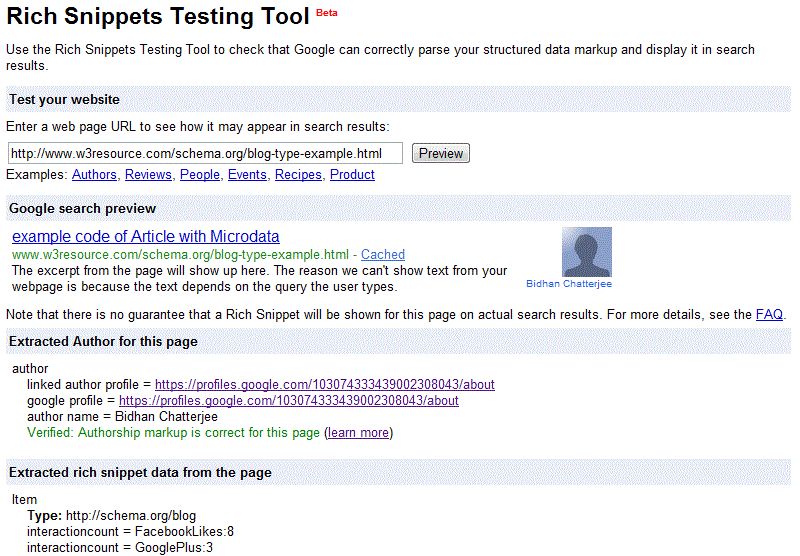
Result of testing the above code with Rich Snippets Tool
Previous: Schema.org Article > BlogPosting, NewsArticle, ScholarlyArticle Types
Next: Schema.org Movie Type tutorial
Test your Programming skills with w3resource's quiz.