
Schema.org Article > BlogPosting, NewsArticle, ScholarlyArticle Types tutorial
Article
In this page, we have discussed Article type of Schema.org in detail. We have also discussed more specific types of Article, i.e. BlogPosting, NewsArticle, ScholarlyArticle.
Hierarchy
Thing > CreativeWork > Article
Article > Blogposting
Article > NewsArticle
Article > ScholarlyArticle
The article specifies the associated content is an Article. An example of associated content may be a blog posting, a news article, an article regarding academics etc.
To be more specific, Schema.org offers three types - BlogPosting to specify that the associated content is a blog posting, NewsArticle to specify that the associated content is a news article and ScholarlyArticle to specify that the associated content is a scholarly article.
Properties
The following table described the properties of Article.
| Properties | Which type should be used | Description |
|---|---|---|
| articleBody | Text | Specifies that the associated content is the actual body of the article. |
| articleSection | Text | Specifies that the Articles may be under one of the sections of a newspaper or magazine. Like Politics, Sports, Entertainment etc. |
Example
Example of Article without Microdata
<!DOCTYPE HTML>
<html lang="en">
<head>
<meta charset=utf-8>
<title>example of Article without Microdata</title>
</head>
<body>
<div>
<h1>Features of the w3resource JavaScript tutorials</h1>
<p>Aurhor :  Rameshwar Ghosh</p>
<p>This article has received 7 likes in facebook and received 3 google plus.</p>
</div>
</body>
</html>
Example of CreativeWork with Microdata
<!DOCTYPE HTML>
<html lang="en">
<head>
<meta charset=utf-8>
<title>example code of Article with Microdata</title>
<a rel="author" href="https://profiles.google.com/103074333439002308043/about">Bidhan Chatterjee</a>
</head>
<body>
<div itemscope itemtype="http://schema.org/Article">
<span itemprop="name">Features of the w3resource JavaScript tutorials</span>
by <span itemprop="author">Rameshwar Ghosh</span>
This article has received 7 likes in facebook and received 3 google plus.
<meta itemprop="interactionCount" content="FacebookLikes:7"/>
<meta itemprop="interactionCount" content="GooglePlus:3"/>
</div>
</body>
</html>
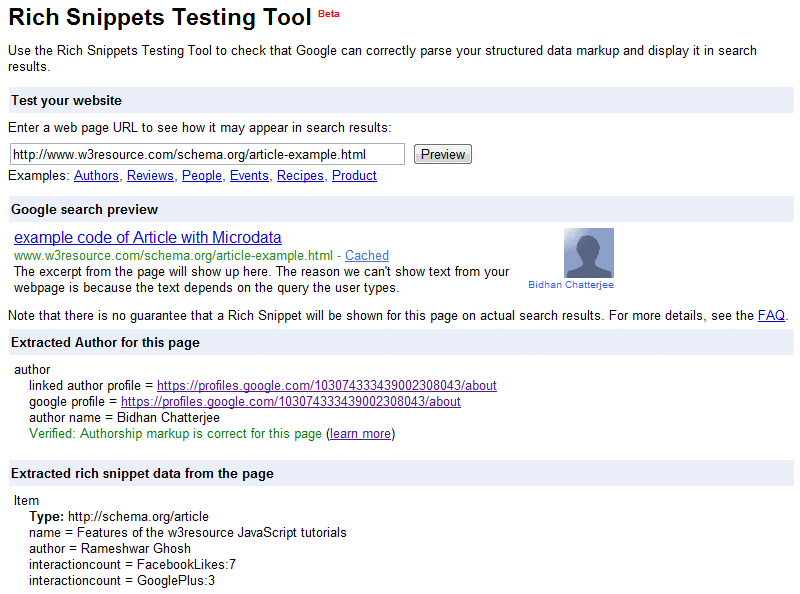
Result of testing the above code with Rich Snippets Tool
Previous: Schema.org CreativeWork Type tutorial
Next: Schema.org Article > BlogPosting, NewsArticle, ScholarlyArticle Types
Test your Programming skills with w3resource's quiz.