
Mermaid.js: The Ultimate 2026 Guide to Diagrams as Code
Why Mermaid.js Became the Standard for Developer
Documentation in 2026
In 2026, technical documentation, README files, wikis, and even enterprise architecture reviews rely heavily on visual communication. Yet traditional diagramming tools often create friction: version control issues, manual updates, collaboration headaches, and bloated file sizes.
Mermaid.js solves these problems elegantly. It is a lightweight, open-source JavaScript library that turns simple, Markdown-inspired text into beautiful, dynamic diagrams — right inside your markdown files, GitHub READMEs, Notion pages, Obsidian notes, VS Code previews, Confluence, and hundreds of other platforms.
Diagrams as code means:
- Everything lives in plain text → perfect Git diffs & history
- No more "diagram_v12_final_final.png"
- Instant updates when requirements change
- AI assistants (Copilot, Claude, Gemini) can generate and edit them
Why Mermaid.js Exploded in Popularity (2025–2026)
- Native rendering in GitHub, GitLab, Notion, Obsidian, MkDocs, Docusaurus, Jupyter, Datadog Notebooks, and many more
- Official VS Code extension (Mermaid Chart) with real-time preview, AI generation, smart regeneration from code changes
- Visual Studio 2026 added built-in Mermaid chart rendering in markdown files
- Strong AI integrations: describe a system → get a C4 diagram, sequence diagram, cloud architecture, ER diagram, or dependency graph automatically
- New diagram types and layout improvements in versions 11.x (latest ~11.12.x as of early 2026)
Supported Diagram Types (2026 Overview)
Mermaid offers a rich palette of diagram types. Here are the most popular ones with brief examples:
- Flowchart (graph) – processes, workflows, system architecture
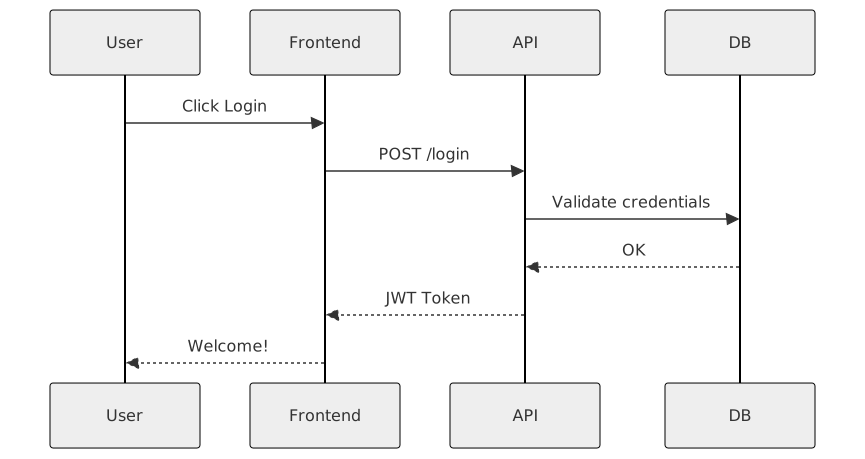
- Sequence Diagram – API calls, user journeys, protocol interactions
- Class Diagram – OOP structures, data models
- Entity Relationship (ER) Diagram – databases
- Gantt Chart – project timelines
- Other powerful types:
- State Diagram
- Pie Chart & Donut
- Git graph (branch visualization)
- Mindmap
- Timeline
- Kanban (newer addition)
- Sankey, Requirement Diagram, C4 (with extensions/AI)



How to Get Started in Under 60 Seconds
Option 1: Use the Live Editor (zero setup)
Go to https://mermaid.live/
Paste any code example → edit live → export SVG/PNG or copy markdown.
Option 2: Add to your Markdown/GitHub README
Just wrap your code:
**Option 3: HTML website / React / Vue**
```html
<script src="https://cdn.jsdelivr.net/npm/mermaid@11/dist/mermaid.min.js"></script>
<script>
  mermaid.initialize({startOnLoad: true, theme: 'dark'});
</script>

<div class="mermaid">
graph TD
    A[Hello] --> B[World!]
</div>
Best Practices for Professional Mermaid Diagrams (2026 Edition)
- Use meaningful node IDs and labels (avoid A → B → C)
- Keep diagrams under ~30–40 nodes; split complex ones
- Use subgraphs for logical grouping
- Apply themes consistently (base, default, dark, forest, neutral, custom CSS)
- Add tooltips & hyperlinks where supported
- Version control .mmd files or keep diagrams inline in docs
- Leverage AI assistants for initial drafts (prompt: "Create a Mermaid sequence diagram for OAuth2 authorization code flow")
- Use direction wisely: TD (top-down), LR (left-right), BT, RL
- Test rendering in your target platform (GitHub still lags on some advanced features)
Integrations & Tools Powering Mermaid in 2026
- Mermaid Chart (mermaid.ai) – collaborative editing, AI generation, plugins for VS Code, JetBrains, ChatGPT, PowerPoint
- VS Code → Official Mermaid Chart extension (AI chat @mermaid-chart)
- Visual Studio 2026 → native markdown Mermaid preview
- Obsidian, Typora, MarkText → live preview plugins
- Docusaurus / MkDocs / GitBook → built-in support
- Confluence / Jira → plugins + AI generation
Stay tuned to our site for more updates on AI developments, market impacts, and practical advice for businesses navigating this new landscape.
PREV : JavaScript 1.5 version: Deprecated Featuresess validation
NEXT : JavaScript - Exercises, Practice, Solution