
SQL Left Join
LEFT JOIN
Overview
The SQL LEFT JOIN clause is a powerful feature in SQL used to combine records from two tables based on a related column. The LEFT JOIN keyword ensures that all rows from the left table (the first table listed) are returned, along with the matched rows from the right table. If there is no match, the result is NULL for the columns from the right table.
How LEFT JOIN Works
LEFT JOIN retrieves all records from the left table and the matched records from the right table. If there are no matches, the result is NULL on the right side. This is particularly useful for finding unmatched records in a dataset or ensuring that all records from one table are included in the result, regardless of their presence in the other table.
Visual presentation of SQL Left Join:

Left Join: Syntax
SELECT *
FROM table1
LEFT [ OUTER ] JOIN table2
ON table1.column_name=table2.column_name;
- SELECT: Specifies the columns or all columns to be included in the result.
- FROM table1: Specifies the left table in the join.
- LEFT [OUTER] JOIN table2: Specifies the right table and the type of join. The OUTER keyword is optional.
- ON table1.column_name = table2.column_name: Specifies the condition to match rows between the tables.
Key Points
- All rows from the left table: The LEFT JOIN returns all rows from the left table, regardless of whether there are matching rows in the right table.
- NULL values for unmatched rows: If there are no matching rows in the right table, the result will contain NULL for the columns from the right table.
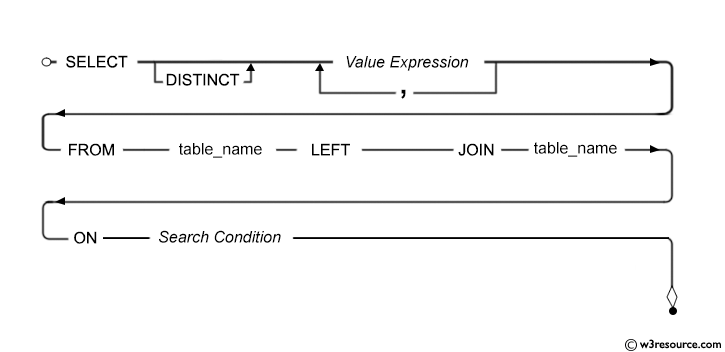
Syntax diagram - LEFT JOIN
Example of SQL Left Join
To get company name and company id columns from company table and company id, item name, item unit columns from foods table, after an OUTER JOINING with these mentioned tables, the following SQL statement can be used :
Sample table: foods
+---------+--------------+-----------+------------+
| ITEM_ID | ITEM_NAME    | ITEM_UNIT | COMPANY_ID |
+---------+--------------+-----------+------------+
| 1       | Chex Mix     | Pcs       | 16         |
| 6       | Cheez-It     | Pcs       | 15         |
| 2       | BN Biscuit   | Pcs       | 15         |
| 3       | Mighty Munch | Pcs       | 17         |
| 4       | Pot Rice     | Pcs       | 15         |
| 5       | Jaffa Cakes  | Pcs       | 18         |
| 7       | Salt n Shake | Pcs       |            |
+---------+--------------+-----------+------------+
Sample table: company
+------------+---------------+--------------+
| COMPANY_ID | COMPANY_NAME  | COMPANY_CITY |
+------------+---------------+--------------+
| 18         | Order All     | Boston       |
| 15         | Jack Hill Ltd | London       |
| 16         | Akas Foods    | Delhi        |
| 17         | Foodies.      | London       |
| 19         | sip-n-Bite.   | New York     |
+------------+---------------+--------------+
SQL Code:
-- Selecting specific columns from the 'company' table and the 'foods' table
SELECT company.company_id, company.company_name, company.company_city, foods.company_id, foods.item_name
-- Joining the 'company' table with the 'foods' table using a LEFT JOIN
FROM company
LEFT JOIN foods
-- Matching rows from 'company' and 'foods' where the company_id values are equal
ON company.company_id = foods.company_id;
Explanation:
- This SQL query is retrieving data from two tables: 'company' and 'foods'.
- It selects specific columns from these tables: 'company_id', 'company_name', 'company_city' from the 'company' table, and 'company_id', 'item_name' from the 'foods' table.
- The query uses a LEFT JOIN to combine rows from the 'company' table with matching rows from the 'foods' table.
- The join condition is specified in the ON clause, which matches rows based on the equality of 'company_id' values between the two tables.
- If there are no matching rows in the 'foods' table for a particular row in the 'company' table, NULL values will be returned for the columns selected from the 'foods' table.
- This query is useful for retrieving information about companies and the food items they produce, even if some companies don't produce any food items (hence the LEFT JOIN to ensure all companies are included in the result).
Output:
COMPANY_ID COMPANY_NAME              COMPANY_CITY              COMPANY_ID ITEM_NAME
---------- ------------------------- ------------------------- ---------- --------------
16         Akas Foods                Delhi                     16         Chex Mix
15         Jack Hill Ltd             London                    15         Cheez-It
15         Jack Hill Ltd             London                    15         BN Biscuit
17         Foodies.                  London                    17         Mighty Munch
15         Jack Hill Ltd             London                    15         Pot Rice
18         Order All                 Boston                    18         Jaffa Cakes
19         sip-n-Bite.               New York
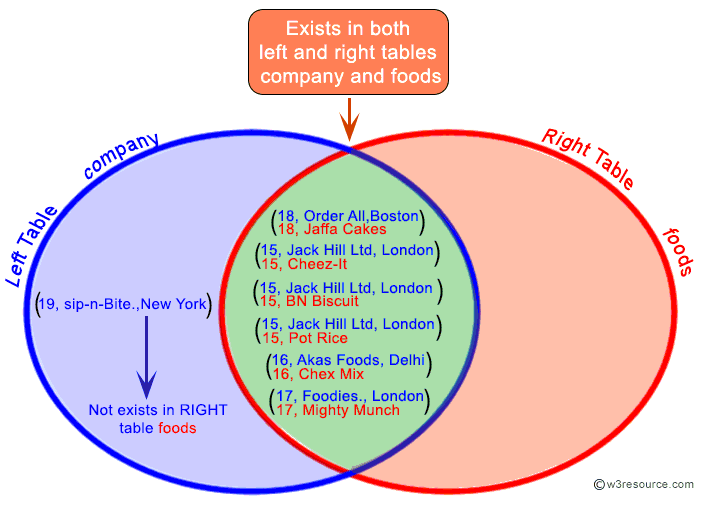
Visual Presentation of the above example SQL Left Join:
Example of SQL Left Join using multiple columns
To filtered out those bill number, item name and the bill amount for each bill which bill amount exceeds the value 500 and must be available at the food stall, the following SQL statement can be used :
Sample table: foods
+---------+--------------+-----------+------------+
| ITEM_ID | ITEM_NAME    | ITEM_UNIT | COMPANY_ID |
+---------+--------------+-----------+------------+
| 1       | Chex Mix     | Pcs       | 16         |
| 6       | Cheez-It     | Pcs       | 15         |
| 2       | BN Biscuit   | Pcs       | 15         |
| 3       | Mighty Munch | Pcs       | 17         |
| 4       | Pot Rice     | Pcs       | 15         |
| 5       | Jaffa Cakes  | Pcs       | 18         |
| 7       | Salt n Shake | Pcs       |            |
+---------+--------------+-----------+------------+
Sample table: counter_sale
   BILL_NO ITEM_ID        SL_QTY    SL_RATE   BILL_AMT
---------- ---------- ---------- ---------- ----------
      1003 6                  15         20        300
      1004 4                  18         30        540
      1005 7                  10         60        600
      1006 3                  25         25        625
      1001 4                  20         30        600
      1002 1                  40         50       2000
SQL Code:
-- Selecting specific columns from the 'counter_sale' table and the 'foods' table
SELECT a.bill_no, b.item_name, a.bill_amt
-- Joining the 'counter_sale' table with the 'foods' table using a LEFT JOIN
FROM counter_sale a
LEFT JOIN foods b
-- Matching rows from 'counter_sale' and 'foods' where the item_id values are equal
ON a.item_id=b.item_id
-- Filtering the result to include only rows where the bill_amt is greater than 500
WHERE a.bill_amt > 500;
Explanation:
- This SQL query is retrieving data from two tables: 'counter_sale' and 'foods'.
- It selects specific columns from these tables: 'bill_no' and 'bill_amt' from the 'counter_sale' table, and 'item_name' from the 'foods' table.
- The query uses a LEFT JOIN to combine rows from the 'counter_sale' table with matching rows from the 'foods' table.
- The join condition is specified in the ON clause, which matches rows based on the equality of 'item_id' values between the two tables.
- If there are no matching rows in the 'foods' table for a particular row in the 'counter_sale' table, NULL values will be returned for the 'item_name'.
- The WHERE clause filters the result to include only rows where the 'bill_amt' is greater than 500.
- This query is useful for retrieving information about counter sales where the bill amount exceeds a certain threshold, along with the names of the food items purchased (if available).
Output:
   BILL_NO ITEM_NAME                   BILL_AMT
---------- ------------------------- ----------
      1002 Chex Mix                        2000
      1006 Mighty Munch                     625
      1001 Pot Rice                         600
      1004 Pot Rice                         540
      1005 Salt n Shake                     600
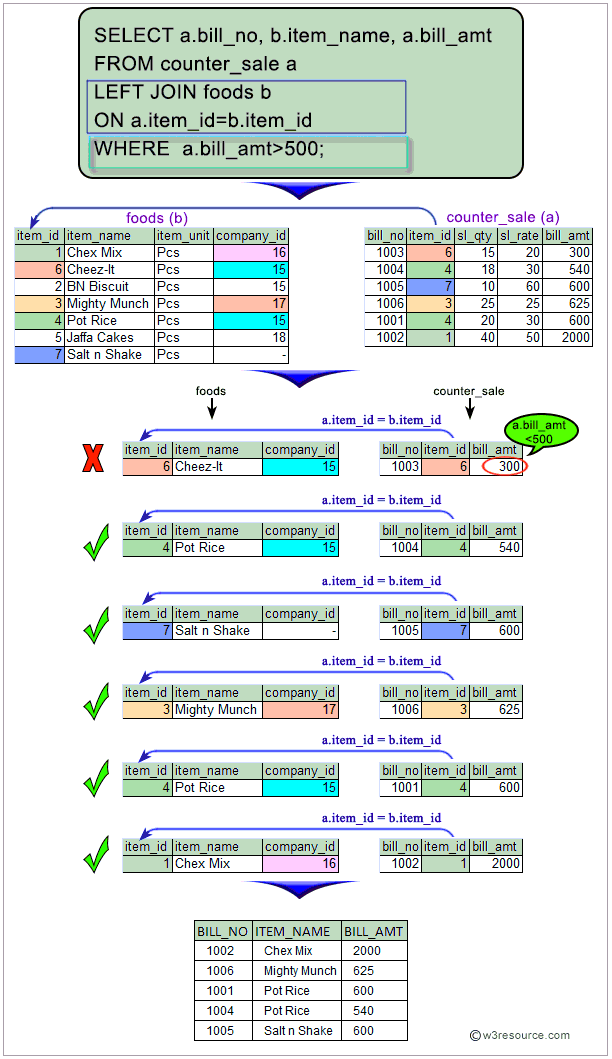
Visual Presentation of SQL Left Join using Multiple Columns:
Example of SQL Left Join using multiple tables
To filtered out those bill number, item name, company name and city and the bill amount for each bill, which items are available in foods table, and their manufacturer must have enlisted to supply that item, and no NULL value for manufacturer are not allowed, the following SQL statement can be used:
Sample table: foods
+---------+--------------+-----------+------------+
| ITEM_ID | ITEM_NAME    | ITEM_UNIT | COMPANY_ID |
+---------+--------------+-----------+------------+
| 1       | Chex Mix     | Pcs       | 16         |
| 6       | Cheez-It     | Pcs       | 15         |
| 2       | BN Biscuit   | Pcs       | 15         |
| 3       | Mighty Munch | Pcs       | 17         |
| 4       | Pot Rice     | Pcs       | 15         |
| 5       | Jaffa Cakes  | Pcs       | 18         |
| 7       | Salt n Shake | Pcs       |            |
+---------+--------------+-----------+------------+
Sample table: company
+------------+---------------+--------------+
| COMPANY_ID | COMPANY_NAME  | COMPANY_CITY |
+------------+---------------+--------------+
| 18         | Order All     | Boston       |
| 15         | Jack Hill Ltd | London       |
| 16         | Akas Foods    | Delhi        |
| 17         | Foodies.      | London       |
| 19         | sip-n-Bite.   | New York     |
+------------+---------------+--------------+
Sample table: counter_sale
   BILL_NO ITEM_ID        SL_QTY    SL_RATE   BILL_AMT
---------- ---------- ---------- ---------- ----------
      1003 6                  15         20        300
      1004 4                  18         30        540
      1005 7                  10         60        600
      1006 3                  25         25        625
      1001 4                  20         30        600
      1002 1                  40         50       2000
SQL Code:
-- Selecting specific columns from the 'counter_sale' table, the 'foods' table, and the 'company' table
SELECT a.bill_no, b.item_name, c.company_name, c.company_city, a.bill_amt
-- Joining the 'counter_sale' table with the 'foods' table using a LEFT JOIN
FROM counter_sale a
LEFT JOIN foods b ON a.item_id = b.item_id
-- Joining the result of the previous join with the 'company' table using a LEFT JOIN
LEFT JOIN company c ON b.company_id = c.company_id
-- Filtering the result to include only rows where the 'company_name' is not NULL
WHERE c.company_name IS NOT NULL
-- Sorting the result by the 'bill_no' column in ascending order
ORDER BY a.bill_no;
Explanation:
- This SQL query is retrieving data from three tables: 'counter_sale', 'foods', and 'company'.
- It selects specific columns from these tables: 'bill_no' from the 'counter_sale' table, 'item_name' from the 'foods' table, 'company_name' and 'company_city' from the 'company' table, and 'bill_amt' from the 'counter_sale' table.
- The query uses LEFT JOINs to combine rows from the 'counter_sale' table with matching rows from the 'foods' table, and then with matching rows from the 'company' table.
- The join conditions are specified in the ON clauses, which match rows based on the equality of 'item_id' between 'counter_sale' and 'foods', and 'company_id' between 'foods' and 'company'.
- If there are no matching rows in the 'foods' or 'company' tables for a particular row in the 'counter_sale' or 'foods' tables, NULL values will be returned for the respective columns.
- The WHERE clause filters the result to include only rows where the 'company_name' is not NULL, ensuring that only counter sales with associated companies are included.
- The ORDER BY clause sorts the result by the 'bill_no' column in ascending order.
- This query is useful for retrieving information about counter sales, including the associated food items and the companies that produce them, while ensuring that only valid data is included in the result.
Output:
   BILL_NO ITEM_NAME                 COMPANY_NAME              COMPANY_CITY                BILL_AMT
---------- ------------------------- ------------------------- ------------------------- ----------
      1001 Pot Rice                  Jack Hill Ltd             London                           600
      1002 Chex Mix                  Akas Foods                Delhi                           2000
      1003 Cheez-It                  Jack Hill Ltd             London                           300
      1004 Pot Rice                  Jack Hill Ltd             London                           540
      1006 Mighty Munch              Foodies.                  London                           625
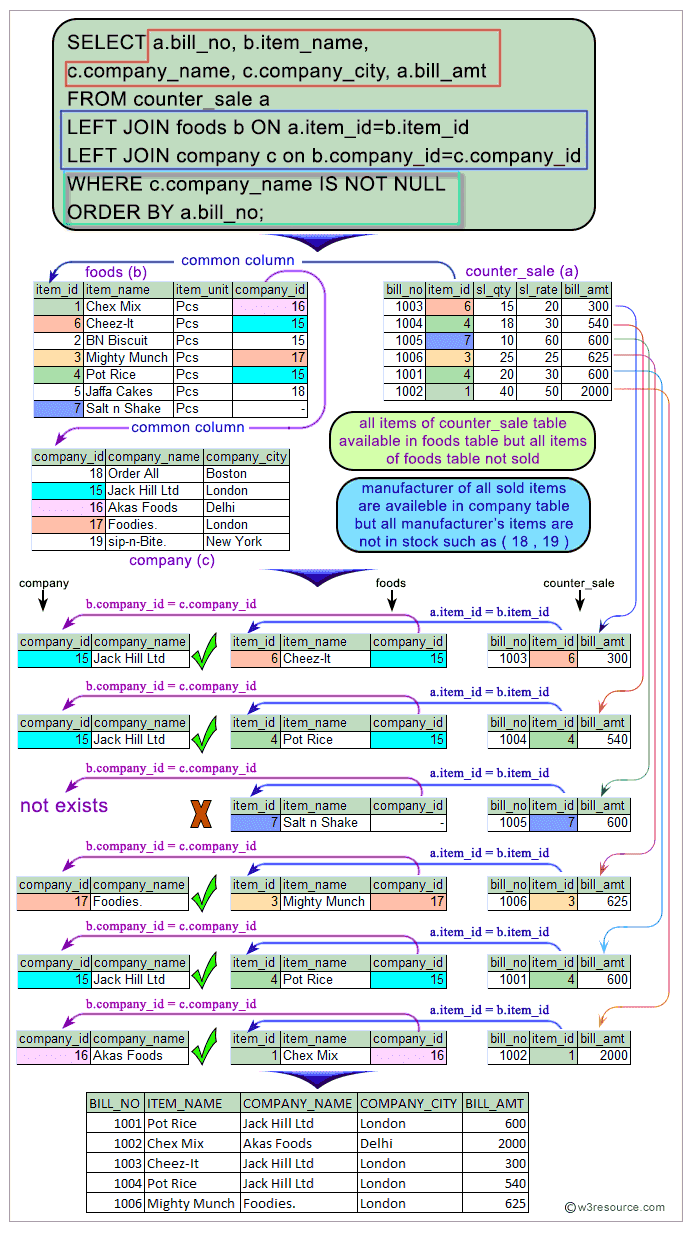
Visual Presentation of SQL Left Join using Multiple Tables:
Comparison with Other Joins
- INNER JOIN: Returns only matching rows between the tables.
- RIGHT JOIN: Returns all rows from the right table and the matched rows from the left table.
- FULL OUTER JOIN: Returns all rows when there is a match in either table.
What is the difference between Left Join and Left Outer Join in SQL?
There is actually no difference between a left join and a left outer join – both of them refer to the similar operation in SQL.
Sample table: company
COMPANY_ID COMPANY_NAME              COMPANY_CITY
---------- ------------------------- -------------
18         Order All                 Boston
15         Jack Hill Ltd             London
16         Akas Foods                Delhi
17         Foodies.                  London
19         sip-n-Bite.               New York
Sample table: foods
ITEM_ID  ITEM_NAME                 ITEM_UNIT  COMPANY_ID
-------- ------------------------- ---------- ----------
1        Chex Mix                  Pcs        16
6        Cheez-It                  Pcs        15
2        BN Biscuit                Pcs        15
3        Mighty Munch              Pcs        17
4        Pot Rice                  Pcs        15
5        Jaffa Cakes               Pcs        18
7        Salt n Shake              Pcs
The important point to be noted that the very last row in the company table, the company ID does not exist in the foods table. Also, the very last row in the foods table the value of company ID is NULL and does not exist in the company table. These facts will prove to be significant of the left join.
Here the SQL statement without using "outer" with "left join".
SQL Code:
-- Selecting specific columns from the 'company' table and the 'foods' table
SELECT company.company_id, company.company_name, foods.item_id, foods.item_name, foods.company_id
-- Joining the 'company' table with the 'foods' table using a LEFT JOIN
FROM company
LEFT JOIN foods
-- Matching rows from 'company' and 'foods' where the company_id values are equal
ON company.company_id = foods.company_id;
Explanation:
- This SQL query is retrieving data from two tables: 'company' and 'foods'.
- It selects specific columns from these tables: 'company_id' and 'company_name' from the 'company' table, and 'item_id', 'item_name', and 'company_id' from the 'foods' table.
- The query uses a LEFT JOIN to combine rows from the 'company' table with matching rows from the 'foods' table.
- The join condition is specified in the ON clause, which matches rows based on the equality of 'company_id' values between the two tables.
- If there are no matching rows in the 'foods' table for a particular row in the 'company' table, NULL values will be returned for the columns selected from the 'foods' table.
- This query is useful for retrieving information about companies and the food items they produce, ensuring that all companies are included in the result regardless of whether they produce any food items (hence the LEFT JOIN).
Running the SQL with the "outer" keyword, would give us the exact same results as running the SQL without the “outer”. Here the SQL statement with "outer" with "left join".
SQL Code:
-- Selecting specific columns from the 'company' table and the 'foods' table
SELECT company.company_id, company.company_name, foods.item_id, foods.item_name, foods.company_id
-- Joining the 'company' table with the 'foods' table using a LEFT OUTER JOIN
FROM company
LEFT OUTER JOIN foods
-- Matching rows from 'company' and 'foods' where the company_id values are equal
ON company.company_id = foods.company_id;
Explanation:
- This SQL query is retrieving data from two tables: 'company' and 'foods'.
- It selects specific columns from these tables: 'company_id' and 'company_name' from the 'company' table, and 'item_id', 'item_name', and 'company_id' from the 'foods' table.
- The query uses a LEFT OUTER JOIN to combine rows from the 'company' table with matching rows from the 'foods' table.
- The join condition is specified in the ON clause, which matches rows based on the equality of 'company_id' values between the two tables.
- If there are no matching rows in the 'foods' table for a particular row in the 'company' table, NULL values will be returned for the columns selected from the 'foods' table.
- This query is useful for retrieving information about companies and the food items they produce, ensuring that all companies are included in the result regardless of whether they produce any food items (hence the LEFT OUTER JOIN, which behaves the same as LEFT JOIN).
Output:
COMPANY_ID COMPANY_NAME              ITEM_ID  ITEM_NAME                 COMPANY_ID
---------- ------------------------- -------- ------------------------- ----------
16         Akas Foods                1        Chex Mix                  16
15         Jack Hill Ltd             6        Cheez-It                  15
15         Jack Hill Ltd             2        BN Biscuit                15
17         Foodies.                  3        Mighty Munch              17
15         Jack Hill Ltd             4        Pot Rice                  15
18         Order All                 5        Jaffa Cakes               18
19         sip-n-Bite.               NULL     NULL                      NULL
Outputs of the said SQL statement shown here is taken by using Oracle Database 10g Express Edition.
Frequently Asked Questions (FAQ) - SQL LEFT JOIN
1. What is a SQL LEFT JOIN?
- A SQL LEFT JOIN is a clause used to combine rows from two tables based on a related column. It ensures that all rows from the left table are included in the result, along with matching rows from the right table. If there are no matches, the result will include NULL for columns from the right table.
2. When should we use a SQL LEFT JOIN?
- Use a LEFT JOIN when we need to include all records from the left table in our query results, even if there are no corresponding matches in the right table. This is particularly useful for identifying unmatched records or ensuring comprehensive data retrieval from one primary table.
3. How does a SQL LEFT JOIN differ from other joins?
- INNER JOIN: Returns only the rows with matching data in both tables.
- RIGHT JOIN: Returns all rows from the right table and the matched rows from the left table.
- FULL OUTER JOIN: Returns all rows when there is a match in either table.
4. What happens to unmatched rows in a SQL LEFT JOIN?
- For rows in the left table that do not have matching rows in the right table, the result will contain NULL values for the columns from the right table.
5. Can we use a SQL LEFT JOIN to combine more than two tables?
- Yes, we can use multiple LEFT JOINs to combine more than two tables. Each additional LEFT JOIN will connect another table based on a specified condition.
6. Is there a difference between SQL LEFT JOIN and SQL LEFT OUTER JOIN?
- No, there is no difference between LEFT JOIN and LEFT OUTER JOIN. The term "OUTER" is optional and both result in the same output.
7. How do we filter results in a SQL LEFT JOIN query?
- We can filter results in a LEFT JOIN query using the WHERE clause to specify conditions that the results must meet, such as limiting the results to rows where certain columns are not NULL or where numerical values exceed a threshold.
8. Can we use SQL LEFT JOIN with aggregate functions?
- Yes, we can use aggregate functions like COUNT, SUM, AVG, etc., in conjunction with LEFT JOIN to perform calculations on our query results, including data from both the left and right tables.
9. What should we consider when using SQL LEFT JOINs with large datasets?
- When dealing with large datasets, performance can be a concern. Ensure that we have indexed the columns used in the JOIN conditions to optimize query performance. Also, be mindful of the data volume, as LEFT JOINs can produce large result sets.
10. How can we visualize the effect of a SQL LEFT JOIN?
- Conceptually, a LEFT JOIN can be visualized as retaining all rows from the left table and appending matching rows from the right table where they exist. Unmatched rows in the right table are represented with NULL values in the result set.
LEFT JOIN: Relational Databases
Key points to remember :
Click on the following to get the slides presentation -

Check out our 1000+ SQL Exercises with solution and explanation to improve your skills.
PREV : SQL OUTER JOIN
NEXT :SQL RIGHT JOIN