
Thonny Python IDE
Python is known for being beginner-friendly—but choosing the right development environment makes learning even easier.
Thonny is a simple, lightweight Python IDE designed specifically for beginners, students, and first-time programmers.
This article focuses on floor division, how it works, and where beginners often get confused.
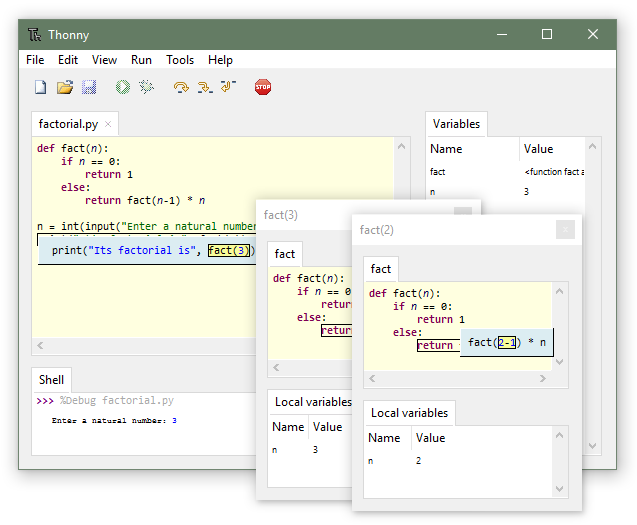
What Is Thonny?
Thonny is an Integrated Development Environment (IDE) created to help new Python learners write, run, and debug code with minimal setup and confusion.
Unlike professional IDEs that can feel overwhelming, Thonny focuses on:
- Simplicity
- Clarity
- Learning-oriented features
It comes with Python pre-installed, so beginners can start coding immediately.
Why Thonny Is Ideal for Beginners
Thonny removes many obstacles that new programmers face.
Key Beginner-Friendly Advantages
- No complex configuration
- Clean and minimal interface
- Clear error messages
- Built-in Python interpreter
- Step-by-step debugging support
This makes Thonny perfect for:
- School and college students
- Self-learners
- First-time coders
Key Features of Thonny Python
1. Simple and Clean Interface
Thonny provides a distraction-free editor with:
- Code editor
- Python shell
- Variable explorer
- Debug controls
Everything is visible in one place.
2. Built-in Python Interpreter
You don’t need to install Python separately.
Thonny includes Python by default, which avoids version and path issues.
3. Beginner-Friendly Debugger
One of Thonny’s strongest features is its visual debugger.
You can:
- Run code line by line
- See how variables change
- Understand program flow clearly
This helps beginners understand how Python executes code internally.
4. Variable and Expression Viewer
Thonny shows:
- Current variable values
- Data types
- Expressions during execution
This is extremely useful when learning concepts like:
- Loops
- Functions
- Lists and dictionaries
5. Helpful Error Messages
Instead of confusing traceback errors, Thonny explains errors in simple language, making debugging less frustrating.
Writing and Running Python Code in Thonny
A basic Python program in Thonny looks like this:
print("Hello, Python!")
- Write code in the editor
- Click Run
- Output appears instantly in the shell
No terminal commands required.
Thonny vs Other Python IDEs
| Feature | Thonny | VS Code | PyCharm |
|---|---|---|---|
| Beginner Friendly | Very High | Medium | Low |
| Built-in Python | Yes | No | No |
| Easy Debugging | Visual | Moderate | Advanced |
| Best For | Beginners | Intermediate | Professionals |
Thonny is not meant to replace professional IDEs, but to prepare learners for them.
Who Should Use Thonny?
Thonny is ideal if you are:
- Learning Python for the first time
- Studying Python in school or college
- Practicing basic programming concepts
- Teaching Python to beginners
It may not be suitable for:
- Large-scale projects
- Advanced frameworks (Django, Flask, etc.)
Common Limitations of Thonny
- Limited plugin ecosystem
- Not designed for large projects
- Fewer advanced development tools
These limitations are intentional—to keep learning simple.
PREV :Floor Division in Python (//)
NEXT :pip install mysql-connector-python
Test your Python skills with w3resource's quiz