
SQL WHERE clause
Where clause
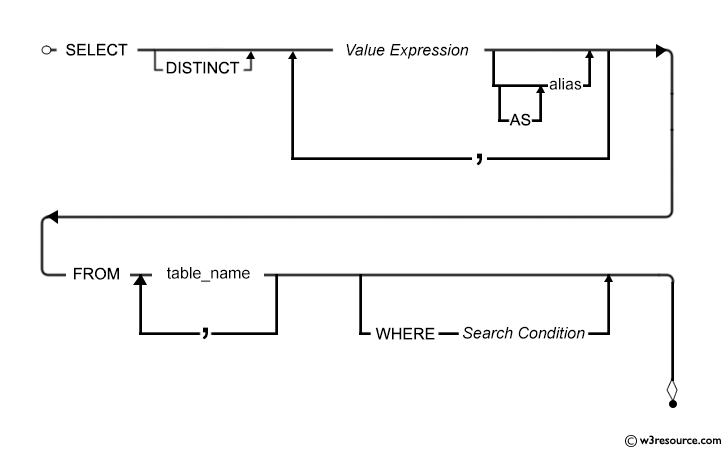
The basic form of the SELECT statement is SELECT-FROM-WHERE block. In a SELECT statement, WHERE clause is optional. Using SELECT without a WHERE clause is useful for browsing data from tables.
In a WHERE clause, you can specify a search condition (logical expression) that has one or more conditions. When the condition (logical expression) evaluates to true the WHERE clause filter unwanted rows from the result.
Here is the syntax:
Syntax:
SELECT <column_list>
FROM < table name >
WHERE <condition>;
Parameters:
| Name | Description |
|---|---|
| table_name | Name of the table. |
| column_list | Name of the columns of the table. |
| condition | Search condition. |
SQL: WHERE clause - Syntax diagram
Contents:
- Types of conditions
- Example: Using the WHERE clause
- Example : WHERE clause using comparison conditions
- Example: WHERE clause using expression
- Example: WHERE clause using BETWEEN condition
- Example: WHERE clause using IN condition
- Example: WHERE clause using LIKE condition
- Example: WHERE clause using NULL condition
- Example: WHERE clause using Logical Conditions
Types of conditions
| Condition | SQL Operators |
|---|---|
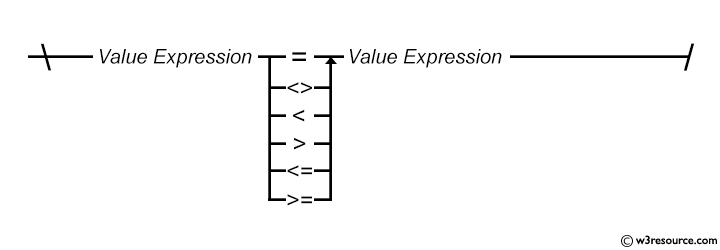
| Comparison | =, >, >=, <, <=, <> |
| Range filtering | BETWEEN |
| Match a character pattern | LIKE |
| List filtering [Match any of a list of values] | IN |
| Null testing | IS NULL |
A list of SQL Operators and Descriptions can be used in WHERE clause:
| Operator | Description |
|---|---|
| = | Tests for equality between two values. |
| <> | Tests for inequality between two values. |
| > | Tests if the left operand is greater than the right operand. |
| < | Tests if the left operand is less than the right operand. |
| >= | Tests if the left operand is greater than or equal to the right operand. |
| <= | Tests if the left operand is less than or equal to the right operand. |
| BETWEEN | Tests if a value lies within a specified range (inclusive). |
| IN | Tests if a value matches any value in a list of specified values. |
| LIKE | Tests if a value matches a specified pattern, using wildcards (%) to represent zero or more characters |
| and (_) to represent a single character. | |
| IS NULL | Tests if a value is NULL (has no value). |
| IS NOT NULL | Tests if a value is not NULL (has a value). |
SQL: Comparison condition - Syntax diagram
Example: Using the WHERE clause in SQL
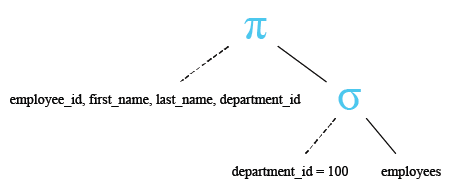
The query selects the employee_id, first_name, last_name, and department_id columns from the employees table, filtering the results to include only rows where the department_id is equal to 100.
Sample table : employees
SQL Code:
-- Selecting specific columns: employee_id, first_name, last_name, department_id
-- From the 'employees' table
SELECT employee_id, first_name, last_name, department_id
FROM employees
-- Filtering the results to include only rows where the 'department_id' is equal to 100
-- From the 'employees' table
WHERE department_id = 100;
Explanation:
- SELECT employee_id, first_name, last_name, department_id: This line specifies the columns that you want to retrieve data from. It selects the columns 'employee_id', 'first_name', 'last_name', and 'department_id' from the 'employees' table.
- FROM employees: This line specifies the table from which you want to retrieve data. In this case, it's the 'employees' table.
- WHERE department_id = 100: This line specifies a condition for filtering the results. It filters the results to only include rows where the value in the 'department_id' column is equal to 100. This condition acts as a filter, allowing only rows with a 'department_id' of 100 to be included in the result set.
Relational Algebra Expression:

Relational Algebra Tree:
Output:
EMPLOYEE_ID FIRST_NAME           LAST_NAME                 DEPARTMENT_ID
----------- -------------------- ------------------------- -------------
        108 Nancy                Greenberg                           100
        109 Daniel               Faviet                              100
        110 John                 Chen                                100
        111 Ismael               Sciarra                             100
        112 Jose Manuel          Urman                               100
        113 Luis                 Popp                                100
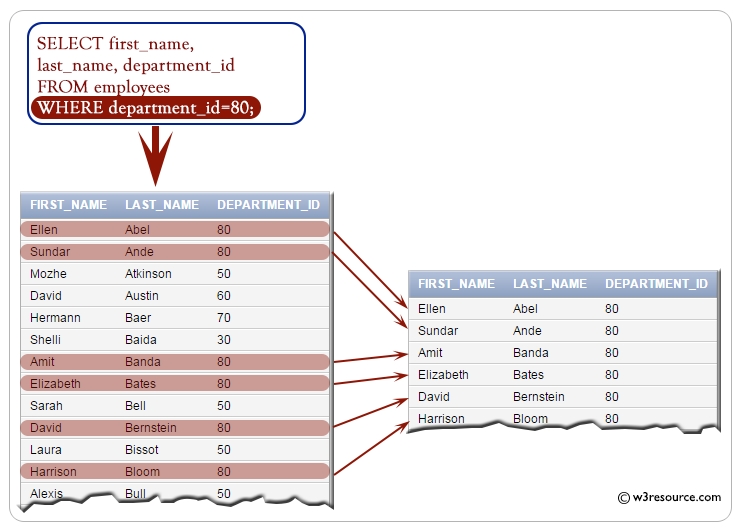
Visual presentation :
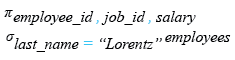
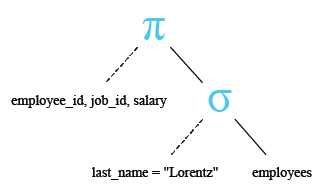
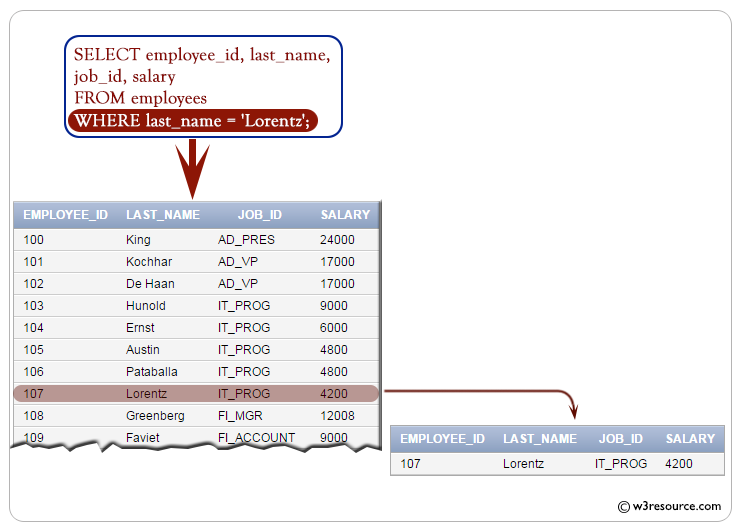
The provided SQL code retrieves the employee ID, job ID, and salary of employees with the last name 'Lorentz' from the employees table.
Note : Character strings are enclosed in quotation marks. Character values are case-sensitive for some database.
SQL Code:
-- Selecting specific columns: employee_id, job_id, salary
SELECT employee_id, job_id, salary
-- From the 'employees' table
FROM employees
-- Filtering the results to include only rows where the 'last_name' is equal to 'Lorentz'
WHERE last_name = 'Lorentz';
Explanation:
- SELECT employee_id, job_id, salary: This line specifies the columns that you want to retrieve data from. It selects the columns 'employee_id', 'job_id', and 'salary' from the 'employees' table.
- FROM employees: This line specifies the table from which you want to retrieve data. In this case, it's the 'employees' table.
- WHERE last_name = 'Lorentz': This line specifies a condition for filtering the results. It filters the results to only include rows where the value in the 'last_name' column is equal to 'Lorentz'. This condition acts as a filter, allowing only rows with the last name 'Lorentz' to be included in the result set.
Relational Algebra Expression:
Relational Algebra Tree:
Output:
EMPLOYEE_ID JOB_ID         SALARY
----------- ---------- ----------
        107 IT_PROG          4200
Visual presentation :
Example: WHERE clause using comparison conditions in SQL
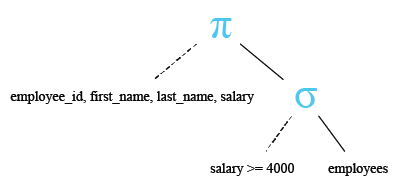
The provided SQL query retrieves the employee ID, first name, last name, and salary of employees with a salary greater than or equal to 4000.
Sample table : employees
employee_id  first_name  last_name   email       phone_number  hire_date   job_id      salary      commission_pct  manager_id  department_id
-----------  ----------  ----------  ----------  ------------  ----------  ----------  ----------  --------------  ----------  -------------
100          Steven      King        SKING       515.123.4567  6/17/1987   AD_PRES     24000                                   90
101          Neena       Kochhar     NKOCHHAR    515.123.4568  6/18/1987   AD_VP       17000                       100         90
102          Lex         De Haan     LDEHAAN     515.123.4569  6/19/1987   AD_VP       17000                       100         90
103          Alexander   Hunold      AHUNOLD     590.423.4567  6/20/1987   IT_PROG     9000                        102         60
104          Bruce       Ernst       BERNST      590.423.4568  6/21/1987   IT_PROG     6000                        103         60
105          David       Austin      DAUSTIN     590.423.4569  6/22/1987   IT_PROG     4800                        103         60
106          Valli       Pataballa   VPATABAL    590.423.4560  6/23/1987   IT_PROG     4800                        103         60
107          Diana       Lorentz     DLORENTZ    590.423.5567  6/24/1987   IT_PROG     4200                        103         60
108          Nancy       Greenberg   NGREENBE    515.124.4569  6/25/1987   FI_MGR      12000                       101         100
109          Daniel      Faviet      DFAVIET     515.124.4169  6/26/1987   FI_ACCOUNT  9000                        108         100
...........
206          William     Gietz       WGIETZ      515.123.8181  10/1/1987   AC_ACCOUNT  8300                        205         110
SQL Code:
-- Selecting specific columns from the 'employees' table
SELECT employee_id, first_name, last_name, salary
-- Filtering the results to include only rows where the 'salary' is greater than or equal to 4000
FROM employees
WHERE salary >= 4000;
Explanation:
- SELECT employee_id, first_name, last_name, salary: This line specifies the columns that you want to retrieve data from. It selects the columns 'employee_id', 'first_name', 'last_name', and 'salary' from the 'employees' table.
- FROM employees: This line specifies the table from which you want to retrieve data. In this case, it's the 'employees' table.
- WHERE salary >= 4000: This line specifies a condition for filtering the results. It filters the results to only include rows where the value in the 'salary' column is greater than or equal to 4000. This condition acts as a filter, allowing only rows with a salary of 4000 or higher to be included in the result set.
Relational Algebra Expression:

Relational Algebra Tree:
Output:
EMPLOYEE_ID FIRST_NAME           LAST_NAME                     SALARY
----------- -------------------- ------------------------- ----------
        100 Steven               King                           24000
        101 Neena                Kochhar                        17000
        102 Lex                  De Haan                        17000
        103 Alexander            Hunold                          9000
        104 Bruce                Ernst                           6000
        105 David                Austin                          4800
        106 Valli                Pataballa                       4800
        107 Diana                Lorentz                         4200
        108 Nancy                Greenberg                      12008
        109 Daniel               Faviet                          9000
        110 John                 Chen                            8200
        111 Ismael               Sciarra                         7700
        112 Jose Manuel          Urman                           7800
        113 Luis                 Popp                            6900
        114 Den                  Raphaely                       11000
.........................
.........................
Example: WHERE clause using expression in SQL
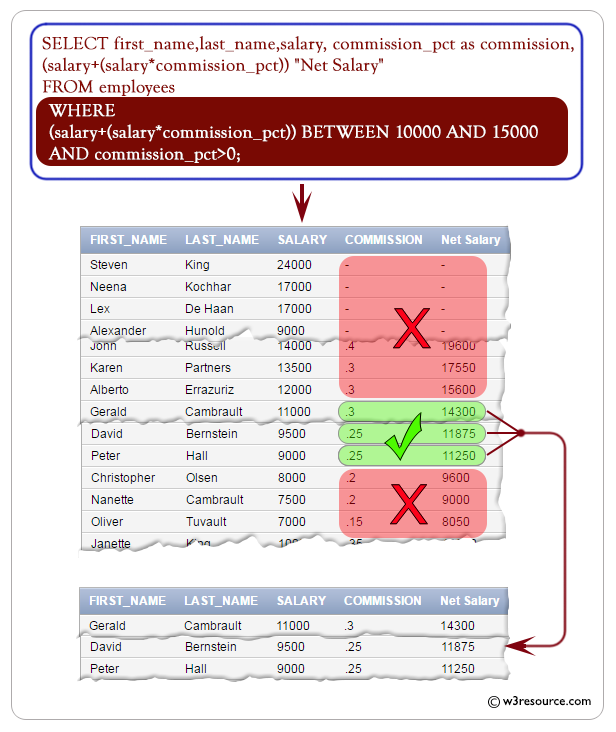
The given SQL query retrieves the first name, last name, salary, and net salary (calculated as salary plus the product of salary and commission percentage) of employees whose net salary falls within the range of 10000 to 15000 and who receive a commission percentage greater than zero.
Sample table: employees
employee_id  first_name  last_name   email       phone_number  hire_date   job_id      salary      commission_pct  manager_id  department_id
-----------  ----------  ----------  ----------  ------------  ----------  ----------  ----------  --------------  ----------  -------------
100          Steven      King        SKING       515.123.4567  6/17/1987   AD_PRES     24000                                   90
101          Neena       Kochhar     NKOCHHAR    515.123.4568  6/18/1987   AD_VP       17000                       100         90
102          Lex         De Haan     LDEHAAN     515.123.4569  6/19/1987   AD_VP       17000                       100         90
103          Alexander   Hunold      AHUNOLD     590.423.4567  6/20/1987   IT_PROG     9000                        102         60
104          Bruce       Ernst       BERNST      590.423.4568  6/21/1987   IT_PROG     6000                        103         60
105          David       Austin      DAUSTIN     590.423.4569  6/22/1987   IT_PROG     4800                        103         60
106          Valli       Pataballa   VPATABAL    590.423.4560  6/23/1987   IT_PROG     4800                        103         60
107          Diana       Lorentz     DLORENTZ    590.423.5567  6/24/1987   IT_PROG     4200                        103         60
108          Nancy       Greenberg   NGREENBE    515.124.4569  6/25/1987   FI_MGR      12000                       101         100
109          Daniel      Faviet      DFAVIET     515.124.4169  6/26/1987   FI_ACCOUNT  9000                        108         100
...........
206          William     Gietz       WGIETZ      515.123.8181  10/1/1987   AC_ACCOUNT  8300                        205         110
SQL Code:
-- Selecting specific columns from the 'employees' table: first_name, last_name, salary
-- Calculating the "Net Salary" by adding the commission to the salary
SELECT first_name, last_name, salary, (salary + (salary * commission_pct)) "Net Salary"
-- From the 'employees' table
FROM employees
-- Filtering the results to include only rows where the "Net Salary" is between 10000 and 15000
-- and the commission_pct is greater than 0
WHERE (salary + (salary * commission_pct)) BETWEEN 10000 AND 15000 AND commission_pct > 0;
Explanation:
- SELECT first_name, last_name, salary, (salary + (salary * commission_pct)) "Net Salary": This line specifies the columns that you want to retrieve data from. It selects the columns 'first_name', 'last_name', and 'salary' from the 'employees' table. Additionally, it calculates the "Net Salary" by adding the commission percentage (commission_pct) to the salary. The result is aliased as "Net Salary".
- FROM employees: This line specifies the table from which you want to retrieve data. In this case, it's the 'employees' table.
- WHERE (salary + (salary * commission_pct)) BETWEEN 10000 AND 15000 AND commission_pct > 0: This line specifies conditions for filtering the results. It filters the results to only include rows where the calculated "Net Salary" falls between 10000 and 15000, and where the commission percentage (commission_pct) is greater than 0. These conditions act as filters, allowing only rows that meet both criteria to be included in the result set.
Output:
FIRST_NAME           LAST_NAME                     SALARY Net Salary
-------------------- ------------------------- ---------- ----------
Gerald               Cambrault                      11000      14300
Eleni                Zlotkey                        10500      12600
Peter                Tucker                         10000      13000
David                Bernstein                       9500      11875
Peter                Hall                            9000      11250
Janette              King                           10000      13500
Patrick              Sully                           9500      12825
Allan                McEwen                          9000      12150
Lindsey              Smith                           8000      10400
Clara                Vishney                        10500      13125
Danielle             Greene                          9500      10925
Lisa                 Ozer                           11500      14375
Harrison             Bloom                          10000      12000
Tayler               Fox                             9600      11520
Ellen                Abel                           11000      14300
Alyssa               Hutton                          8800      11000
Jonathon             Taylor                          8600      10320
Jack                 Livingston                      8400      10080
Visual presentation :
Example: WHERE clause using BETWEEN condition in SQL
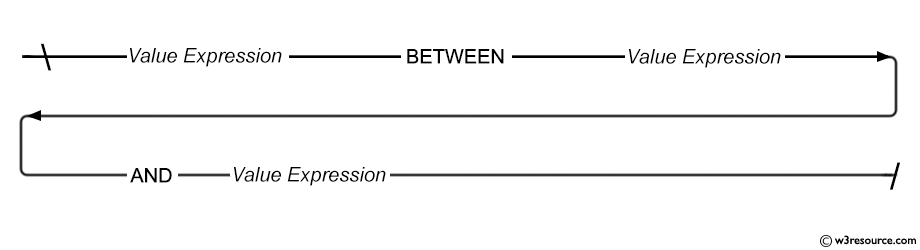
The BETWEEN condition is used to test for values in a list.
SQL: BETWEEN condition - Syntax diagram
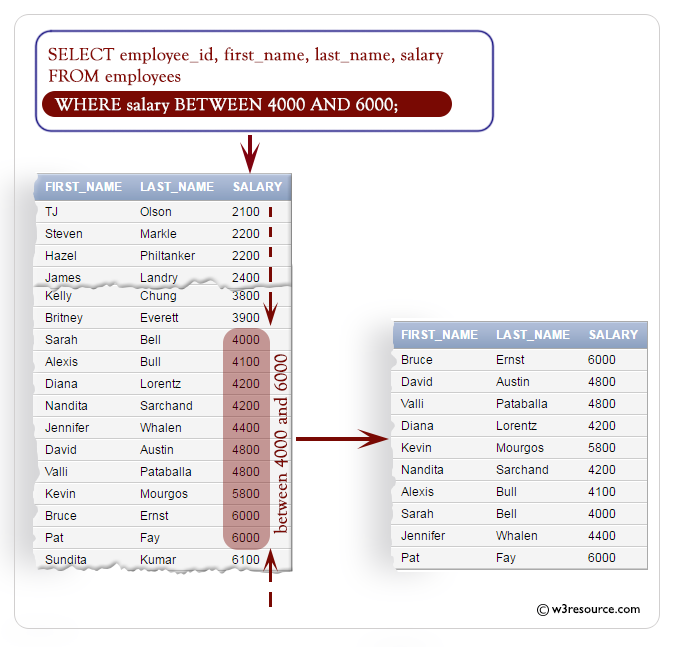
The given SQL query retrieves the employee ID, first name, last name, and salary of employees whose salary falls within the range of 4000 to 6000, inclusive.
Sample table : employees
employee_id  first_name  last_name   email       phone_number  hire_date   job_id      salary      commission_pct  manager_id  department_id
-----------  ----------  ----------  ----------  ------------  ----------  ----------  ----------  --------------  ----------  -------------
100          Steven      King        SKING       515.123.4567  6/17/1987   AD_PRES     24000                                   90
101          Neena       Kochhar     NKOCHHAR    515.123.4568  6/18/1987   AD_VP       17000                       100         90
102          Lex         De Haan     LDEHAAN     515.123.4569  6/19/1987   AD_VP       17000                       100         90
103          Alexander   Hunold      AHUNOLD     590.423.4567  6/20/1987   IT_PROG     9000                        102         60
104          Bruce       Ernst       BERNST      590.423.4568  6/21/1987   IT_PROG     6000                        103         60
105          David       Austin      DAUSTIN     590.423.4569  6/22/1987   IT_PROG     4800                        103         60
106          Valli       Pataballa   VPATABAL    590.423.4560  6/23/1987   IT_PROG     4800                        103         60
107          Diana       Lorentz     DLORENTZ    590.423.5567  6/24/1987   IT_PROG     4200                        103         60
108          Nancy       Greenberg   NGREENBE    515.124.4569  6/25/1987   FI_MGR      12000                       101         100
109          Daniel      Faviet      DFAVIET     515.124.4169  6/26/1987   FI_ACCOUNT  9000                        108         100
...........
206          William     Gietz       WGIETZ      515.123.8181  10/1/1987   AC_ACCOUNT  8300                        205         110
SQL Code:
-- Selecting specific columns from the 'employees' table: employee_id, first_name, last_name, salary
SELECT employee_id, first_name, last_name, salary
-- From the 'employees' table
FROM employees
-- Filtering the results to include only rows where the 'salary' is between 4000 and 6000
WHERE salary BETWEEN 4000 AND 6000;
Explanation:
- SELECT employee_id, first_name, last_name, salary: This line specifies the columns that you want to retrieve data from. It selects the columns 'employee_id', 'first_name', 'last_name', and 'salary' from the 'employees' table.
- FROM employees: This line specifies the table from which you want to retrieve data. In this case, it's the 'employees' table.
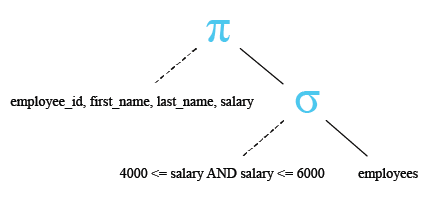
- WHERE salary BETWEEN 4000 AND 6000: This line specifies a condition for filtering the results. It filters the results to only include rows where the value in the 'salary' column falls within the range of 4000 to 6000 (inclusive). The BETWEEN keyword is used to specify a range condition.
Relational Algebra Expression:

Relational Algebra Tree:
Output:
EMPLOYEE_ID FIRST_NAME           LAST_NAME                     SALARY
----------- -------------------- ------------------------- ----------
        104 Bruce                Ernst                           6000
        105 David                Austin                          4800
        106 Valli                Pataballa                       4800
        107 Diana                Lorentz                         4200
        124 Kevin                Mourgos                         5800
        184 Nandita              Sarchand                        4200
        185 Alexis               Bull                            4100
        192 Sarah                Bell                            4000
        200 Jennifer             Whalen                          4400
        202 Pat                  Fay                             6000
Visual presentation :
Example: WHERE clause using IN condition in SQL
The IN condition is used to test for values in a list.
SQL: IN condition - Syntax diagram

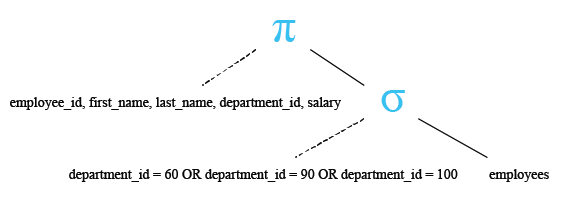
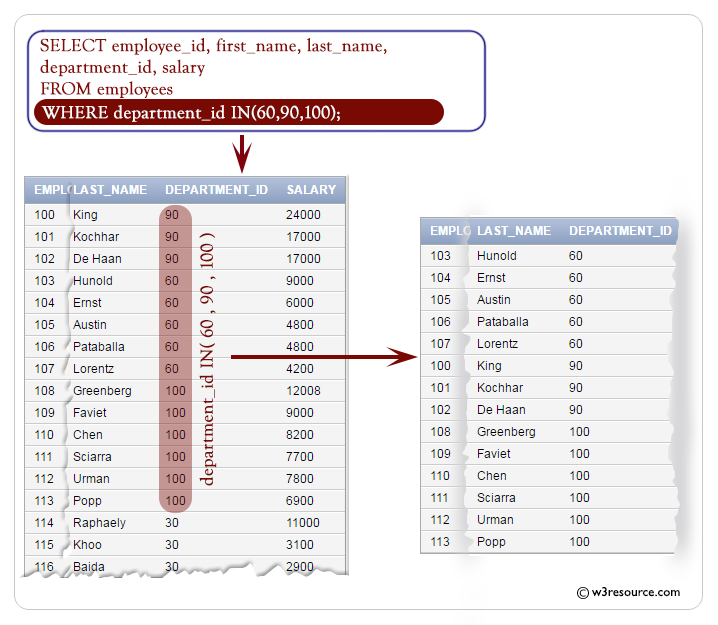
The following query displays the employee_id, first_name, last_name, department_id and salary of employees whose department_id 60, 90 or 100.
Sample table : employees
employee_id  first_name  last_name   email       phone_number  hire_date   job_id      salary      commission_pct  manager_id  department_id
-----------  ----------  ----------  ----------  ------------  ----------  ----------  ----------  --------------  ----------  -------------
100          Steven      King        SKING       515.123.4567  6/17/1987   AD_PRES     24000                                   90
101          Neena       Kochhar     NKOCHHAR    515.123.4568  6/18/1987   AD_VP       17000                       100         90
102          Lex         De Haan     LDEHAAN     515.123.4569  6/19/1987   AD_VP       17000                       100         90
103          Alexander   Hunold      AHUNOLD     590.423.4567  6/20/1987   IT_PROG     9000                        102         60
104          Bruce       Ernst       BERNST      590.423.4568  6/21/1987   IT_PROG     6000                        103         60
105          David       Austin      DAUSTIN     590.423.4569  6/22/1987   IT_PROG     4800                        103         60
106          Valli       Pataballa   VPATABAL    590.423.4560  6/23/1987   IT_PROG     4800                        103         60
107          Diana       Lorentz     DLORENTZ    590.423.5567  6/24/1987   IT_PROG     4200                        103         60
108          Nancy       Greenberg   NGREENBE    515.124.4569  6/25/1987   FI_MGR      12000                       101         100
109          Daniel      Faviet      DFAVIET     515.124.4169  6/26/1987   FI_ACCOUNT  9000                        108         100
...........
206          William     Gietz       WGIETZ      515.123.8181  10/1/1987   AC_ACCOUNT  8300                        205         110
SQL Code:
-- Selecting specific columns from the 'employees' table: employee_id, first_name, last_name, department_id, salary
SELECT employee_id, first_name, last_name, department_id, salary
-- From the 'employees' table
FROM employees
-- Filtering the results to include only rows where the 'department_id' is in the list (60, 90, 100)
WHERE department_id IN (60, 90, 100);
Explanation:
- SELECT employee_id, first_name, last_name, department_id, salary: This line specifies the columns that you want to retrieve data from. It selects the columns 'employee_id', 'first_name', 'last_name', 'department_id', and 'salary' from the 'employees' table.
- FROM employees: This line specifies the table from which you want to retrieve data. In this case, it's the 'employees' table.
- WHERE department_id IN (60, 90, 100): This line specifies a condition for filtering the results. It filters the results to only include rows where the value in the 'department_id' column is contained within the list (60, 90, 100). The IN keyword is used to check if the value of 'department_id' matches any value in the provided list.
Relational Algebra Expression:

Relational Algebra Tree:
Output :
EMPLOYEE_ID FIRST_NAME           LAST_NAME                 DEPARTMENT_ID     SALARY
----------- -------------------- ------------------------- ------------- ----------
        103 Alexander            Hunold                               60       9000
        104 Bruce                Ernst                                60       6000
        105 David                Austin                               60       4800
        106 Valli                Pataballa                            60       4800
        107 Diana                Lorentz                              60       4200
        100 Steven               King                                 90      24000
        101 Neena                Kochhar                              90      17000
        102 Lex                  De Haan                              90      17000
        108 Nancy                Greenberg                           100      12008
        109 Daniel               Faviet                              100       9000
        110 John                 Chen                                100       8200
        111 Ismael               Sciarra                             100       7700
        112 Jose Manuel          Urman                               100       7800
        113 Luis                 Popp                                100       6900
Visual presentation :
Example: WHERE clause using LIKE condition in SQL
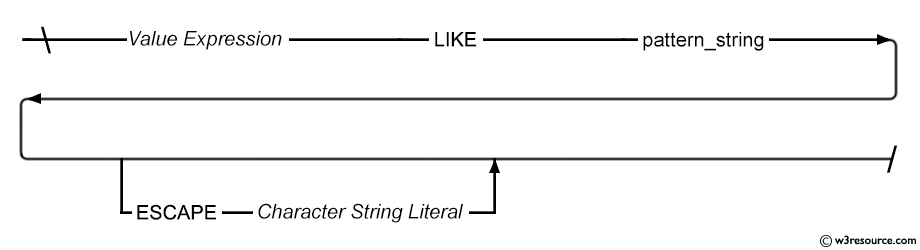
The LIKE condition facilitates wildcard searches within string values. This condition allows for the inclusion of numbers or literal characters, where '_' represents a single character and '%' represents zero or multiple characters.
SQL: LIKE condition - Syntax diagram
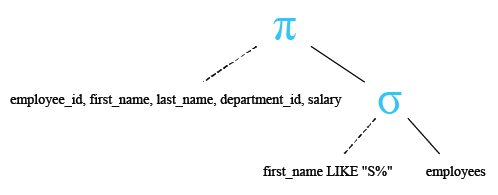
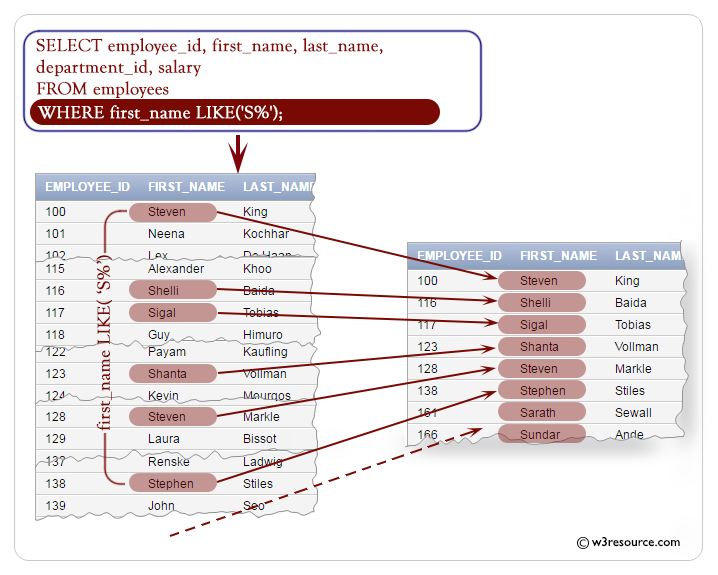
The following query displays the employee_id, first_name, last_name and salary of employees whose first_name starting with 'S'.
Sample table : employees
employee_id  first_name  last_name   email       phone_number  hire_date   job_id      salary      commission_pct  manager_id  department_id
-----------  ----------  ----------  ----------  ------------  ----------  ----------  ----------  --------------  ----------  -------------
100          Steven      King        SKING       515.123.4567  6/17/1987   AD_PRES     24000                                   90
101          Neena       Kochhar     NKOCHHAR    515.123.4568  6/18/1987   AD_VP       17000                       100         90
102          Lex         De Haan     LDEHAAN     515.123.4569  6/19/1987   AD_VP       17000                       100         90
103          Alexander   Hunold      AHUNOLD     590.423.4567  6/20/1987   IT_PROG     9000                        102         60
104          Bruce       Ernst       BERNST      590.423.4568  6/21/1987   IT_PROG     6000                        103         60
105          David       Austin      DAUSTIN     590.423.4569  6/22/1987   IT_PROG     4800                        103         60
106          Valli       Pataballa   VPATABAL    590.423.4560  6/23/1987   IT_PROG     4800                        103         60
107          Diana       Lorentz     DLORENTZ    590.423.5567  6/24/1987   IT_PROG     4200                        103         60
108          Nancy       Greenberg   NGREENBE    515.124.4569  6/25/1987   FI_MGR      12000                       101         100
109          Daniel      Faviet      DFAVIET     515.124.4169  6/26/1987   FI_ACCOUNT  9000                        108         100
...........
206          William     Gietz       WGIETZ      515.123.8181  10/1/1987   AC_ACCOUNT  8300                        205         110
SQL Code:
-- Selecting specific columns from the 'employees' table: employee_id, first_name, last_name, department_id, salary
SELECT employee_id, first_name, last_name, department_id, salary
-- From the 'employees' table
FROM employees
-- Filtering the results to include only rows where the 'first_name' starts with the letter 'S'
WHERE first_name LIKE ('S%');
Explanation:
- SELECT employee_id, first_name, last_name, department_id, salary: This line specifies the columns that you want to retrieve data from. It selects the columns 'employee_id', 'first_name', 'last_name', 'department_id', and 'salary' from the 'employees' table.
- FROM employees: This line specifies the table from which you want to retrieve data. In this case, it's the 'employees' table.
- WHERE first_name LIKE ('S%'): This line specifies a condition for filtering the results. It filters the results to only include rows where the value in the 'first_name' column starts with the letter 'S'. The LIKE keyword is used for pattern matching, where 'S%' represents any string that starts with 'S' followed by zero or more characters.
Relational Algebra Expression:

Relational Algebra Tree:
Output:
EMPLOYEE_ID FIRST_NAME           LAST_NAME                 DEPARTMENT_ID     SALARY
----------- -------------------- ------------------------- ------------- ----------
        166 Sundar               Ande                                 80       6400
        116 Shelli               Baida                                30       2900
        192 Sarah                Bell                                 50       4000
        205 Shelley              Higgins                             110      12008
        100 Steven               King                                 90      24000
        173 Sundita              Kumar                                80       6100
        128 Steven               Markle                               50       2200
        203 Susan                Mavris                               40       6500
        194 Samuel               McCain                               50       3200
        161 Sarath               Sewall                               80       7000
        138 Stephen              Stiles                               50       3200
        117 Sigal                Tobias                               30       2800
        123 Shanta               Vollman                              50       6500
Visual presentation :
Example : WHERE clause using NULL condition in SQL
IS NULL operator is used to test for nulls.
SQL: NULL condition - Syntax diagram

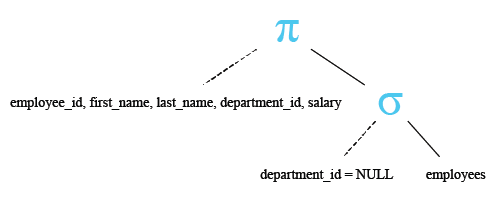
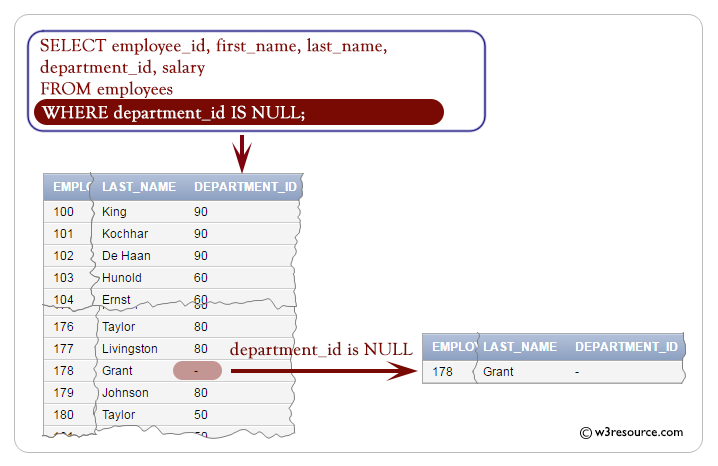
The following query displays the employee_id, first_name, last_name and salary of employees whose department_id is null.
Sample table : employees
employee_id  first_name  last_name   email       phone_number  hire_date   job_id      salary      commission_pct  manager_id  department_id
-----------  ----------  ----------  ----------  ------------  ----------  ----------  ----------  --------------  ----------  -------------
100          Steven      King        SKING       515.123.4567  6/17/1987   AD_PRES     24000                                   90
101          Neena       Kochhar     NKOCHHAR    515.123.4568  6/18/1987   AD_VP       17000                       100         90
102          Lex         De Haan     LDEHAAN     515.123.4569  6/19/1987   AD_VP       17000                       100         90
103          Alexander   Hunold      AHUNOLD     590.423.4567  6/20/1987   IT_PROG     9000                        102         60
104          Bruce       Ernst       BERNST      590.423.4568  6/21/1987   IT_PROG     6000                        103         60
105          David       Austin      DAUSTIN     590.423.4569  6/22/1987   IT_PROG     4800                        103         60
106          Valli       Pataballa   VPATABAL    590.423.4560  6/23/1987   IT_PROG     4800                        103         60
107          Diana       Lorentz     DLORENTZ    590.423.5567  6/24/1987   IT_PROG     4200                        103         60
108          Nancy       Greenberg   NGREENBE    515.124.4569  6/25/1987   FI_MGR      12000                       101         100
109          Daniel      Faviet      DFAVIET     515.124.4169  6/26/1987   FI_ACCOUNT  9000                        108         100
...........
206          William     Gietz       WGIETZ      515.123.8181  10/1/1987   AC_ACCOUNT  8300                        205         110
SQL Code:
-- Selecting specific columns from the 'employees' table: employee_id, first_name, last_name, department_id, salary
SELECT employee_id, first_name, last_name, department_id, salary
-- From the 'employees' table
FROM employees
-- Filtering the results to include only rows where the 'department_id' is NULL
WHERE department_id IS NULL;
Explanation:
- SELECT employee_id, first_name, last_name, department_id, salary: This line specifies the columns that you want to retrieve data from. It selects the columns 'employee_id', 'first_name', 'last_name', 'department_id', and 'salary' from the 'employees' table.
- FROM employees: This line specifies the table from which you want to retrieve data. In this case, it's the 'employees' table.
- WHERE department_id IS NULL: This line specifies a condition for filtering the results. It filters the results to only include rows where the value in the 'department_id' column is NULL. The IS NULL condition is used to check for NULL values in the 'department_id' column.
Relational Algebra Expression:

Relational Algebra Tree:
Output:
EMPLOYEE_ID FIRST_NAME           LAST_NAME                 DEPARTMENT_ID     SALARY
----------- -------------------- ------------------------- ------------- ----------
        178 Kimberely            Grant                                         7000
Visual presentation :
Example : WHERE clause using Logical Conditions in SQL
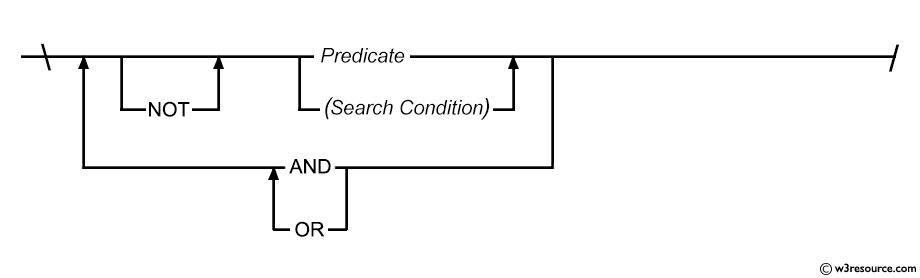
Logical Conditions
| Operators | Description |
|---|---|
| AND | Returns TRUE if both conditions are true. |
| OR | Returns TRUE if either condition is true. |
| NOT | Returns TRUE if the following condition is false. |
SQL: Logical condition - Syntax diagram
Example : WHERE clause using the AND operator in SQL
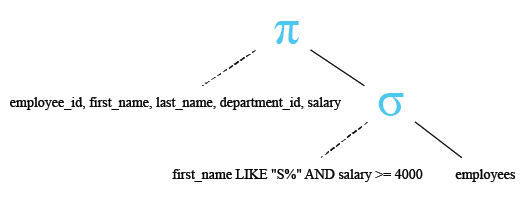
The following query displays the employee_id, first_name, last_name and salary of employees whose first_name starting with 'S' and salary greater than or equal to 4000.
Sample table : employees
employee_id  first_name  last_name   email       phone_number  hire_date   job_id      salary      commission_pct  manager_id  department_id
-----------  ----------  ----------  ----------  ------------  ----------  ----------  ----------  --------------  ----------  -------------
100          Steven      King        SKING       515.123.4567  6/17/1987   AD_PRES     24000                                   90
101          Neena       Kochhar     NKOCHHAR    515.123.4568  6/18/1987   AD_VP       17000                       100         90
102          Lex         De Haan     LDEHAAN     515.123.4569  6/19/1987   AD_VP       17000                       100         90
103          Alexander   Hunold      AHUNOLD     590.423.4567  6/20/1987   IT_PROG     9000                        102         60
104          Bruce       Ernst       BERNST      590.423.4568  6/21/1987   IT_PROG     6000                        103         60
105          David       Austin      DAUSTIN     590.423.4569  6/22/1987   IT_PROG     4800                        103         60
106          Valli       Pataballa   VPATABAL    590.423.4560  6/23/1987   IT_PROG     4800                        103         60
107          Diana       Lorentz     DLORENTZ    590.423.5567  6/24/1987   IT_PROG     4200                        103         60
108          Nancy       Greenberg   NGREENBE    515.124.4569  6/25/1987   FI_MGR      12000                       101         100
109          Daniel      Faviet      DFAVIET     515.124.4169  6/26/1987   FI_ACCOUNT  9000                        108         100
...........
206          William     Gietz       WGIETZ      515.123.8181  10/1/1987   AC_ACCOUNT  8300                        205         110
SQL Code:
-- Selecting specific columns from the 'employees' table: employee_id, first_name, last_name, department_id, salary
SELECT employee_id, first_name, last_name, department_id, salary
-- From the 'employees' table
FROM employees
-- Filtering the results to include only rows where the 'first_name' starts with the letter 'S'
-- and the 'salary' is greater than or equal to 4000
WHERE first_name LIKE ('S%') AND salary >= 4000;
Explanation:
- SELECT employee_id, first_name, last_name, department_id, salary: This line specifies the columns that you want to retrieve data from. It selects the columns 'employee_id', 'first_name', 'last_name', 'department_id', and 'salary' from the 'employees' table.
- FROM employees: This line specifies the table from which you want to retrieve data. In this case, it's the 'employees' table.
- WHERE first_name LIKE ('S%') AND salary >= 4000: This line specifies conditions for filtering the results. It filters the results to only include rows where:
- The value in the 'first_name' column starts with the letter 'S' (using the LIKE keyword for pattern matching).
- The value in the 'salary' column is greater than or equal to 4000.
- The AND keyword is used to combine these conditions, ensuring that both conditions must be true for a row to be included in the result set.
Relational Algebra Expression:

Relational Algebra Tree:
Output:
EMPLOYEE_ID FIRST_NAME           LAST_NAME                 DEPARTMENT_ID     SALARY
----------- -------------------- ------------------------- ------------- ----------
        166 Sundar               Ande                                 80       6400
        192 Sarah                Bell                                 50       4000
        205 Shelley              Higgins                             110      12008
        100 Steven               King                                 90      24000
        173 Sundita              Kumar                                80       6100
        203 Susan                Mavris                               40       6500
        161 Sarath               Sewall                               80       7000
        123 Shanta               Vollman                              50       6500
Example: WHERE clause using the OR operator in SQL
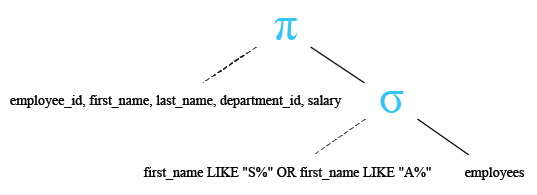
The following query displays the employee_id, first_name, last_name and salary of employees whose first_name starting with 'S' or 'A'.
Sample table: employees
employee_id  first_name  last_name   email       phone_number  hire_date   job_id      salary      commission_pct  manager_id  department_id
-----------  ----------  ----------  ----------  ------------  ----------  ----------  ----------  --------------  ----------  -------------
100          Steven      King        SKING       515.123.4567  6/17/1987   AD_PRES     24000                                   90
101          Neena       Kochhar     NKOCHHAR    515.123.4568  6/18/1987   AD_VP       17000                       100         90
102          Lex         De Haan     LDEHAAN     515.123.4569  6/19/1987   AD_VP       17000                       100         90
103          Alexander   Hunold      AHUNOLD     590.423.4567  6/20/1987   IT_PROG     9000                        102         60
104          Bruce       Ernst       BERNST      590.423.4568  6/21/1987   IT_PROG     6000                        103         60
105          David       Austin      DAUSTIN     590.423.4569  6/22/1987   IT_PROG     4800                        103         60
106          Valli       Pataballa   VPATABAL    590.423.4560  6/23/1987   IT_PROG     4800                        103         60
107          Diana       Lorentz     DLORENTZ    590.423.5567  6/24/1987   IT_PROG     4200                        103         60
108          Nancy       Greenberg   NGREENBE    515.124.4569  6/25/1987   FI_MGR      12000                       101         100
109          Daniel      Faviet      DFAVIET     515.124.4169  6/26/1987   FI_ACCOUNT  9000                        108         100
...........
206          William     Gietz       WGIETZ      515.123.8181  10/1/1987   AC_ACCOUNT  8300                        205         110
SQL Code:
-- Selecting specific columns from the 'employees' table: employee_id, first_name, last_name, department_id, salary
SELECT employee_id, first_name, last_name, department_id, salary
-- From the 'employees' table
FROM employees
-- Filtering the results to include only rows where the 'first_name' starts with the letter 'S'
-- OR the 'first_name' starts with the letter 'A'
WHERE first_name LIKE ('S%') OR first_name LIKE ('A%');
Explanation:
- SELECT employee_id, first_name, last_name, department_id, salary: This line specifies the columns that you want to retrieve data from. It selects the columns 'employee_id', 'first_name', 'last_name', 'department_id', and 'salary' from the 'employees' table.
- FROM employees: This line specifies the table from which you want to retrieve data. In this case, it's the 'employees' table.
- WHERE first_name LIKE ('S%') OR first_name LIKE ('A%'): This line specifies conditions for filtering the results. It filters the results to only include rows where:
- The value in the 'first_name' column starts with the letter 'S' (using the LIKE keyword for pattern matching), OR
- The value in the 'first_name' column starts with the letter 'A'.
- The OR keyword is used to combine these conditions, ensuring that a row will be included in the result set if either condition is true.
Relational Algebra Expression:

Relational Algebra Tree:
Output:
EMPLOYEE_ID FIRST_NAME           LAST_NAME                 DEPARTMENT_ID     SALARY
----------- -------------------- ------------------------- ------------- ----------
        100 Steven               King                                 90      24000
        103 Alexander            Hunold                               60       9000
        115 Alexander            Khoo                                 30       3100
        116 Shelli               Baida                                30       2900
        117 Sigal                Tobias                               30       2800
        121 Adam                 Fripp                                50       8200
        123 Shanta               Vollman                              50       6500
        128 Steven               Markle                               50       2200
        138 Stephen              Stiles                               50       3200
        147 Alberto              Errazuriz                            80      12000
        158 Allan                McEwen                               80       9000
        161 Sarath               Sewall                               80       7000
        166 Sundar               Ande                                 80       6400
        167 Amit                 Banda                                80       6200
        173 Sundita              Kumar                                80       6100
        175 Alyssa               Hutton                               80       8800
        185 Alexis               Bull                                 50       4100
        187 Anthony              Cabrio                               50       3000
        192 Sarah                Bell                                 50       4000
        194 Samuel               McCain                               50       3200
        196 Alana                Walsh                                50       3100
        203 Susan                Mavris                               40       6500
        205 Shelley              Higgins                             110      12008
Example: WHERE clause using the NOT operator in SQL
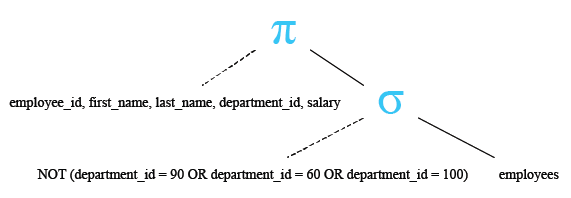
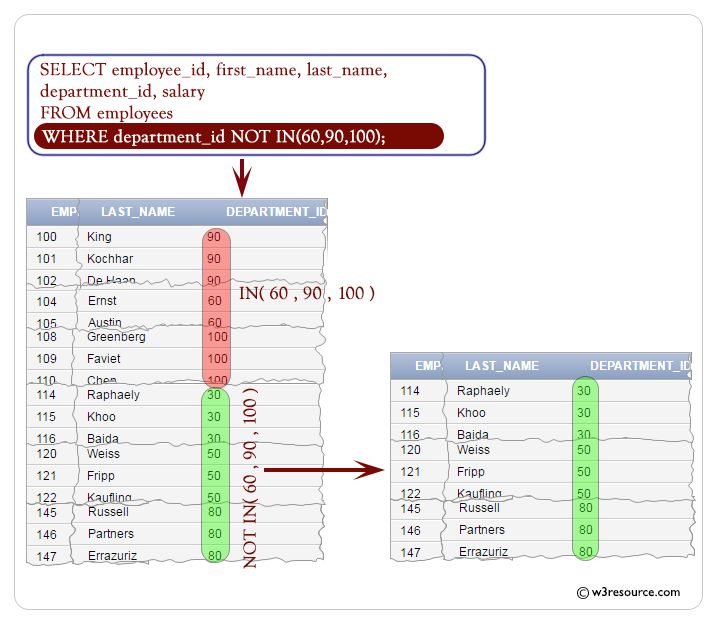
The following query displays the employee_id, first_name, last_name and salary of employees except the department_id 90, 60 or 100 :
Sample table: employees
employee_id  first_name  last_name   email       phone_number  hire_date   job_id      salary      commission_pct  manager_id  department_id
-----------  ----------  ----------  ----------  ------------  ----------  ----------  ----------  --------------  ----------  -------------
100          Steven      King        SKING       515.123.4567  6/17/1987   AD_PRES     24000                                   90
101          Neena       Kochhar     NKOCHHAR    515.123.4568  6/18/1987   AD_VP       17000                       100         90
102          Lex         De Haan     LDEHAAN     515.123.4569  6/19/1987   AD_VP       17000                       100         90
103          Alexander   Hunold      AHUNOLD     590.423.4567  6/20/1987   IT_PROG     9000                        102         60
104          Bruce       Ernst       BERNST      590.423.4568  6/21/1987   IT_PROG     6000                        103         60
105          David       Austin      DAUSTIN     590.423.4569  6/22/1987   IT_PROG     4800                        103         60
106          Valli       Pataballa   VPATABAL    590.423.4560  6/23/1987   IT_PROG     4800                        103         60
107          Diana       Lorentz     DLORENTZ    590.423.5567  6/24/1987   IT_PROG     4200                        103         60
108          Nancy       Greenberg   NGREENBE    515.124.4569  6/25/1987   FI_MGR      12000                       101         100
109          Daniel      Faviet      DFAVIET     515.124.4169  6/26/1987   FI_ACCOUNT  9000                        108         100
...........
206          William     Gietz       WGIETZ      515.123.8181  10/1/1987   AC_ACCOUNT  8300                        205         110
SQL Code:
-- Selecting specific columns from the 'employees' table: employee_id, first_name, last_name, department_id, salary
SELECT employee_id, first_name, last_name, department_id, salary
-- From the 'employees' table
FROM employees
-- Filtering the results to include only rows where the 'department_id' is NOT IN (90, 60, 100)
WHERE department_id NOT IN (90, 60, 100);
Explanation:
- SELECT employee_id, first_name, last_name, department_id, salary: This line selects specific columns from the 'employees' table, namely 'employee_id', 'first_name', 'last_name', 'department_id', and 'salary'.
- FROM employees: This specifies that the data is being retrieved from the 'employees' table.
- WHERE department_id NOT IN (90, 60, 100): This condition filters the rows to only include those where the 'department_id' is not equal to 90, 60, or 100. The NOT IN operator negates the list of values provided within the parentheses.
Relational Algebra Expression:

Relational Algebra Tree:
Output:
EMPLOYEE_ID FIRST_NAME           LAST_NAME                 DEPARTMENT_ID     SALARY
----------- -------------------- ------------------------- ------------- ----------
        114 Den                  Raphaely                             30      11000
        115 Alexander            Khoo                                 30       3100
        116 Shelli               Baida                                30       2900
        117 Sigal                Tobias                               30       2800
        118 Guy                  Himuro                               30       2600
        119 Karen                Colmenares                           30       2500
        120 Matthew              Weiss                                50       8000
        121 Adam                 Fripp                                50       8200
        122 Payam                Kaufling                             50       7900
        123 Shanta               Vollman                              50       6500
        124 Kevin                Mourgos                              50       5800
        125 Julia                Nayer                                50       3200
        126 Irene                Mikkilineni                          50       2700
        127 James                Landry                               50       2400
        128 Steven               Markle                               50       2200
        129 Laura                Bissot                               50       3300
        130 Mozhe                Atkinson                             50       2800
        131 James                Marlow                               50       2500
        132 TJ                   Olson                                50       2100
        133 Jason                Mallin                               50       3300
        134 Michael              Rogers                               50       2900
        135 Ki                   Gee                                  50       2400
        136 Hazel                Philtanker                           50       2200
        137 Renske               Ladwig                               50       3600
................
................
Visual presentation :
Check out our 1000+ SQL Exercises with solution and explanation to improve your skills.
PREV :SQL SELECT statement
NEXT : SQL ORDER BY clause