
HTML disabled attribute
disabled
The purpose of the HTML disabled attribute is to disable an element.
Using this attribute you can disable form controls. Once set, the element on which it is set, becomes grey.
Supported elements
HTML disabled attribute supports button, input, optgroup, option, select, textarea elements.
Syntax
<ElementName disabled>.....</ElementName>
Where ElementName is any supported element.
Type of value
disabled.
Value
disabled.
Default value
There is no default value of HTML disabled attribute.
Supported doctypes
HTML 4.01 strict, HTML 4.01 transitional, HTML 4.01 frameset.
Example of HTML disabled attribute with button, input, optgroup, option, select, textarea
<!DOCTYPE HTML PUBLIC "-//W3C//DTD HTML 4.01 Transitional//EN" "http://www.w3.org/TR/html4/loose.dtd">
<html>
<head>
<meta http-equiv="Content-Type" content="text/html; charset=iso-8859-1">
<title>Example of HTML disabled attribute with button, input, optgroup, option, select, textarea</title>
</head>
<body>
<form action="action.php" method="post">
First Name : <input type="text" name="Fname" disabled><br>
Comment : <br><textarea disabled cols="10" rows="10"> </textarea><br>
Select your favorite games<br>
<select disabled>
<optgroup label="Indoor Games" disabled>
<option value="Chess" disabled>Chess</option>
<option value="Table Tennis" disabled>Table Tennis</option>
</optgroup>
<optgroup label="Outdoor Games" disabled>
<option value="Hockey" disabled>Hockey</option>
<option value="Soccer" disabled>Hockey</option>
</optgroup>
</select>
<button type="button" name="Submit" disabled >Submit</button>
</form>
</body>
</html>
Result
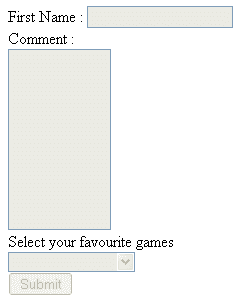
View this example in a separate browser window
Example of HTML disabled attribute with button, input, optgroup, option, select, textarea
PREV : HTML dir attribute
NEXT : HTML enctype attribute
Test your Programming skills with w3resource's quiz.