
JavaScript: HTML Form - Phone Number validation
Phone Number validation
The validating phone number is an important point while validating an HTML form. In this page we have discussed how to validate a phone number (in different format) using JavaScript :
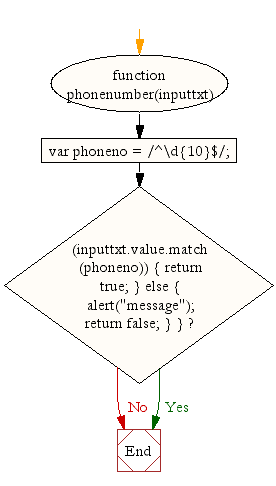
At first, we validate a phone number of 10 digits with no comma, no spaces, no punctuation and there will be no + sign in front the number. Simply the validation will remove all non-digits and permit only phone numbers with 10 digits. Here is the function.
function phonenumber(inputtxt)
{
  var phoneno = /^\d{10}$/;
  if((inputtxt.value.match(phoneno))
        {
      return true;
        }
      else
        {
        alert("message");
        return false;
        }
}
Flowchart:
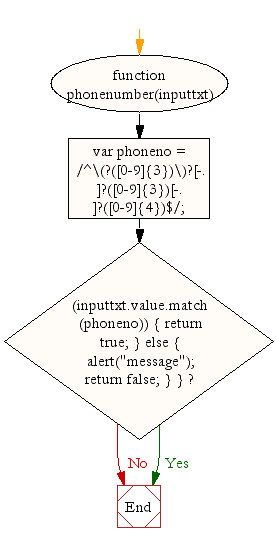
To valid a phone number like
XXX-XXX-XXXX
XXX.XXX.XXXX
XXX XXX XXXX
use the following code.
function phonenumber(inputtxt)
{
  var phoneno = /^\(?([0-9]{3})\)?[-. ]?([0-9]{3})[-. ]?([0-9]{4})$/;
  if((inputtxt.value.match(phoneno))
        {
      return true;
        }
      else
        {
        alert("message");
        return false;
        }
}
Flowchart:
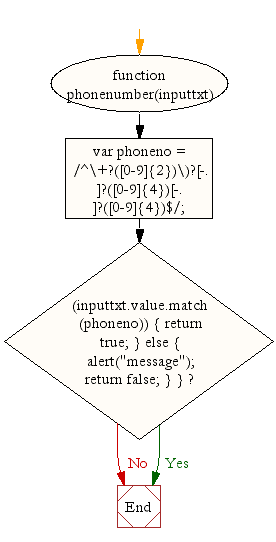
If you want to use a + sign before the number in the following way
+XX-XXXX-XXXX
+XX.XXXX.XXXX
+XX XXXX XXXX
use the following code.
function phonenumber(inputtxt)
{
  var phoneno = /^\+?([0-9]{2})\)?[-. ]?([0-9]{4})[-. ]?([0-9]{4})$/;
  if((inputtxt.value.match(phoneno))
        {
      return true;
        }
      else
        {
        alert("message");
        return false;
        }
}
Flowchart:
Following code blocks contain actual codes for the said validations. We have kept the CSS code part common for all the validations.
CSS Code
 li {list-style-type: none;
font-size: 16pt;
}
.mail {
margin: auto;
padding-top: 10px;
padding-bottom: 10px;
width: 400px;
background : #D8F1F8;
border: 1px soild silver;
}
.mail h2 {
margin-left: 38px;
}
input {
font-size: 20pt;
}
input:focus, textarea:focus{
background-color: lightyellow;
}
input submit {
font-size: 12pt;
}
.rq {
color: #FF0000;
font-size: 10pt;
}
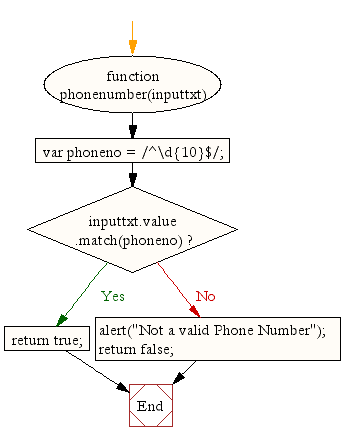
Validate a 10 digit phone number
At first we validate a phone number of 10 digit. For example 1234567890, 0999990011, 8888855555 etc.
HTML Code
<!DOCTYPE html>
<html lang="en">
<head>
<meta charset="utf-8">
<title>JavaScript form validation - checking non-empty</title>
<link rel='stylesheet' href='form-style.css' type='text/css' />
</head>
<body onload='document.form1.text1.focus()'>
<div class="mail">
<h2>Input an Phone No.[xxxxxxxxxx] and Submit</h2>
<form name="form1" action="#">
<ul>
<li><input type='text' name='text1'/></li>
<li> </li>
<li class="submit"><input type="submit" name="submit" value="Submit" onclick="phonenumber(document.form1.text1)"/></li>
<li> </li>
</ul>
</form>
</div>
<script src="phoneno-all-numeric-validation.js"></script>
</body>
</html>
JavaScript Code
function phonenumber(inputtxt)
{
  var phoneno = /^\d{10}$/;
  if(inputtxt.value.match(phoneno))
  {
      return true;
  }
  else
  {
     alert("Not a valid Phone Number");
     return false;
  }
  }
View the example in the browser
Flowchart:
Validate North American phone numbers
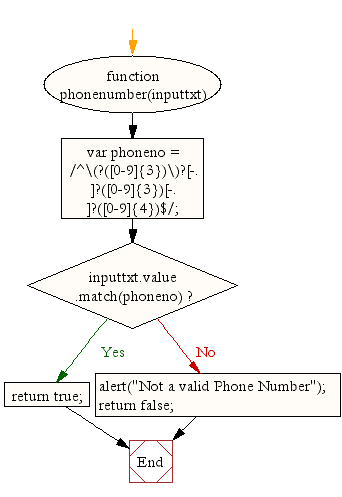
Now, let's see how to validate a phone number, either in 222-055-9034, 321.789.4512 or 123 256 4587 formats.
HTML Code
<!DOCTYPE html>
<html lang="en">
<head>
<meta charset="utf-8">
<title>JavaScript form validation - checking non-empty</title>
<link rel='stylesheet' href='form-style.css' type='text/css' />
</head>
<body onload='document.form1.text1.focus()'>
<div class="mail">
<h2>Input an Phone No.[xxx-xxx-xxxx, xxx.xxx.xxxx, xxx xxx xxxx] and Submit</h2>
<form name="form1" action="#">
<ul>
<li><input type='text' name='text1'/></li>
<li> </li>
<li class="submit"><input type="submit" name="submit" value="Submit" onclick="phonenumber(document.form1.text1)"/></li>
<li> </li>
</ul>
</form>
</div>
<script src="phoneno-international-format.js"></script>
</body>
</html>
JavaScript Code
function phonenumber(inputtxt)
{
  var phoneno = /^\(?([0-9]{3})\)?[-. ]?([0-9]{3})[-. ]?([0-9]{4})$/;
  if(inputtxt.value.match(phoneno))
     {
	   return true;
	 }
   else
     {
	   alert("Not a valid Phone Number");
	   return false;
     }
}
View the example in the browser
Flowchart:
Validate an international phone number with country code
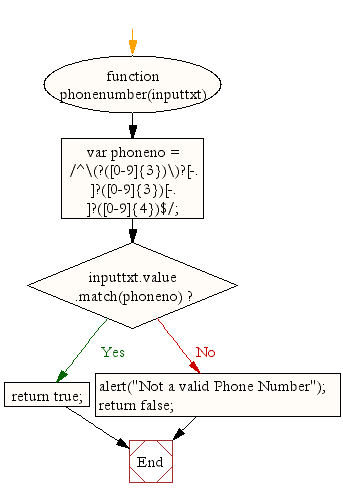
Now, let's see how to validate a phone number with country code, either in +24-0455-9034, +21.3789.4512 or +23 1256 4587 format.
HTML Code
<!DOCTYPE html>
<html lang="en">
<head>
<meta charset="utf-8">
<title>JavaScript form validation - checking non-empty</title>
<link rel='stylesheet' href='form-style.css' type='text/css' />
</head>
<body onload='document.form1.text1.focus()'>
<div class="mail">
<h2>Input an Phone No.[+xx-xxxx-xxxx, +xx.xxxx.xxxx, +xx xxxx xxxx] and Submit</h2>
<form name="form1" action="#">
<ul>
<li><input type='text' name='text1'/></li>
<li> </li>
<li class="submit"><input type="submit" name="submit" value="Submit" onclick="phonenumber(document.form1.text1)"/></li>
<li> </li>
</ul>
</form>
</div>
<script src="phoneno-+international-format.js"></script>
</body>
</html>
JavaScript Code
function phonenumber(inputtxt)
{
  var phoneno = /^\(?([0-9]{3})\)?[-. ]?([0-9]{3})[-. ]?([0-9]{4})$/;
  if(inputtxt.value.match(phoneno))
     {
	   return true;
	 }
   else
     {
	   alert("Not a valid Phone Number");
	   return false;
     }
}
View the example in the browser
Flowchart:
file_download Download the validation code from here.
Other JavaScript Validation :
- Checking for non-empty
- Checking for all letters
- Checking for all numbers
- Checking for floating numbers
- Checking for letters and numbers
- Checking string length
- Email Validation
- Date Validation
- A sample Registration Form
- Phone No. Validation
- Credit Card No. Validation
- Password Validation
- IP address Validation
Previous: JavaScript Field Level Form Validation using a registration form
Next: JavaScript: HTML Form - Credit Card Number validation
Test your Programming skills with w3resource's quiz.